


In this guide
- Why QuickBooks' Features Matter
- Automated Book-keeping
- Invoicing And Payments
- Reporting That Grows With The Plan
- Budgeting, Projects, And Deeper Operational Control
- AI Guidance And Connected Intelligence
- Access, Apps, And Operational Flexibility
- Pricing Context
- Which Businesses Feel The Difference Fastest
- What Makes QuickBooks Feel Different
Why QuickBooks’ Features Matter
QuickBooks still matters in 2026 because it is not only accounting software anymore in the way many people casually describe it. The official QuickBooks Online pricing page positions it as a broader financial operations platform with bookkeeping automation, invoicing, payments, bill management, reports, budgeting, project visibility, app integrations, mobile access, and AI-assisted guidance.
Disclosure: Stack99 earns a commission if you buy through links on this page. It costs you nothing extra and never changes our assessment.
That is a much stronger feature story than, “It helps you send invoices.”

The public page also makes one thing obvious: QuickBooks is trying to scale with business complexity, not only with bookkeeping basics.
If you want to look at the product while you read, start with QuickBooks here.
Automated Book-keeping
This is still one of QuickBooks’ most important features.
The official pricing page explicitly calls out automated bookkeeping and explains that QuickBooks learns how you categorize income and expenses, then automatically matches and records transactions from then on.
That matters because bookkeeping software only feels useful when it removes repetitive work instead of simply digitizing it.
For small businesses, this feature matters because:
- It reduces manual classification work.
- It helps create more consistent books.
- It saves time for owners who are not accountants.
That is a very strong core feature and still one of the biggest reasons QuickBooks stays on shortlists.
Invoicing And Payments
The official page also highlights invoicing and payment collection in a very practical way.
It describes the ability to:
- Accept credit cards and bank transfers from invoices.
- Get status updates and reminders.
- Get paid faster with AI-supported payment workflows.
That matters because cash flow friction is a real operating problem for small businesses, not just a finance-team annoyance.
When invoicing and collection live close to bookkeeping, the system becomes more useful than a disconnected accounting ledger.
Reporting That Grows With The Plan
QuickBooks’ feature ladder gets stronger as reporting depth grows.
The official pricing page shows:
- Basic reports on Simple Start.
- Enhanced reports on Essentials.
- Comprehensive reports on Plus.
- Custom KPIs, dashboards, and reports on Advanced.
That progression matters because businesses do not all need the same reporting depth at the same stage.
The smarter part of the product story is that QuickBooks does not force a one-reporting-level-fits-all approach. It lets visibility mature with the business.
Budgeting, Projects, And Deeper Operational Control
The public page makes it clear that QuickBooks goes further on upper plans.
For example, it highlights:
- Budget planning on Plus.
- Automatic project profitability tracking.
- Classes and locations.
- Project-management related AI integration on Advanced.
That matters because once a business grows, the finance question is not only, “Are the books accurate?”
It becomes:
- Which projects are actually profitable?
- Where are margins slipping?
- How do budgets line up with reality?
Those are much more strategic features.
AI Guidance And Connected Intelligence
QuickBooks is leaning hard into AI and connected intelligence in 2026.
The official pricing page references:
- Guidance for setup and onboarding.
- Expense organization assistance.
- Payment acceleration support.
- Instant insights chat.
- Personalized business intelligence metrics.
- Finance AI and project management AI language on higher tiers.
That matters because QuickBooks wants to be more than a bookkeeping tool. It wants to be an operating assistant around financial workflows.
Whether every business needs all of that is another question, but the feature direction is clear.
Access, Apps, And Operational Flexibility
One of the more underrated QuickBooks strengths is that the official plan ladder does not stop at core accounting tasks.
The public page also emphasizes:
- App integrations.
- Mobile access.
- Growing user limits by tier.
- Expert and guided support layers.
That matters because finance work rarely happens in isolation anymore.
A business owner may review numbers on a phone, a bookkeeper may need cleaner categorization support, a manager may care about project profitability, and leadership may want broader dashboards without logging into five separate tools.
QuickBooks feels stronger when you look at it that way. It is not only software for entering transactions. It is a workflow hub for financial visibility.
Pricing Context
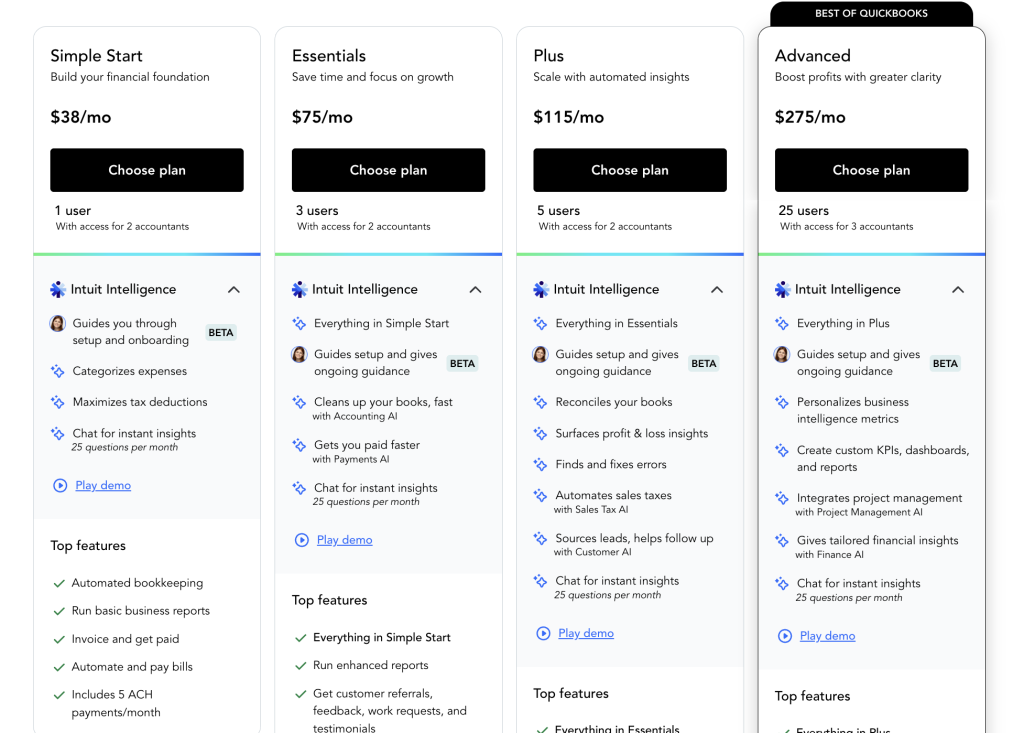
The official QuickBooks Online pricing page currently shows these plan levels:
- Simple Start at $38 standard, with a visible $19 per month promotional price.
- Essentials at $75 standard, with a visible $37.50 promotional price.
- Plus at $115 standard, with a visible $57.50 promotional price.
- Advanced at $275 standard, with a visible $137.50 promotional price.
The page also promotes:
- 50% off for 3 months.
- A 30-day free trial.
That is a very visible commercial ladder, and the user-count structure is also clear:
- 1 user on Simple Start.
- 3 users on Essentials.
- 5 users on Plus.
- 25 users on Advanced.
If you want to compare that against your own workflow, start with QuickBooks here and line up your reporting, invoicing, budgeting, and user-access needs against the current public ladder.
Which Businesses Feel The Difference Fastest
QuickBooks’ top features matter most when a business is outgrowing ad hoc finance habits.
The product is especially useful for:
- Service businesses that invoice regularly.
- Small teams that want bookkeeping and payments in one place.
- Agencies or project-driven businesses that care about profitability and visibility.
- Growing companies that need stronger reporting without immediately jumping to a more enterprise-style finance stack.
That is why QuickBooks remains sticky. It helps owners move from reactive bookkeeping into more organized financial operations without forcing a brutal software jump too early.
If you want to judge that fit against your own workflow, start with QuickBooks here and compare what you currently do in spreadsheets, invoices, reporting, and budget tracking against the public Simple Start, Essentials, Plus, and Advanced structure.
What Makes QuickBooks Feel Different
QuickBooks feels stronger than many entry-level finance tools because its public feature story is not limited to bookkeeping.
It brings together:
- Bookkeeping automation.
- Payments.
- Bills.
- Reports.
- Budgets.
- Projects.
- App integrations.
- Mobile access.
- Expert and AI guidance.
That makes the platform attractive to businesses that want one financial operating layer instead of a stack of disconnected finance and admin tools.
That is also why QuickBooks tends to stay relevant after the first setup phase.
The product does not only help you record what happened. It increasingly helps you understand what is happening across invoicing, spending, visibility, and decision-making.
That shift from record-keeping to operating visibility is a big part of the product’s appeal.
That is where the platform starts feeling more strategic than basic accounting software.
That broader role is why many growing businesses keep it in the stack longer.
It gives them more room to mature financial operations without changing systems too quickly.
That continuity can save a lot of operational friction.
That is a real strength for growing teams.
It keeps the finance stack more stable.
Verdict
QuickBooks’ best features in 2026 are the ones that move it beyond simple ledger software: automated bookkeeping, invoicing and payments, a reporting ladder that matures with the business, budgeting and project profitability tools, and increasingly visible AI-assisted guidance.
That is why QuickBooks still stands out. It scales from basic financial organization into more strategic business visibility without forcing every customer into the same complexity level on day one.
If you want to judge whether that fits your business, start with QuickBooks here and compare the current feature ladder against the actual finance tasks you handle every week, not only against the idea of “accounting software.”
That practical comparison is usually where the real value becomes easiest to see.
FAQ
What is QuickBooks’ best feature in 2026?
For many businesses, it is still automated bookkeeping because it reduces repetitive categorization work while keeping the books more organized.
Does QuickBooks still have a free trial?
Yes. The official pricing page currently promotes a 30-day free trial.
How much does QuickBooks cost?
The official QuickBooks Online pricing page currently shows Simple Start at $38 standard or $19 promotional, Essentials at $75 or $37.50, Plus at $115 or $57.50, and Advanced at $275 or $137.50.
Who should care most about the higher QuickBooks tiers?
Businesses that need stronger reports, budgets, project profitability tracking, more users, and deeper operational visibility benefit the most from the upper plans.
More on QuickBooks
Hand-picked guides to help you choose the right tool — no fluff.
 ReviewsQuickBooks Review 2026Hands-on verdict with the pros, cons and who it fits best.
 ComparisonsQuickBooks vs Alternatives 2026The strongest competitors compared side by side.
 ReviewsNavan Review 2026Hands-on verdict with the pros, cons and who it fits best.
 Use CasesWho Is Runpod Best For? Use Cases & Fit (2026)Who gets the most out of it – and who should skip it.