

Quick Verdict :
1Password is one of the easiest security products to respect because it does the boring, important work well. The official business signup page is very direct about the value: protect passwords and secrets, manage app access, and secure AI tools without making the rollout feel like a side project. That is a strong starting point for any team that wants security to feel operational instead of theatrical.
What stands out most in 2026 is the combination of a free 14-day trial, consumption-based per-user billing, and monthly pay-as-you-go pricing. The official page also says there are no minimums, commitments, or fees, which makes the buying process a lot less painful than the usual enterprise maze. If you want to test it the same way a real team would, start the 14-day trial here and see whether it simplifies day-to-day access control instead of adding another admin burden.

Product Facts And Overview
The official 1Password business page presents a very clear product story:
- Protect passwords and secrets.
- Manage app access.
- Secure AI tools.
- Support teams from growing businesses to enterprise environments.
- Offer a free 14-day trial.
- Bill on a monthly pay-as-you-go basis.
That matters because the product is not trying to hide behind vague language. It is positioning itself as a practical system for teams that want control over identity, access, and stored secrets without forcing everyone through a painful deployment process.
I also like that the page speaks to real adoption concerns. It mentions easy adoption for growing teams and larger organizations, which is usually the hard part in security software. The best tools are not just secure; they are secure enough to be used consistently by the people who actually touch the work every day.
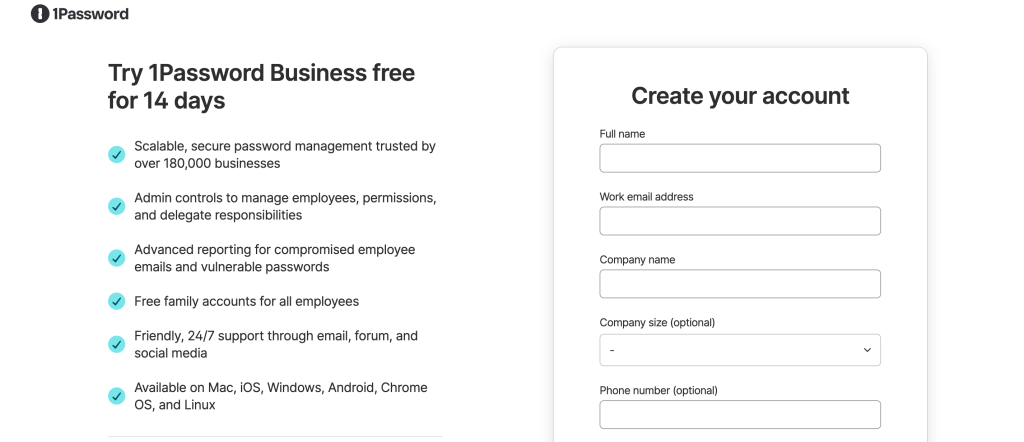
The signup page also shows the business path very plainly. You are not hunting through hidden pricing calculators or waiting for a sales rep to explain the most basic entry point. That clarity makes it easier to decide whether 1Password belongs in the stack at all.
Pros And Cons :
Pros –
- The official value proposition is easy to understand.
- The free trial lowers the barrier to testing it in a real team.
- Monthly pay-as-you-go billing is easier to justify than heavy upfront commitments.
- The page makes passwords, secrets, app access, and AI security feel like one workflow.
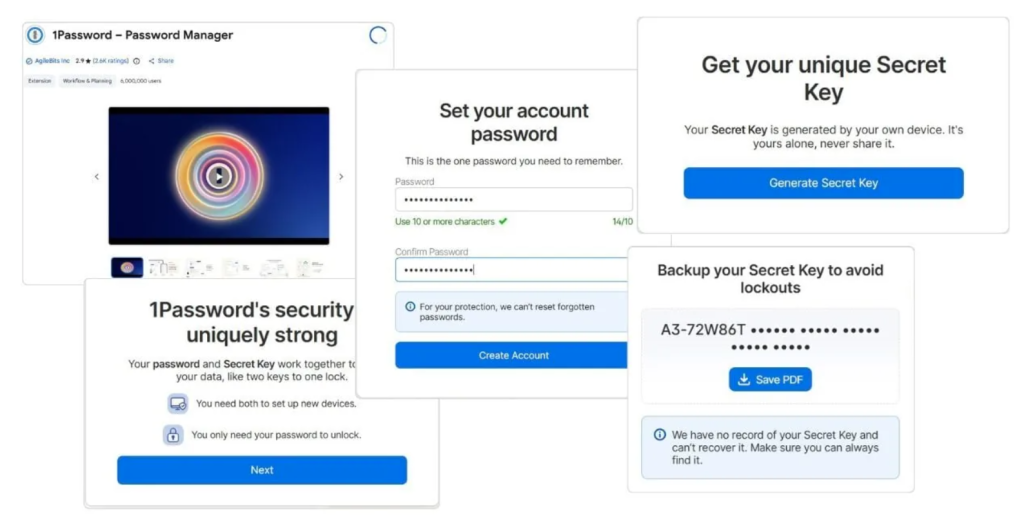
- The business signup flow looks straightforward enough for practical rollout.
Cons –
- Security tools are only as good as the team’s habits, so adoption discipline still matters.
- Consumption-based billing can feel less predictable if your headcount changes often.
- The product is clearly aimed at teams that want structure, which means casual users may feel like they are buying more than they need.
That tradeoff feels fair to me. 1Password is not pretending to be a tiny consumer utility. It is selling a business-grade workflow, and that usually comes with the responsibility to manage rollout well.
If you are already juggling shared credentials, app access requests, and secrets in too many places, see the business setup flow here and compare it against the current mess your team is living with.
Feature Deep Dive :
Password And Secrets Protection –
This is the foundation of the product, and it is still the reason most teams start looking at 1Password in the first place. The official copy explicitly says it protects passwords and secrets, which is exactly what you want from a tool in this category. That sounds simple, but simple is often the point when the real risk is scattered credentials and inconsistent practices.
In practice, this feature matters most when a team stops treating secrets like random files, shared messages, or spreadsheet leftovers. A proper vault workflow gives the team one place to store sensitive data and one habit to trust when people move quickly.
App Access Management –
The business page also emphasizes managing app access. That is a big deal because access sprawl is usually what turns a password tool into an operational safety net. If the product can help teams control who gets into what, then it is doing more than just storing credentials.
This is especially useful for teams that hire often, switch tools often, or maintain separate access layers for different departments. You do not want access management to become a manual ritual every time someone joins, changes roles, or leaves.
The stronger the access workflow, the less time IT and operations spend on cleanup. That is the kind of unglamorous productivity win that saves headaches later.
Secure AI Tools –
I think this is the feature that makes the 2026 positioning feel modern. The official page specifically says 1Password can secure AI tools. That matters because more teams are connecting AI assistants, browser-based copilots, and internal workflows to sensitive data.
The risk is not just someone forgetting a password. It is also someone connecting the wrong thing to the wrong tool and not noticing until the damage is already done. A product that helps with AI tool security is doing real work in the current workflow, not just guarding the old one.
That also makes 1Password feel timely rather than legacy. Plenty of security products still talk like it is 2019. This one clearly knows teams are using AI as part of the daily stack now.
A Smooth Business Trial And Billing Model –
The official page makes the buying model a feature in its own right. A free 14-day trial, monthly pay-as-you-go billing, and no minimums or commitments are all practical advantages. You can test the product without turning procurement into a mini drama.
That is useful because the biggest challenge with security software is often not the feature list. It is the internal friction of proving the product is worth adopting. Lower-friction billing helps the tool earn its place.
Multi-Team And Multi-Tenant Readiness –
The public business page also leans toward larger operational setups, including team-friendly adoption and management. That tells me the product is not just for a tiny startup with five passwords to sort out. It is designed to work when access becomes a shared responsibility.
That matters for MSPs, growing companies, and internal IT teams that need a cleaner way to manage access across people and systems. The more groups depend on the same security workflow, the more important it is that the product does not fall apart under real-world complexity.
What Adoption Looks Like In Practice :
What makes 1Password feel especially usable is that the business case is obvious the moment a team starts listing the things it already handles badly. Shared credentials in chat threads, ad hoc secrets in documents, and access requests handled one by one all create friction. A proper business vault removes a lot of that noise and gives the team a repeatable habit.
That matters even more when people move between roles or departments. Instead of rebuilding access from scratch each time, the team can lean on a structured workflow that is easier to audit and easier to explain. The product does not need to be flashy to be valuable; it just needs to be reliable in the places where the workflow usually breaks.
The other practical win is confidence. When people know where the password, secret, or app access lives, they stop improvising. That does not just save time. It reduces the number of dumb mistakes that happen when everyone is moving fast and nobody wants to stop and ask where the key is stored.
Pricing Breakdown :
The official pricing story is refreshingly simple. The business signup page says there is a free 14-day trial, monthly pay-as-you-go billing, and consumption-based pricing per user. It also says there are no minimums, commitments, or fees. That is the kind of clarity buyers should expect more often.
What you do not get on the public page is a confusing pile of tiers, hidden surcharges, or half-explained packaging. That helps because it lets the buyer focus on fit instead of decoding the sales page.
The right way to think about the pricing is this: 1Password wants to be evaluated as a business utility with real adoption value. If the tool replaces weak shared-password habits, ad hoc secret storage, and too much access confusion, the cost becomes easier to justify. The real decision is not only the subscription line item. It is whether the tool removes enough operational mess that the team stops wasting time on avoidable security cleanup.
That is why the trial matters. It lets you test the product inside the messy middle of daily work instead of imagining value in a vacuum. If the team can move through sign-in, vault access, and app access without friction, the pricing is much easier to defend later.
If your team wants to see whether the economics make sense in a real workflow, open the trial here and compare it against the time your team currently wastes managing access the hard way.
Who Should Use It :
1Password makes the most sense for teams that care about access discipline and do not want security to be a hero project every week. I would especially look at it for:
- Growing startups that need a sane password and secrets system.
- Mid-sized teams that are tired of shared credential chaos.
- IT and operations teams that need cleaner app access management.
- MSPs or multi-client environments that need straightforward administration.
- Teams using AI tools that want a better security posture around those workflows.
It is less compelling for people who only need a personal password app and nothing else. This is a business product first, and the official page makes that extremely clear.
That is also why the sign-up flow feels practical. It assumes a real team with onboarding, access, and growth concerns instead of a hobby user who just wants one more vault.
If your situation sounds closer to team governance than casual storage, start the business trial here and see whether it reduces friction in the first week.
Expert Verdict And CTA :
My 2026 read is that 1Password is strong because it knows exactly what job it is trying to do. It protects passwords and secrets, manages app access, and now explicitly reaches into AI security too. That is a coherent story, and coherent stories are easier to trust.
The pricing structure also helps. A free trial and monthly pay-as-you-go billing make it easier to test without committing the whole company to a long contract on day one. That matters because the real question is not whether the product sounds secure. The real question is whether the team will actually use it consistently.
If you are looking for a business-grade security foundation with a lower-friction entry point, start the 14-day trial here and judge it on whether it makes access cleaner, safer, and less annoying.
FAQ :
What does 1Password do in 2026?
1Password helps teams protect passwords and secrets, manage app access, and secure AI tools from one business-oriented workflow.
Does 1Password offer a free trial?
Yes. The official business signup page says there is a free 14-day trial.
Is 1Password billed monthly?
Yes. The official page says the pricing is monthly pay-as-you-go and consumption-based per user.
Are there minimum commitments?
No. The public business page says there are no minimums, commitments, or fees.
Who is 1Password best for?
It is best for growing teams, IT-led organizations, MSP-style setups, and any business that wants a cleaner way to manage credentials, app access, and AI-related security. It is also a strong fit for teams that are tired of pretending access problems will somehow get smaller if nobody talks about them. The more tools and people you have, the more valuable a structured password and secrets workflow becomes.
In other words, this is the kind of product that pays off when a team wants fewer “where is that?” moments and more predictable administration. That is not glamorous, but it is very easy to appreciate once the team has lived with the alternative for a while.