


- Advanced Feature 1: Apollo AI
- Advanced Feature 2: AI Assistant
- Advanced Feature 3: AI Projects
- Advanced Feature 4: Sequencing And Outreach Control
In this guide
- Power User Intro
- Advanced Feature 1: Apollo AI
- Advanced Feature 2: AI Assistant
- Advanced Feature 3: AI Projects
- Advanced Feature 4: Sequencing And Outreach Control
- Advanced Feature 5: Integrations And Workflow Fit
- Advanced Feature 6: Custom Workflows And API Potential
- Performance And Efficiency Angle
- Pricing Context For Power Users
- Expert Workflows
Power User Intro
Apollo.io gets interesting when you stop seeing it as a basic prospecting database and start seeing it as a workflow platform. Beginners usually focus on contact search, credits, and sequencing. Power users care about what happens after that. They want better list building, smarter prioritization, integrated AI, deeper automation, and fewer manual clicks.
Disclosure: Stack99 earns a commission if you buy through links on this page. It costs you nothing extra and never changes our assessment.
That is where Apollo’s more advanced feature set becomes worth exploring.
On Apollo’s official pricing page and knowledge base, the platform highlights a mix of prospecting, sequencing, AI assistance, workflow support, and integrations. In 2026, Apollo is clearly pushing further into AI-assisted selling rather than staying a plain data tool.
If your team already uses Apollo and wants to get more from it, this guide is the advanced version of the conversation.
If you want to test the platform while you read, start Apollo.io here.

Advanced Feature 1: Apollo AI
Apollo’s official AI overview describes Apollo AI as a collection of intelligent tools embedded across the platform. That phrasing matters because it means Apollo AI is not one separate feature. It is a layer that supports multiple workflows.
The official overview highlights:
- AI Assistant
- AI Content Center
- AI Research
- AI Filters
For power users, that is useful because it shifts Apollo from a “search and export” product to a system that can support decision-making and execution within the platform.
The AI overview also says Apollo AI helps teams streamline tasks, improve writing workflows, and surface insights that move prospects from cold to won more effectively. That is exactly the kind of advanced value teams want once the basics are already working.
Advanced Feature 2: AI Assistant
Apollo’s official AI Assistant page says the assistant helps users work faster through natural language instructions. The page positions it as a way to:
- Find decision-makers
- Prioritize accounts with deep web research
- Build and optimize sequences
- Improve messaging and deliverability
- Create workflows
- Export lists
- Report on performance
That is significant because it reduces click-heavy navigation inside the product. Advanced users are not usually limited by a lack of features. They are limited by time and friction. Anything that shortens the path from intention to execution is valuable.
Advanced Feature 3: AI Projects
Apollo’s AI Projects documentation describes projects as a central workspace for a go-to-market initiative, grouping prospect lists, saved searches, sequences, workflows, analytics, and context together.
This is the kind of feature that matters to more mature teams. Once multiple people are working across the same accounts, messaging, and goals, scattered workflows become a problem. Projects look like Apollo’s answer to that.
Even though the documentation notes that the feature is in beta for some users, the direction is important. It shows Apollo is trying to support campaign orchestration, not just data access.
Advanced Feature 4: Sequencing And Outreach Control
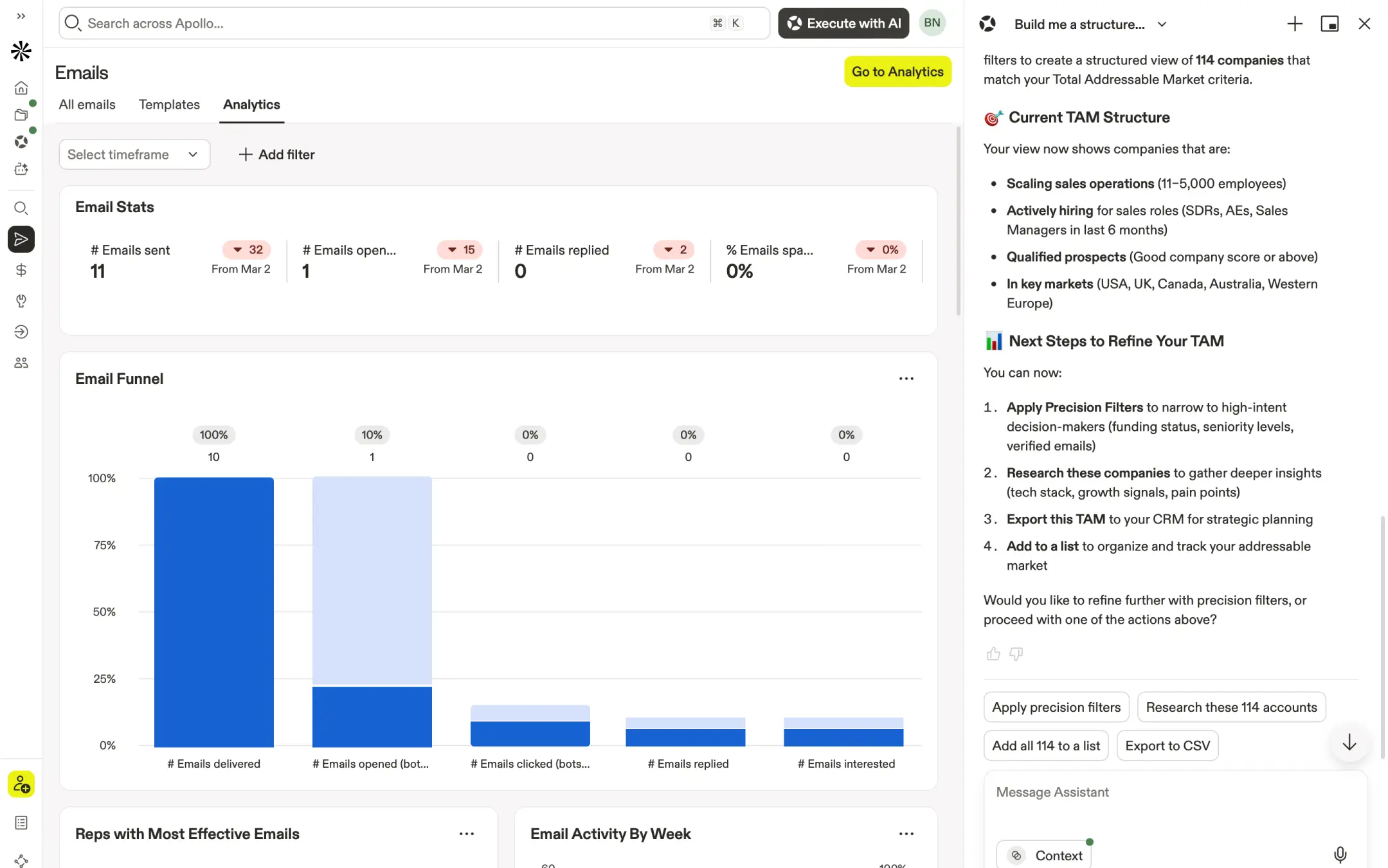
Apollo’s pricing FAQ makes it clear the platform includes email campaigns even on non-paying accounts, with extra flexibility unlocked on paid plans. It also describes capabilities like:
- A/B testing emails
- Recording calls
- Automating follow-ups
- Creating repeatable sales processes
For advanced users, the point is not just that sequences exist. The point is that Apollo wants prospecting, outreach, and process repeatability to live inside one environment.
That becomes more useful when paired with AI-generated research and filtering, because you are not only finding leads. You are shaping the way the follow-up machine runs.
Advanced Feature 5: Integrations And Workflow Fit
Apollo’s official pricing page says it integrates with:
- Salesforce
- HubSpot
- Outreach
- Salesloft
- Marketo
- SendGrid
- all email providers
It also says API access is available on Custom plans.
That matters because advanced users often hit the ceiling of a platform when it cannot fit into the rest of the stack. Apollo appears aware of that and positions integrations as part of the value, not just an afterthought.
Advanced Feature 6: Custom Workflows And API Potential
This is where Apollo becomes more interesting for mature teams. The official pricing information makes it clear that API access sits on Custom plans, which tells you something important: Apollo expects more advanced customers to push the platform deeper into their stack.
For power users, that can mean:
- Syncing Apollo data into internal workflows
- Keeping prospecting and CRM activity aligned
- Extending outreach logic beyond default sequences
- Reducing manual exports and repetitive admin work
That is a meaningful step up from using Apollo as a plain contact database.
Performance And Efficiency Angle
One advanced reason to like Apollo is that it tries to keep several sales activities inside one platform:
- Data lookup
- Sequencing
- AI-assisted messaging
- Account and contact prioritization
- Integrations
- Pipeline support
That is useful because advanced users are usually trying to reduce context switching, not increase it.
Apollo’s pricing FAQ also notes that after closing an initial deal with Apollo, teams are left with a framework to repeatedly close business and scale customer acquisition efforts. That is marketing language, sure, but it points to the right advanced use case: building a repeatable engine instead of doing one-off prospecting work.
If you want to see how that fits your team, try Apollo.io here and test one advanced workflow instead of only poking around the database.
Pricing Context For Power Users
Apollo’s official pricing page highlights several useful details for advanced users:
- Trial plans include 50 credits and 5 mobile credits
- Non-paying plans can connect Gmail accounts for email campaigns
- Paid plans are needed for Microsoft Office or other email providers
- Additional credits can be purchased
- Unlimited plans are governed by a fair use policy
These details matter because power users tend to hit platform limits faster than casual users. If your team is doing heavier automation, more outreach, and more integrated workflows, understanding those plan boundaries matters a lot.
If you are assessing the platform seriously, start Apollo.io here and pay special attention to credits, provider requirements, and where your team might hit fair-use limits.

Expert Workflows
If I were using Apollo as a power user in 2026, I would focus on four workflows:
- Use AI Research and AI Filters to prioritize better prospects.
- Use the AI Assistant to reduce repetitive setup work.
- Build repeatable sequences and outreach frameworks.
- Connect Apollo tightly to the rest of the sales stack through integrations.
That is where the platform looks strongest. It is not about one flashy AI trick. It is about reducing friction across the whole outbound process.
What Advanced Users Should Watch Carefully
Here is the practical side of the story. Advanced users usually outgrow tools when one of three things happens:
- The credits disappear too fast
- The workflow automation hits plan limits
- The platform cannot connect cleanly to the rest of the stack
Apollo seems aware of those concerns, which is why its official pricing pages say so much about credits, provider support, API access, and fair use. That transparency is useful. It lets a serious team evaluate the product with fewer surprises.
In other words, Apollo is strongest when you use it intentionally. Random prospect searches and loose sequences will not unlock the real value. Tight workflows will.
When Apollo Starts Feeling Truly Advanced
There is a big difference between using Apollo and really operating inside Apollo. The advanced version starts when your team stops treating it like a one-off list generator and starts using it as a connected prospecting and workflow layer. That usually means:
- Sequences are built with clear intent instead of generic blast templates
- AI features are used to speed up research and prioritization
- Credits are managed with a plan, not burned casually
- Integrations are part of the workflow from the beginning
That is the moment when the platform starts acting more like an operating system and less like a contact database with extra buttons.
My Practical Take For Power Users
Apollo looks strongest for sales teams that want one platform for discovery, prioritization, outreach, and AI-assisted workflow support. It is less exciting if your team only needs a simple prospect list and does not care about workflow depth.
What I like most about the official positioning is that it is pretty clear where the advanced value comes from: integrated AI, repeatable sequencing, broad integrations, and plan transparency around credits and usage. That is not flashy, but it is useful.
The bigger takeaway is that Apollo rewards disciplined teams more than casual ones. If your team has clear outbound goals, defined processes, and a habit of measuring what works, the advanced features have more room to shine. If the workflow is messy to begin with, no amount of AI polish will fix that on its own. Strong process usually gets more value from Apollo than improvisation does, especially when teams care about repeatability and measurable outcomes.
If that sounds like the kind of system your team needs, try Apollo.io here and build one serious workflow from research to outreach to reporting.
FAQ
What makes Apollo advanced in 2026?
Apollo’s advanced edge comes from the combination of AI Assistant, AI Research, AI Filters, AI Projects, sequencing, and broad integrations.
Does Apollo.io include AI features?
Yes. The official knowledge base highlights Apollo AI, including AI Assistant, AI Content Center, AI Research, and AI Filters.
Can Apollo help power users automate workflows?
Yes. The AI Assistant page specifically positions the assistant as a way to help create workflows, optimize sequences, and performance reports.
Does Apollo integrate with major sales tools?
Yes. Apollo’s pricing page lists integrations with Salesforce, HubSpot, Outreach, Salesloft, Marketo, SendGrid, LinkedIn, and email providers, with API access on Custom plans.
Is Apollo.io worth trying for advanced users?
If your team wants more than a basic lead database and values integrated prospecting plus AI-assisted workflow support, yes. The easiest next step is to start Apollo.io here.
Before You Choose, Compare These
Hand-picked guides to help you choose the right tool — no fluff.
 Case StudiesApollo.io Case Study 2026What actually happened when teams rolled it out.
 FeaturesApollo.io Top Features 2026The standout features and whether they justify the price.
 Advanced GuidesMiro Advanced Guide 2026Deeper workflows once the basics are in place.
 ComparisonsNetlify vs Alternatives 2026The strongest competitors compared side by side.