


Power User Intro
Pilim gets much more interesting once you stop looking at it like a basic admin app and start looking at it as an operating platform for finance, HR, compliance, asset management, and business document workflows. The official site positions it as an all-in-one tool for freelancers and SMEs, while the premium features pages lean hard into automation, accounting, synchronization with accounting software, real-time cashflow control, and workflow simplification.
That is why the advanced angle matters here. Pilim is not only trying to help users record information. It is trying to reduce manual work across several operational layers.
-p-1080.png)
For power users, the attraction is straightforward:
- Fewer repetitive finance tasks.
- Better synchronization across systems.
- More centralized operational data.
- Cleaner cashflow visibility.
- Broader workflow control across business admin.
If you want to explore the product while you read, start with Pilim here.
Advanced Feature 1: Automation Accounting
This is the feature family that gives Pilim its strongest advanced identity.
The official premium features page describes Automation Accounting as a way to reduce manual tasks, automate recurring entries, improve accuracy, and provide real-time cash flow insights. That is strong positioning because manual financial admin is where many small businesses quietly waste time every week.
The same official pages also connect the product to capabilities such as:
- Invoice management.
- Recurring invoice automation.
- Quotation management.
- Sales order management.
- Automated quotation-to-invoice flow.
- Credit note management.
- Expense management.
- Batch processing support.
That makes Pilim more compelling than a simple bookkeeping helper. It is clearly trying to automate the repetitive handoffs that usually sit between finance admin and day-to-day operations.
For power users, that matters because automation is not just about speed. It is also about consistency and fewer avoidable errors.
Advanced Feature 2: Synchronization With Accounting Software
This is probably the most commercially important advanced feature on the public site.
Pilim’s premium features page explicitly says it synchronizes with accounting software such as QuickBooks and Xero. The page frames this as real-time updating, hassle-free integration, and unified cashflow management across systems.
That is a real advantage for teams that do not want another isolated admin database.
Why this matters:
- Duplicate entry work drops.
- Finance data stays more aligned.
- Teams get fewer manual reconciliation headaches.
- Operational decisions can happen with a fresher financial context.
Real talk: a lot of “all-in-one” business tools fall apart because they become another place to maintain records manually. Pilim’s accounting sync story is one of the clearer signs that it is trying to avoid that trap.
If you want to test whether that sync-first value fits your stack, start with Pilim here and compare one recurring finance workflow against your current manual process.
Advanced Feature 3: Real-Time Cashflow And Financial Control
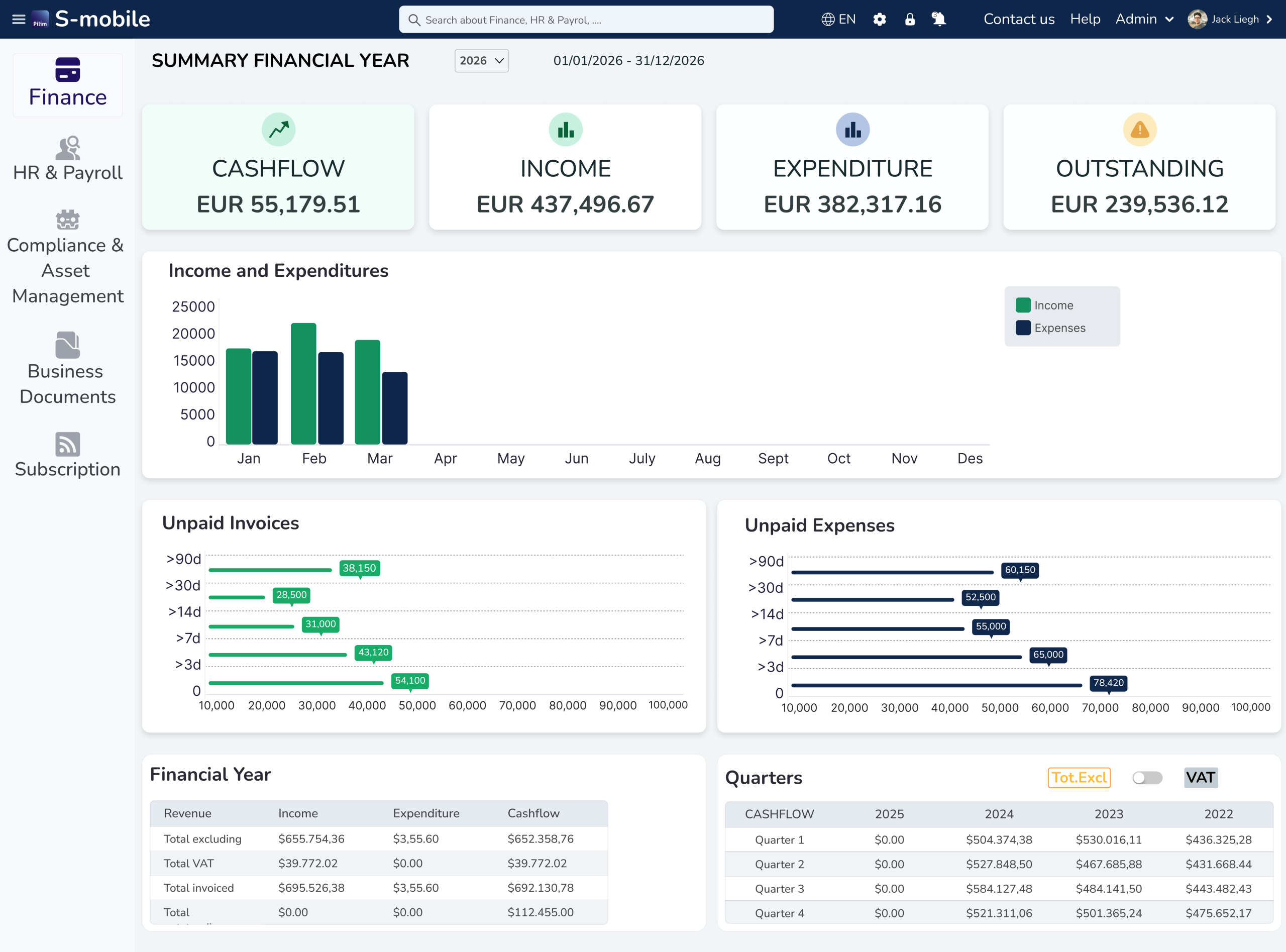
Pilim’s official cashflow and premium pages repeatedly emphasize real-time cashflow management, cash flow statements, invoice handling, VAT-related workflows, and actionable financial visibility.
That matters because advanced users are usually not looking for one more static record system. They want operational visibility that actually helps them decide what to do next.

The official content suggests Pilim can support:
- Tracking income and expenses.
- Monitoring cash flow in real time.
- Generating cash flow statements.
- Managing invoices and recurring billing behavior.
- Creating a more controlled financial operating rhythm.
This is the kind of feature set that becomes especially useful when a business is moving beyond “we just need a place to log things” and into “we need better operational finance discipline.”
Advanced Feature 4: Cross-Module Operational Coverage
One thing Pilim does unusually well on its official site is show that it is not only a finance tool.
Across the homepage and pricing pages, it also highlights:
- HR and payroll capabilities.
- Compliance and asset management.
- Business documents.
- Smart notifications and automated alerts.
- License, insurance, and rental management.
- Secure roles and permissions.
That broader coverage matters because advanced users often do not want to solve one admin problem while leaving six related ones scattered across spreadsheets and side tools.
The platform becomes more interesting when those areas start working together:
- Finance informs admin decisions.
- Document handling supports compliance.
- Roles and permissions support controlled access.
- Alerts help reduce missed dates and overlooked records.
That is a stronger advanced story than “we have one clever finance automation feature.”
Automation Workflows That Make Sense
Pilim’s public pages are full of workflow clues, even when they are not written like formal technical documentation.
The most obvious advanced workflows are:
Recurring Invoice Workflow
Use automation accounting to reduce manual billing repetition and keep recurring revenue admin cleaner.
Accounting Sync Workflow
Use Pilim as the operating layer while syncing entries to QuickBooks, Xero, or other connected accounting software.
Cashflow Oversight Workflow
Use real-time updates, expense tracking, and statements to create a better weekly finance review rhythm.
Document And Compliance Workflow
Use the platform’s document, license, insurance, rental, and notification features to reduce scattered admin follow-up work.
These are not flashy demo tricks. They are practical business workflows that can save time when used consistently.
If you want to explore those workflows on the live product path, start with Pilim here and test one high-friction administrative process first.
Custom Integrations And API Reality
Here is the honest read from the public material: Pilim’s official pages strongly emphasize synchronization with accounting software and integration capabilities with other business systems, but they do not publicly present a deep developer-style API story in the content I reviewed.
That means advanced buyers should interpret Pilim as:
- Strong on practical software synchronization.
- Strong on workflow automation inside the product scope.
- Less publicly explicit, at least on these pages, about a broad open API narrative.
That is not a deal-breaker. It just means buyers should evaluate Pilim based on the operational integrations it publicly confirms, rather than assuming a huge developer platform that the site does not clearly document.
Performance Optimization For Power Users
Pilim will likely perform best in businesses that treat it as a workflow system, not just a storage system.
That means:
- Standardize how invoices and expenses are entered.
- Use the synchronization paths consistently.
- Define roles and permissions cleanly.
- Keep notification rules meaningful.
- Review cashflow and operational admin on a regular cadence.
Without those habits, even good automation can become a messy layer on top of messy processes. With those habits, the product has a much better chance of saving real time and reducing admin drag.
Power users should also think about rollout sequencing. Pilim looks like the kind of platform that becomes more valuable when one process is cleaned up first and then adjacent workflows are added after the team understands the operating rhythm. Starting with everything at once sounds ambitious, but it often creates noise instead of leverage.
The better route is usually:
- Fix one recurring finance process.
- Add synchronization to the accounting system.
- Standardize roles and document handling.
- Expand into adjacent admin modules once the core workflow feels stable.
That kind of sequencing gives the automation layer a much better chance to stick.
Pricing Context For Advanced Buyers
The official pricing page lists Basic, Standard, and Premium plans, with Premium presented as the more comprehensive advanced option. The same pricing page also shows feature comparisons across plan levels, which is useful because advanced buyers can see that not every operational capability sits at the entry tier.
That is exactly how it should be. Advanced workflows should not be judged by the cheapest plan alone. They should be judged by whether the higher-tier package actually supports the complexity your business needs.
The official pricing page also shows that Pilim is trying to ladder buyers from simpler needs into broader operational control. That makes the advanced conversation easier, because businesses can see that Premium is meant for more serious workflow depth instead of pretending every plan is equally suitable for demanding use cases.
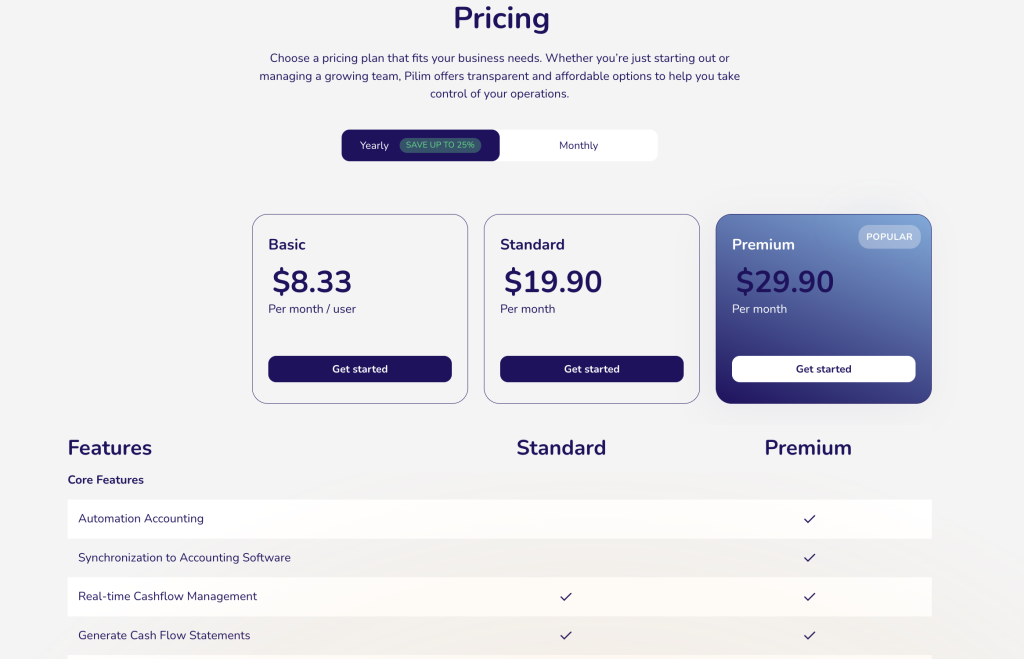
For power users, that means the buying decision should be tied to process intensity. If the business only needs basic tracking, the entry path may be enough. If the business wants synchronized accounting, broader operational modules, and automation that reduces repetitive admin, it makes more sense to evaluate the higher-tier path honestly from the start.
That framing is useful because it keeps the conversation anchored in operational reality. Advanced buyers should be thinking less about feature-count bragging rights and more about whether the system can reduce recurring admin workload across the finance and compliance processes that actually consume staff time.
That is where a broader operational platform starts to feel genuinely worthwhile.
Verdict
Pilim is most compelling in 2026 when you treat it as an advanced operating layer for finance and business administration instead of a lightweight bookkeeping helper. Its strongest public advanced features are automation accounting, synchronization with accounting software like QuickBooks and Xero, real-time cashflow visibility, and the broader operational coverage across HR, compliance, assets, documents, and alerts.
It will not be the perfect fit for every company. Businesses that only need one tiny finance function may find it broader than necessary. But for SMEs that want cleaner financial operations and fewer manual admin handoffs, the advanced story looks promising.
If that sounds close to your use case, start with Pilim here and evaluate it against one real finance or admin workflow that currently wastes too much time.
FAQ
What are Pilim’s most advanced features?
Its strongest advanced public features are automation accounting, accounting software synchronization, real-time cashflow management, recurring invoice workflows, and broader operational modules such as documents, assets, compliance, and notifications.
Does Pilim integrate with QuickBooks and Xero?
Yes. The official premium features page explicitly mentions synchronization with popular accounting software including QuickBooks and Xero.
Is Pilim only for finance teams?
No. The official site also highlights HR, payroll, compliance, asset management, business documents, and smart notification features.
Who should use Pilim’s advanced workflow features?
Freelancers and SMEs with growing administrative complexity, recurring finance tasks, and a need for cleaner synchronization and operational control are the best candidates.