

Pricing Overview :
Gamma is one of those products that looks simple on the surface and then becomes more interesting when you actually compare the plan limits. The official pricing page lays out a clear ladder: Free, Plus, Pro, and Ultra. Each tier changes how far you can go with cards per prompt, branding, domain publishing, and AI model access.
That is useful because pricing only matters if you understand what scales with you. Gamma is not just selling a prettier deck editor. It is selling a workflow for presentations, websites, docs, social content, and graphics, which means the right tier depends on how often your team creates and how much polish you need.
If you want to inspect the live plan page while you read, open Gamma here.
The short version is straightforward: Free is for testing, Plus is for lighter production use, Pro is for teams that need branding and deeper controls, and Ultra is for heavy users who want the most advanced AI features.

Pricing Tiers :
Here is the official plan snapshot as shown on Gamma’s current pricing page:
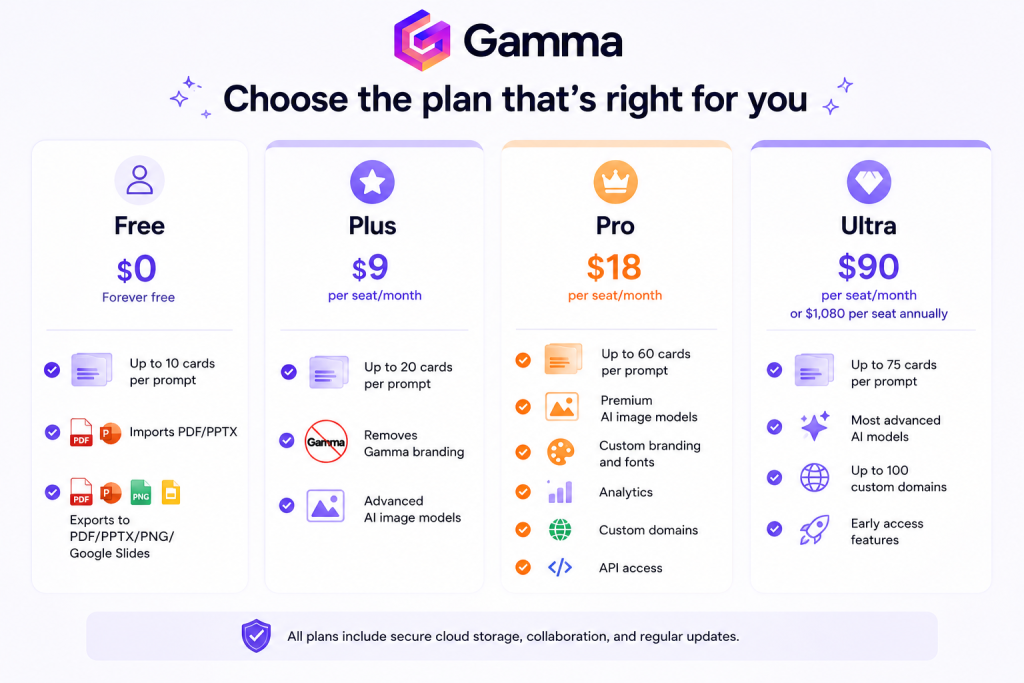
That table is the cleanest way to think about it. The question is not “which plan is cheapest?” The question is “how much control do I need before the workflow starts feeling limited?”
If you are still testing the product, start with Gamma here and use the Free plan to see how the card limit feels in your normal workflow.

Hidden Costs And Gotchas :
Pricing is rarely just the headline number, and Gamma is no exception.
The first thing to remember is that some plans are seat-based. That means your actual monthly spend changes as the team grows. A single-seat account is one thing. A five-person content team is another.
The second thing is plan behavior. Gamma’s help materials say that free-plan credits do not refresh, while paid plans refill monthly. That matters if your team expects the free plan to behave like a perpetual production tier. It does not.
The third thing is feature gating. Gamma’s pricing page makes it clear that custom domains, branding controls, premium AI models, API access, and advanced publishing options live on higher tiers. If your business needs those capabilities, the entry-level price will not tell the full story.
Good buyers ask these questions before upgrading:
- Do I Need Branding Removal?
- Do I Need Custom Domains?
- Do I Need API Access?
- Do I Need More Cards Per Prompt?
- Do I Need Premium AI Models?
That checklist is usually more helpful than staring at the monthly figure and hoping the rest will sort itself out.
ROI Example :
Gamma is easiest to justify when you measure the time it saves across repeated content work.
Let’s use a simple, realistic example.
Imagine a small marketing team creates four presentations a month. Without Gamma, each deck takes a designer or marketer several hours to outline, format, polish, and rework. With Gamma, much of the first-pass layout work can happen faster because the platform is built around rapid creation rather than manual slide building.
Now compare the plans:
- Free gets you started, but the 10-card limit can feel tight.
- Plus gives you a lighter paid workflow at $9 per seat/month.
- Pro gives you more breathing room at $18 per seat/month and adds branding, analytics, custom domains, and API access.
If a team saves even a small number of hours per deck, the monthly cost becomes easy to defend. The real ROI is not “we spent less money on software.” The real ROI is “we shipped better-looking work faster, and we did not burn the team out formatting slides by hand.”
If you want to test whether that logic holds for your team, use Gamma here and build one real deck instead of judging it from screenshots alone.
Cost Comparison :
Gamma’s value becomes clearer when you compare it to the kind of work it replaces.
If you need:
- Fast First-Draft Presentations.
- Lightweight Website Or Doc Creation.
- Social And Graphic Output.
- Simple Sharing Without Heavy Design Overhead.
Then Gamma’s pricing can be easier to justify than a tool stack that requires separate design software, copy tools, and layout tweaks.
The main comparison is not only against other presentation tools. It is also against the time cost of doing the same work manually. That is where Gamma tends to look more reasonable than the sticker price alone suggests.

The higher tiers are especially relevant when your team needs brand control. A cheaper plan that forces you to fight branding limitations is not really cheap if it slows every review cycle.
Best Value Tier :
For most growing teams, Pro is the tier that deserves the most attention.
Why?
- It Raises The Card Limit Enough For Serious Use.
- It Removes The Brand Constraint.
- It Adds Custom Fonts And Branding.
- It Includes Analytics.
- It Opens API Access.
- It Supports Custom Domains.
That combination usually hits the sweet spot between affordability and operational flexibility.
Plus can still be a good choice if your use case is lighter and you mainly want to create polished decks without advanced publishing control. Ultra makes sense when you need the heaviest limits, most advanced AI models, and a large domain footprint.
The best-value answer is not universal. It depends on whether your team is experimenting, producing at a steady pace, or publishing at scale.
Discounts And Annual Billing :
The pricing page shows annual billing for Ultra at $1,080 per seat. That is the clearest annual figure currently visible on the official page, and it is a useful benchmark if you are modeling yearly cost.
The main takeaway is simple: annual billing can make sense if Gamma is already part of your regular workflow. If the tool is still in trial mode for your team, monthly billing gives you more room to learn without committing too early.
The official materials also note that paid plans refill credits monthly, which helps keep the tool usable for teams that create regularly. That is an important detail because it turns Gamma into a working production tool instead of a one-time experiment.
If you want to compare the current price ladder with your own usage pattern, open Gamma here and map your monthly creation volume against the card limits before you choose a tier.
Practical Buying Checklist :
The easiest way to choose a Gamma plan is to work backward from your real production habits. If your team makes one deck every now and then, the lower tiers may be enough. If your team creates repeatedly, brands everything, and wants cleaner publishing control, the value case moves upward fast.
Use this simple checklist before you upgrade:
- Count How Many Decks You Create Each Month.
- Count How Often You Need Branding Control.
- Count Whether Custom Domains Matter.
- Count Whether API Access Would Remove Manual Work.
- Count Whether Your Team Needs More Than A Trial Sandbox.
That is usually the point where the pricing decision becomes obvious. The wrong tier feels cheap at first and annoying later. The right tier feels boring in the best possible way because it does exactly what your team needs without extra friction.
If your team is still experimenting, that is fine. The free tier exists for a reason. But once the workflow becomes repeatable, it is worth comparing the monthly price against the time you save on formatting, exporting, and reworking assets by hand.
Verdict :
Gamma’s pricing is refreshingly transparent. The plan ladder is easy to read, the feature jumps are meaningful, and the value story makes sense as soon as you connect it to the actual output you want to produce.
If you are just testing the workflow, Free is enough to learn the basics. If you are producing regularly, Plus can be a good stepping stone. If you care about branding, domains, analytics, and API access, Pro is the tier that feels like the real business choice. Ultra is for the heaviest users who want the biggest limits and most advanced AI options.
In practical terms, Gamma is priced like a tool that wants to sit in the middle of your presentation and content workflow, not at the very edge of it.
If that sounds like the kind of system your team needs, open Gamma here and compare your real output needs against the plan table before you upgrade.
FAQ :
Is Gamma free?
Yes. The official pricing page includes a Free plan.
How much does Gamma Plus cost?
Plus is listed at $9 per seat per month.
How much does Gamma Pro cost?
Pro is listed at $18 per seat per month.
How much does Gamma Ultra cost?
Ultra is listed at $90 per seat per month, or $1,080 per seat billed annually.
Does Gamma support custom domains?
Yes. The official pricing page says Pro supports up to 10 custom domains, and Ultra supports up to 100.
Does Gamma have API access?
Yes. The official pricing page lists API access on Pro.