


In this guide
Why This Comparison Matters :
Netlify is in one of those product categories where people pretend they are making a clean technical choice, but half the decision is really workflow preference. On its official site, Netlify frames itself as a platform where you can create with AI or code, deploy instantly on production infrastructure, preview every change, run APIs and logic, connect data, optimize images, and ship globally from one place.
Disclosure: Stack99 earns a commission if you buy through links on this page. It costs you nothing extra and never changes our assessment.
That is a strong pitch. It also puts Netlify directly into comparison mode with Vercel and Cloudflare Pages in 2026, because those are three of the most realistic official-platform alternatives for teams building modern sites and web apps.
The real question is not “Which one can deploy a site?” All three can do that. The real questions are:
- Which one feels best for your build and deploy workflow?
- Which one handles previews and developer collaboration the way your team actually works?
- Which one gives the best infrastructure story for your stage?
- Which one makes the pricing model easiest to live with after you scale?
If Netlify is already on your shortlist, start with Netlify here and compare it against the alternatives with your real workflow in mind, not just the homepage glow.

Quick Comparison Table :
| Tool | Starts at | Free option | Best for |
|---|---|---|---|
| Netlify ↗THIS GUIDE | $9/mo | Free plan | Web hosting / deploy |
| Vercel | $20/mo | Free plan | Frontend hosting/deploy |
| Cloudflare Pages | $5/mo | Free plan | Web hosting/deploy |
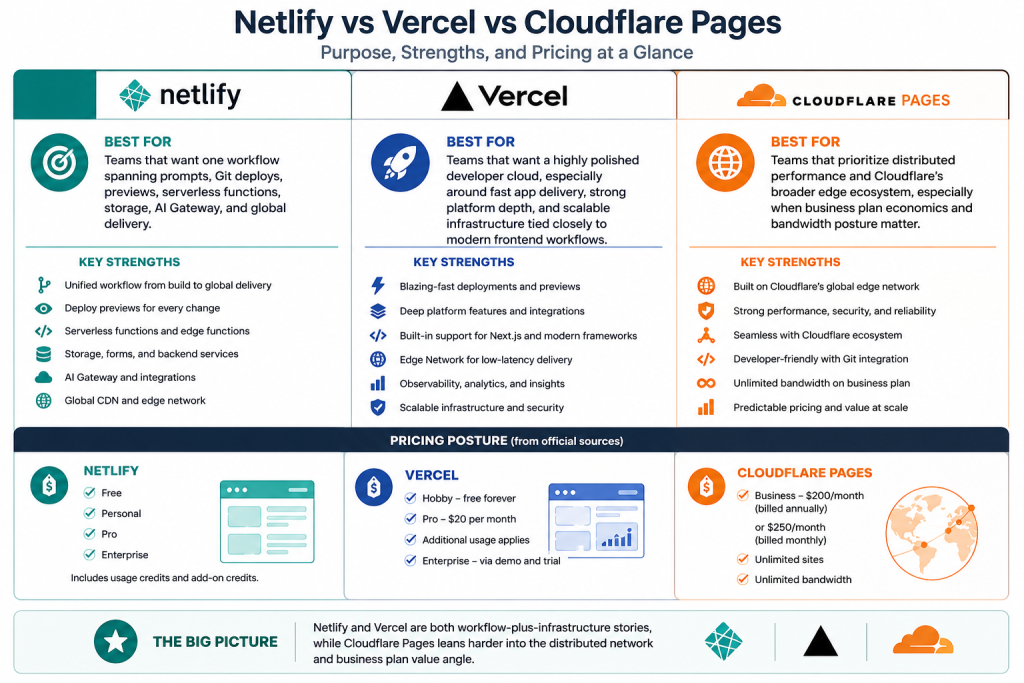
At a high level, this is how the three platforms separate themselves based on official positioning.
- Netlify: Best for teams that want one workflow spanning prompts, Git deploys, previews, serverless functions, storage, AI Gateway, and global delivery.
- Vercel: Best for teams that want a highly polished developer cloud, especially around fast app delivery, strong platform depth, and scalable infrastructure tied closely to modern frontend workflows.
- Cloudflare Pages: Best for teams that prioritize distributed performance and Cloudflare’s broader edge ecosystem, especially when business plan economics and bandwidth posture matter.
Pricing posture from official sources also differs:
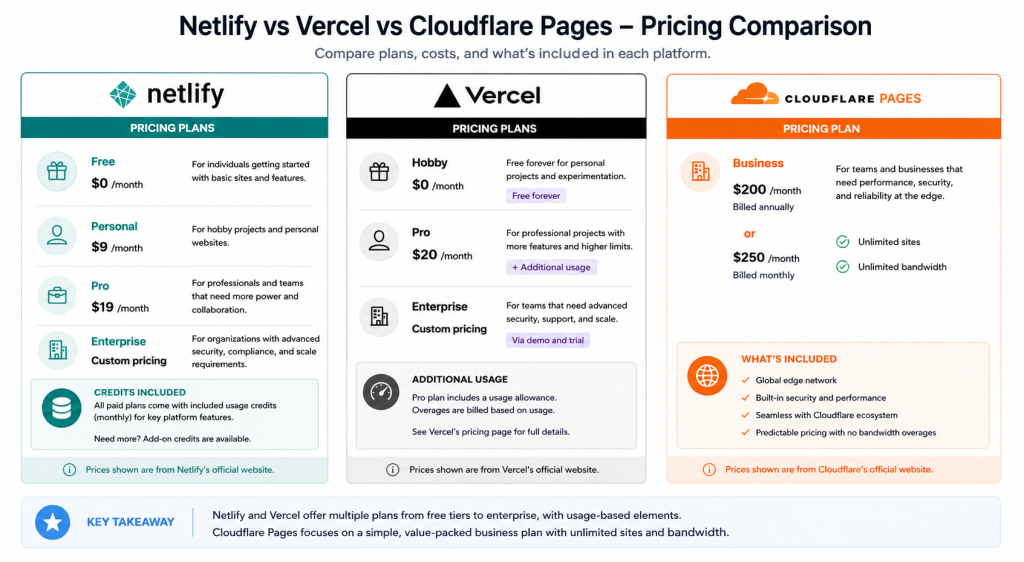
- Netlify: Free, Personal, Pro, and Enterprise with included usage credits and add-on credits.
- Vercel: Hobby free forever, Pro at $20 per month plus additional usage, Enterprise via demo and trial.
- Cloudflare Pages: Business at $200 per month billed annually or $250 billed monthly on the pricing page, with unlimited sites and unlimited bandwidth under that business plan description.
That spread already hints at the core difference: Netlify and Vercel are both workflow-plus-infrastructure stories, while Cloudflare Pages leans harder into the distributed network and business plan value angle.
Netlify Deep Dive :
Netlify’s official site does a good job of making the workflow story feel cohesive. It is not just “deploy here.” It is:
- Start with code or AI.
- Build fullstack apps.
- Preview every change.
- Add APIs, storage, auth, and AI features.
- Ship globally on production infrastructure.
That “prompt, preview, repeat” language is not just marketing fluff. It tells you exactly what Netlify thinks its moat is. Netlify wants to be the place where teams move from idea to preview to production without having to stitch together the experience themselves.
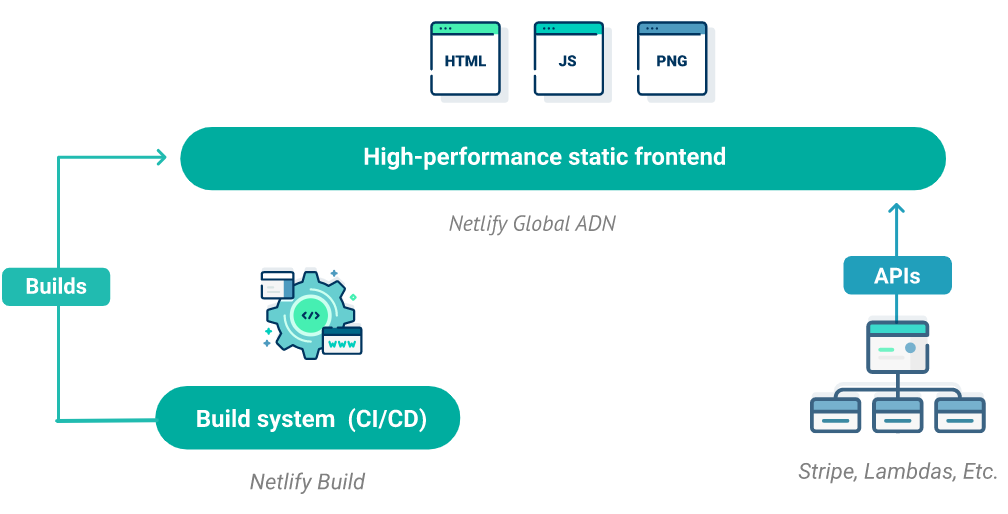
The platform section reinforces that with serverless functions, integrated storage, built-in identity, AI Gateway, scheduled jobs, background work, and a global edge network. The pricing page then turns that into a credit-based model with included monthly credits on Personal and Pro.
Where Netlify feels especially strong:
- Deploy previews are central to the workflow.
- AI and code-based creation both get first-class messaging.
- Global delivery and rollback workflows are easy to understand.
- The platform story extends beyond static hosting.
That is a compelling package for teams that want deployment, previews, and application primitives in one operating rhythm.
If that sounds like the kind of platform you want to standardize on, start with Netlify here and test a real project with previews, functions, and one production deploy.
Vercel Deep Dive :
Vercel’s official positioning is sharper around the developer cloud story. The homepage says “Build and deploy on the AI Cloud,” and the pricing page backs that up with a broad platform stack: CI/CD, delivery network, fluid compute, workflow, observability, firewall, DDoS mitigation, image optimization, blob storage, and more.
Vercel’s official pricing story is also pretty clear:
- Hobby is free forever.
- Pro is $20 per month plus additional usage.
- Enterprise adds advanced security, performance, support, and a 99.99% SLA path.
Compared with Netlify, Vercel feels more infrastructure-deep and more explicitly platform-engineering aware. That does not automatically make it better. It just means it may appeal more to teams that want very fine-grained control and are comfortable living in a usage-based cloud platform model as their app grows.
Vercel looks especially strong when:
- Performance and frontend developer experience are top priorities.
- You want rich platform components under one brand.
- Your team is comfortable monitoring usage details closely as scale increases.
Where Netlify can still feel friendlier is in the overall workflow story for previews, deploy simplicity, and the broader “all paths lead to the same project” framing. Netlify often feels like it is trying to reduce friction first. Vercel often feels like it is trying to maximize platform power first.
Cloudflare Pages Deep Dive :
Cloudflare Pages brings a different kind of appeal. The official Pages site leans into the Cloudflare network story and performance under distributed load, while the Business plan pricing is refreshingly direct: $200 per month billed annually or $250 monthly, 20 concurrent builds, 20,000 builds per month, 500 custom domains per project, unlimited sites, unlimited static requests, and unlimited bandwidth.
That is a strong business-level pitch for teams that care about the network posture and predictability of the package.
Cloudflare Pages becomes especially compelling when:
- You already like the Cloudflare ecosystem.
- Edge distribution is central to your thinking.
- The business plan economics fit your traffic model well.
- You want broad bandwidth confidence without squinting at too many line items.
Where it can feel less polished than Netlify or Vercel for some teams is in the end-to-end product workflow story. Netlify and Vercel both market the developer journey more aggressively. Cloudflare Pages feels more network-rooted and infrastructure-rooted.
Feature Matrix :
Here is the practical breakdown.
- Netlify wins on cohesive deploy-preview-platform flow.
- Vercel wins on depth of modern platform features and polished developer cloud posture.
- Cloudflare Pages wins on edge-network appeal and strong business-plan allowances.
For teams shipping marketing sites, SaaS apps, AI apps, or internal tools, all three platforms are credible. The difference is less about possibility and more about operating style.
Netlify’s official workflow bullets are especially attractive if your team wants:
- Prompt-based starts and Git-based deploys in the same story.
- Preview URLs before every live release.
- Functions, storage, auth, and AI Gateway in one environment.
- Rollbacks and production delivery that stay easy to explain.
Vercel is stronger if you want a denser platform stack and do not mind a more cloud-native usage mindset. Cloudflare Pages is stronger if the network model and included allowances are the main attraction.
Pricing Comparison :
Pricing is where these platforms stop feeling abstract.
Netlify’s official pricing uses included credits and add-on credits. On the Pro plan, the page shows 3,000 included monthly credits per team, with additional credits available once auto recharge is enabled. That is flexible, but it also means teams should actually understand their usage profile instead of just staring at the plan name and hoping for the best.
Vercel’s pricing is also usage-aware, but the starting point is very clear: Pro is $20 per month plus additional usage. The pricing page then goes deep on edge requests, bandwidth, image optimization, blob storage, functions, and more. It is transparent, but it is not casual.
Cloudflare Pages is the easiest official pricing read in this group if you are looking specifically at the Business plan. You get a defined monthly price and a broad set of included operational allowances. That simplicity will appeal to some teams immediately.
So the pricing read is:
- Netlify if you want flexible credits tied to a broader workflow platform.
- Vercel if you are fine with a rich usage-based developer cloud.
- Cloudflare Pages if you prefer a clearer business-plan envelope.
If you want to test the Netlify side of that equation firsthand, start with Netlify here and measure the workflow, not just the bill.
Use Case Recommendations :
Choose Netlify If –
- You want a unified workflow from prompt or Git to preview to production.
- Your team values deploy previews as part of collaboration.
- You want serverless functions, identity, storage, and AI Gateway in the same environment.
- You prefer a platform that markets simplicity without being simplistic.
Choose Vercel If –
- You want the deepest developer cloud posture in this set.
- Your team is comfortable with detailed usage-based infrastructure economics.
- Platform breadth, performance tooling, and advanced cloud features are major priorities.
Choose Cloudflare Pages If –
- You want Cloudflare’s edge and network posture to be the main story.
- The Business plan pricing and allowances fit your traffic model.
- You value bandwidth headroom and distributed delivery over a more curated workflow narrative.
Verdict :
Netlify remains one of the strongest all-around choices in 2026 because it connects the build, preview, and production story better than many alternatives. The official messaging is unusually coherent: start with AI or code, preview changes, add app logic, and ship globally on one platform.
Vercel is a formidable alternative if you want a richer developer cloud and are prepared for a more detailed infrastructure pricing mindset. Cloudflare Pages is a smart alternative if you want the Cloudflare network story and a simpler business-plan read.
My practical take is this: Netlify is easiest to recommend when the team cares about workflow elegance as much as infrastructure power. That balance is exactly why it stays so competitive.
If that matches how your team works, start with Netlify here and run one real project through previews, functions, and production before you decide.
FAQ :
Is Netlify better than Vercel in 2026?
It depends on what you value. Netlify feels stronger on cohesive workflow simplicity, while Vercel looks stronger for teams that want deeper platform breadth and are comfortable with a more detailed cloud-pricing model.
Is Cloudflare Pages cheaper than Netlify?
Not universally, but the official Cloudflare Pages Business plan presents a very clear package at $200 billed annually or $250 monthly. Netlify’s pricing is more credit-based and flexible, so the better value depends on usage.
Who should pick Netlify over the alternatives?
Teams that care about previews, unified deploy flow, and integrated platform features like functions, identity, storage, and AI Gateway are strong candidates for Netlify.
Is Netlify only for static sites?
No. The official site clearly positions Netlify for fullstack apps, APIs, image optimization, AI features, and global production delivery, not just static hosting.
More on Netlify
Hand-picked guides to help you choose the right tool — no fluff.
 PricingNetlify Pricing 2026Real tier prices and what each plan actually includes.
 AlternativesNetlify Alternatives 2026Credible alternatives and when each one wins.
 FeaturesTenable Nessus Features 2026The standout features and whether they justify the price.
 FeaturesCloudTalk Top Features 2026The standout features and whether they justify the price.