

Quick Verdict
Freshchat is a solid choice if your team needs customer chat that lives inside a broader support workflow instead of feeling like a standalone widget. Freshworks is clearly positioning it as a unified workspace for customer conversations, and the current pricing page backs that up with a simple ladder: Free, Growth, Pro, and Enterprise.
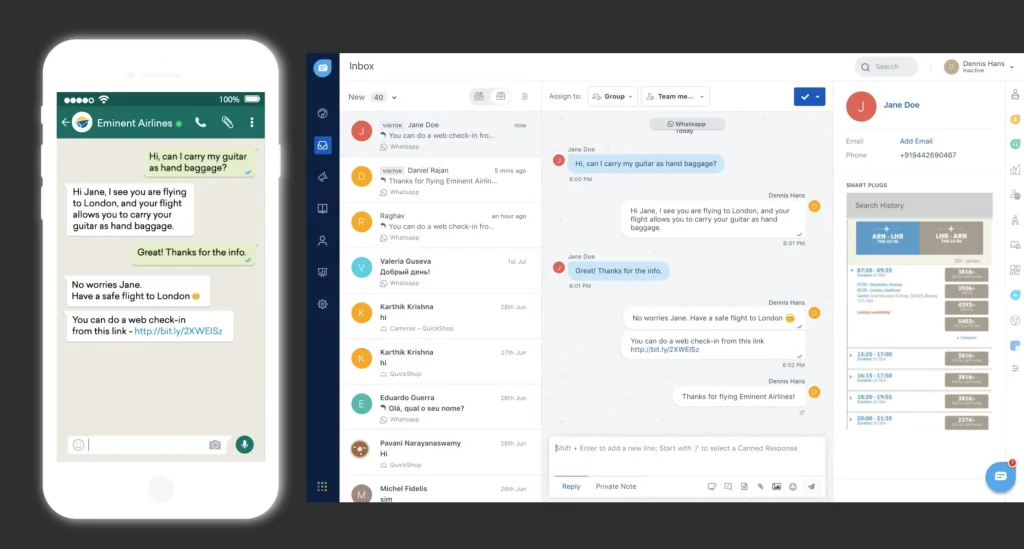
The strongest part of Freshchat is that it does the basics well and then keeps going. You get website live chat, email, a team inbox, social messengers, SMS, and WhatsApp-style channels, multilingual conversations, routing, analytics, and AI support. That is enough for most support teams to move beyond a single chat bubble on a website.
If you want to inspect the platform while you read, start with Freshchat here.
What Freshchat Actually Is
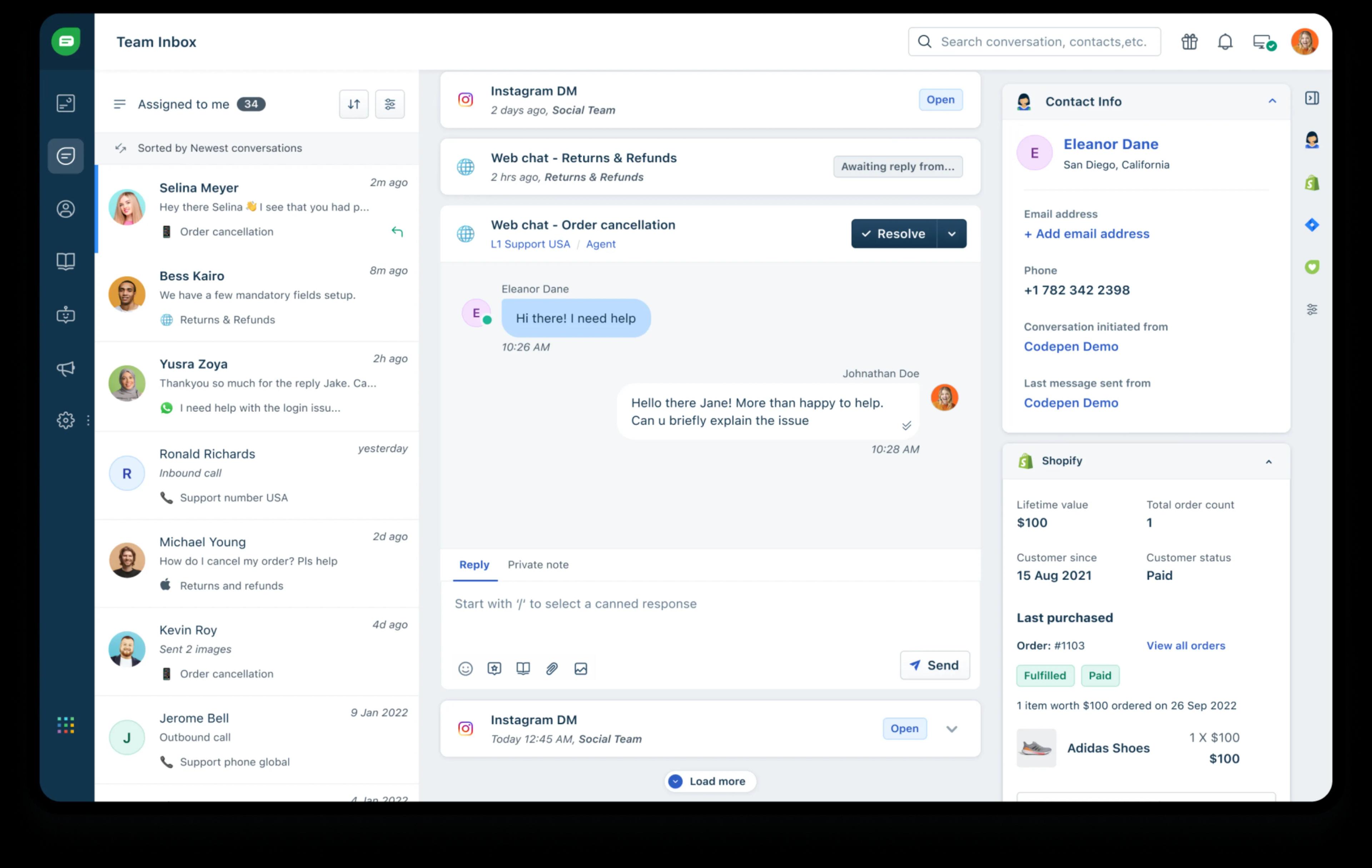
Freshchat is Freshworks’ customer messaging product. The official pricing page describes it as a unified workspace for customer conversations, and that is the right mental model. It is not just “live chat.” It is a conversation layer for support teams that need to handle customers across multiple channels without constantly switching tools.
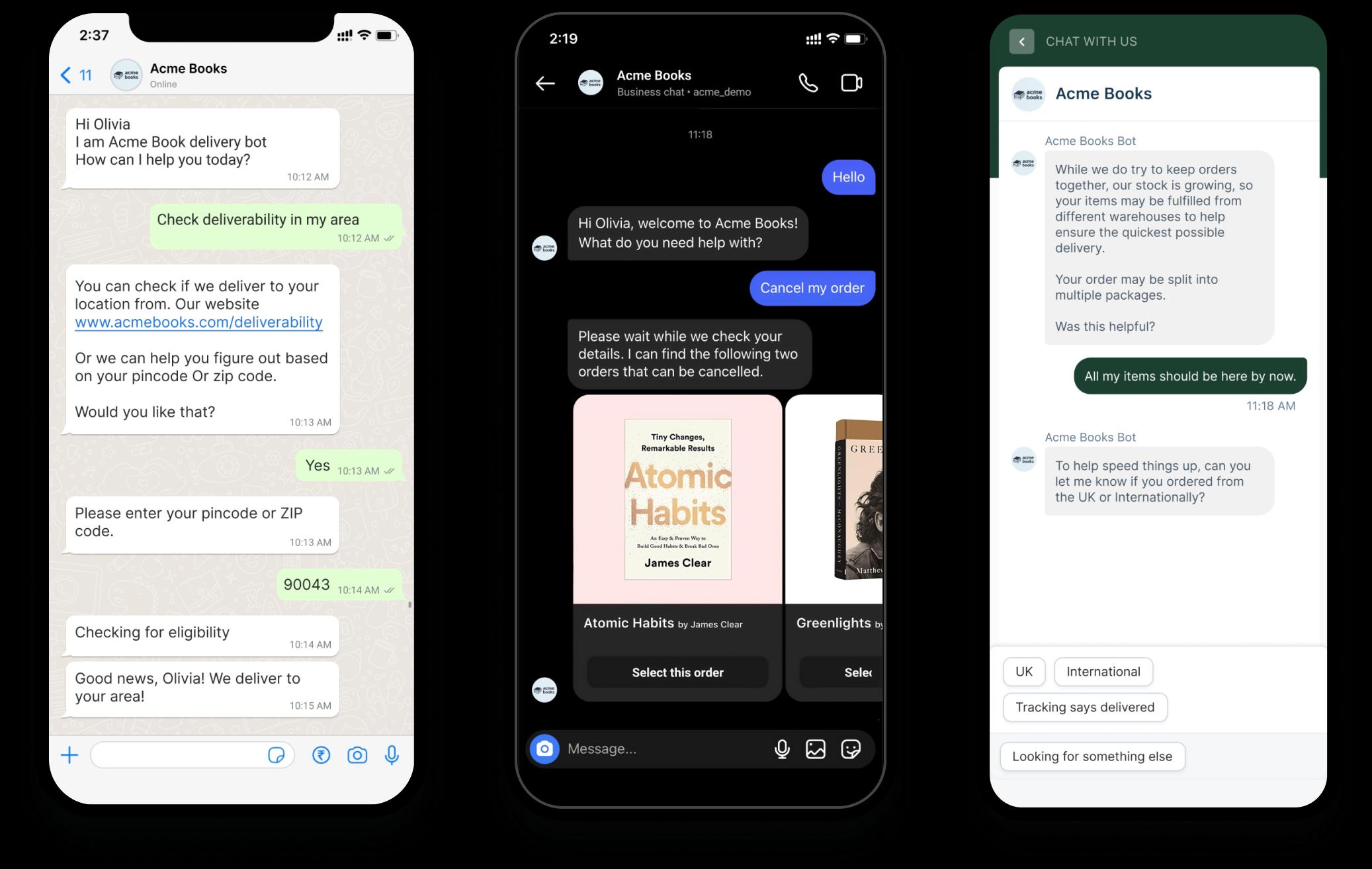
The product is built around omnichannel conversations. The pricing page highlights website and mobile chat, email, team inbox, Facebook and Instagram messaging, SMS, WhatsApp, Line, and Google Business Messages. That makes it more useful than a simple web widget for teams that already handle customer conversations in more than one place.
The other big clue is the plan structure. Freshchat is clearly designed to scale:
- Free for small teams.
- Growth for teams that need omnichannel coverage.
- Pro for teams that want stronger routing and dashboards.
- Enterprise for teams that need advanced security and skill-based assignment.
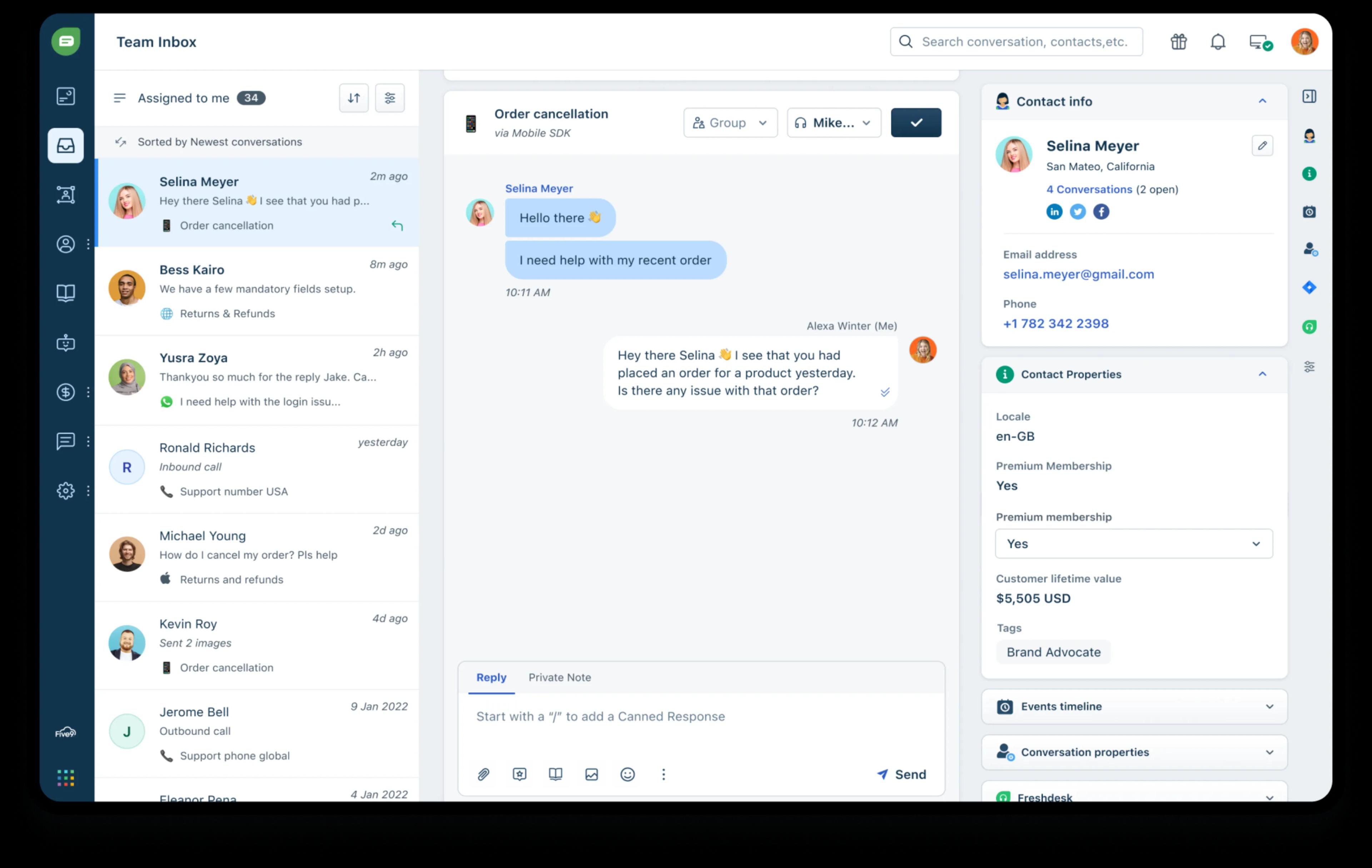
For support teams, the value is not just that customers can send a message. The value is that your team can organize the flood.
If your support workflow is already messy, start with Freshchat here and see whether the routing and inbox structure match the way your team works.
Pros And Cons
Freshchat has a pretty clear set of strengths.
- The pricing is public and easy to understand.
- The Free plan is useful for small teams.
- It supports multiple messaging channels instead of only on-site chat.
- The shared inbox structure makes team handoffs less chaotic.
- The routing and SLA features on paid plans are practical.
- The AI add-ons give it a more modern support layer.
There are also tradeoffs.
- The Free plan is limited to up to 10 agents.
- The AI extras can add cost if you lean on them heavily.
- If your team only needs a simple chat bubble, Freshchat may be more platform than you need.
- Enterprise features can make the product feel heavier than a basic live chat tool.
The important thing is to buy it for the workflow you actually have, not the workflow you wish you had.
Feature Deep Dive
Freshchat’s most useful features are the ones that reduce support friction.
1. Unified Inbox
The unified workspace is the main reason to care. It gives support reps one place to see customer conversations instead of splitting attention across different messaging channels.
2. Omnichannel Coverage
Freshchat supports the channels that matter most for modern support teams:
- Website chat.
- Mobile chat.
- Email.
- Facebook and Instagram messaging.
- SMS.
- WhatsApp.
- Line.
- Google Business Messages.
That matters because customers do not think in channels. They just want a reply.
3. Routing And SLA Controls
The Pro plan adds custom dashboards, effective routing mechanisms, and multiple SLA policies. That is a real support-team feature, not a marketing checkbox. If your team gets enough volume, these controls are the difference between a tidy queue and a mess.
4. Freddy AI
Freshchat also has Freddy AI features. The official pricing page highlights Freddy AI Agent and Freddy AI Copilot, with free sessions included on Growth, Pro, and Enterprise for the agent side and Copilot available as a paid add-on.
AI in support software is only useful when it shortens the time to a good answer. Freshchat’s AI layer is attractive if your team spends too much time on repetitive questions or draft replies.
5. Security And Scale
Enterprise adds skills-based assignments and extra security features. That is the right place for the product if you need support governance, not just faster replies.
If your team wants support chat that can grow into a real operations layer, start with Freshchat here.
Pricing Breakdown
Freshchat’s current pricing page is straightforward:
- Free: $0 for up to 10 agents.
- Growth: $19 per agent per month, billed annually.
- Pro: $49 per agent per month, billed annually.
- Enterprise: $79 per agent per month, billed annually.
The Free plan includes website live chat, email, and a unified agent workspace. Growth adds WhatsApp, Facebook Messenger, and real-time dashboards. Pro adds custom dashboards, routing, and multiple SLA policies. Enterprise adds skills-based assignments and more security.
The page also shows a 14-day free trial. That is important because support tools are hard to judge from screenshots alone. The best way to evaluate Freshchat is to try real conversations, not just a demo.
There are also related add-ons and adjacent costs to understand:
- Freshcaller can be added starting from paid plan levels.
- Freddy AI Agent uses session-based pricing after the included sessions.
- Freddy AI Copilot is a paid per-agent add-on.
So the real pricing question is not just “what is the base plan?” It is “how much of the workflow do we want Freshchat to own?”
Who Should Use It
Freshchat is strongest for:
- Support teams that need one shared inbox.
- SaaS teams handling chat, email and social messages.
- E-commerce teams that want faster replies across channels.
- Teams that need routing and SLA discipline.
- Companies that want AI help without building a custom support stack.
It is less compelling for:
- Solo operators who only need a simple widget.
- Tiny sites with almost no support volume.
- Teams that are not ready to organize support ownership.
If your support process is already real and visible, Freshchat is easier to justify. If the process is mostly ad hoc, the product may feel like too much structure too soon.
If you need a product that can support the whole support stack instead of just chat, start with Freshchat here.
What The First Week Usually Looks Like
The first week usually reveals whether the tool fits your team’s habits.
Teams that do well with Freshchat usually notice three things quickly:
- Conversations are easier to triage.
- Reps can see the customer history faster.
- Channel sprawl becomes less painful.
Teams that struggle usually run into the opposite:
- No clear ownership of incoming chats.
- Too many channels with no routing rule.
- A support process that was never documented.
That is not a Freshchat problem. That is a process problem the tool will expose very quickly.
The best first-week rollout is to start with one or two channels, define who owns what, and then add routing and AI only after the basic queue is working.
Buying Rule
Use Freshchat if your support team needs more than a live chat widget and less than a giant enterprise service platform.
That is the cleanest summary. If you need omnichannel messaging, practical routing, and a shared inbox, Freshchat makes sense. If you only need a tiny embedded chat box, it is probably more software than you need.
The platform also gets more attractive as volume grows. That is because the value of routing, SLA rules, and AI improves when a team is actually handling enough conversations to feel the pain.
What The First Month Usually Looks Like
The first month usually tells you whether the rollout is operationally healthy.
Week one is setup and inbox normalization. The team connects the channels that matter, names the queues, and makes sure every message has an owner. If the team cannot do that, the tool will feel noisy immediately.
Week two is routing. That is when the team adds rules for sales, support, billing, and escalation. This is the point where Freshchat stops being just a front-end chat box and starts feeling like a support workflow.
Week three is AI and optimization. The team tests Freddy AI or Copilot on repetitive questions, checks whether saved replies are accurate, and watches whether response time drops.
Week four is review. The team looks at SLA compliance, channel volume, and handoff quality. If the setup is working, the platform should feel quieter, not louder.
What The Product Is Best At
Freshchat is best at reducing the manual effort that usually sits around chat support.
That means:
- Fewer missed messages.
- Clearer ownership.
- Better cross-channel visibility.
- Faster response times.
- Less switching between tools.
It is not trying to replace every support system in the stack. It is trying to make customer conversations more organized. That distinction matters because a lot of chat tools look useful until you try to operate them at volume.
Freshchat feels like a support system that can grow with the team instead of a gadget that has to be replaced later.
What Support Leaders Should Ask Before Buying
Before buying, support leaders should ask a few practical questions:
- Which channels actually need to be live on day one?
- Who owns the first response on each channel?
- Do we need AI assistance immediately, or can that wait until the queue is stable?
- What SLA rules matter most for the business?
- Is the inbox designed for the way our team already works?
Those questions matter because support software succeeds or fails on operating habits. The best Freshchat rollout is the one that makes the team faster without forcing a weird process that nobody follows.
If the team can answer those questions clearly, the buying decision gets much easier.
That is usually the difference between a support tool that gets adopted and one that gets ignored.
Support teams notice that difference quickly because the queue either gets calmer or it does not.
That is the signal that matters.
It is also why Freshchat is better evaluated on real tickets than on a feature checklist.
If the team’s support volume is growing, that practical test usually gives a clear answer very quickly.
That clarity is the main reason to buy it.
It removes ambiguity before the queue becomes a problem.
Verdict
Freshchat is a good 2026 review pick because it solves the everyday support problem directly: too many messages, too many places, not enough structure. The Free plan is useful, the paid ladder is easy to understand, and the feature set is strong enough to support real customer service operations.
The main downside is simple: you should not buy it unless you plan to use the routing, inbox, and channel coverage. Otherwise, it is a more capable tool than you need.
If your team wants a support messaging platform that can scale from a small inbox to a more serious operations setup, start with Freshchat here.
FAQ
Does Freshchat have a free plan?
Yes. The pricing page shows a Free plan for up to 10 agents.
What does the Growth plan add?
Growth adds WhatsApp, Facebook Messenger, real-time dashboards, and other omnichannel support features at $19 per agent per month billed annually.
Is Freshchat only for website chat?
No. It also supports email, social messengers, SMS, WhatsApp, Line, and Google Business Messages.
Does Freshchat include AI features?
Yes. The pricing page highlights Freddy AI Agent and Freddy AI Copilot.
Is Freshchat good for omnichannel support?
Yes. The official pricing page specifically highlights social and messaging channels in addition to website chat and email.
What is the best first rollout?
Start with one or two channels, define ownership, then add routing and AI after the queue is stable.