


In this guide
When To Consider Alternatives
Instapage is built for serious landing page work. The official pricing page makes that clear with a feature set that includes unlimited pages, unlimited conversions, unlimited contacts, collaboration, reusable blocks, popups, sticky bars, AI content, programmatic pages, server-side A/B testing, global elements, and direct lead bypass.
Disclosure: Stack99 earns a commission if you buy through links on this page. It costs you nothing extra and never changes our assessment.
That is a strong platform. It is also more platform than a lot of teams actually need.
You should start considering alternatives if:
- Your team only needs a few launch pages a month.
- You want simpler publishing with less experimentation overhead.
- You do not need deep collaboration or server-side testing.
- You want a landing page tool that is easier to justify on cost.
If you want to compare the pricing model while you read, start with Instapage here.
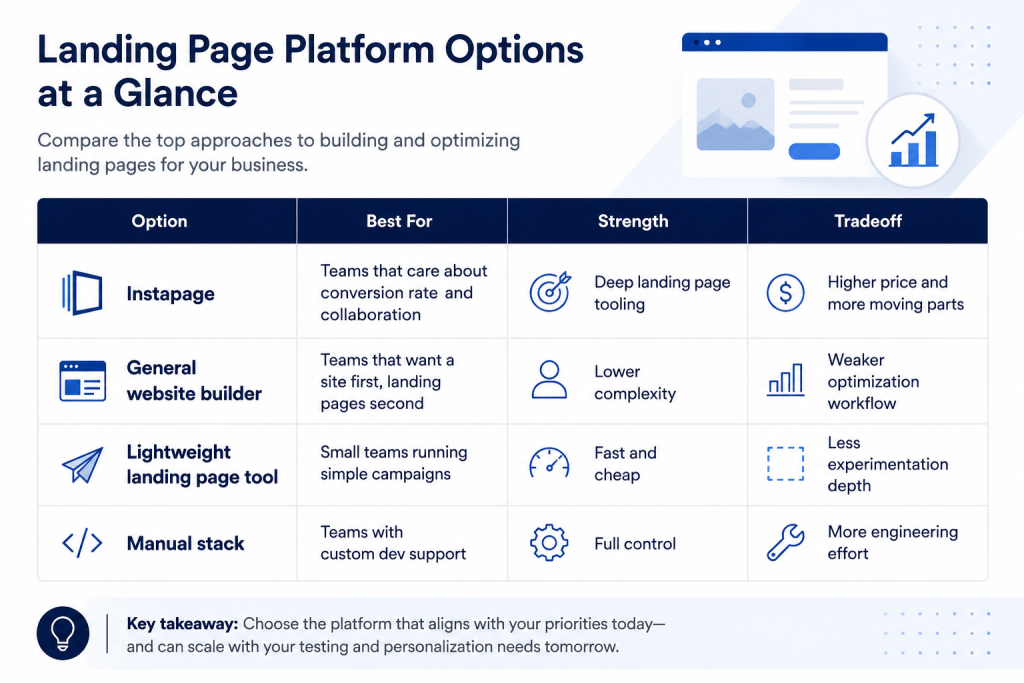
Quick Comparison Table
The question is not whether Instapage is good. It is. The question is whether your page volume and optimization needs justify its depth.
Instapage Deep Dive
Instapage is strongest when landing pages are tied directly to paid acquisition or campaign conversion work.
The official pages highlight:
- Instablocks and reusable page sections.
- Collaboration and approval flows.
- AI content support.
- Popups and sticky bars.
- Global blocks and personalization.
- Programmatic landing pages.
- Server-side A/B testing.
- Heatmaps and experimentation support.
- Direct lead bypass and integrations.
That is the feature set of a team that wants to measure and optimize instead of just publish.
The current pricing ladder is also easy to read:
- Create starts at $99/month, billed annually.
- Optimize starts at $199/month billed annually.
- Convert is custom.
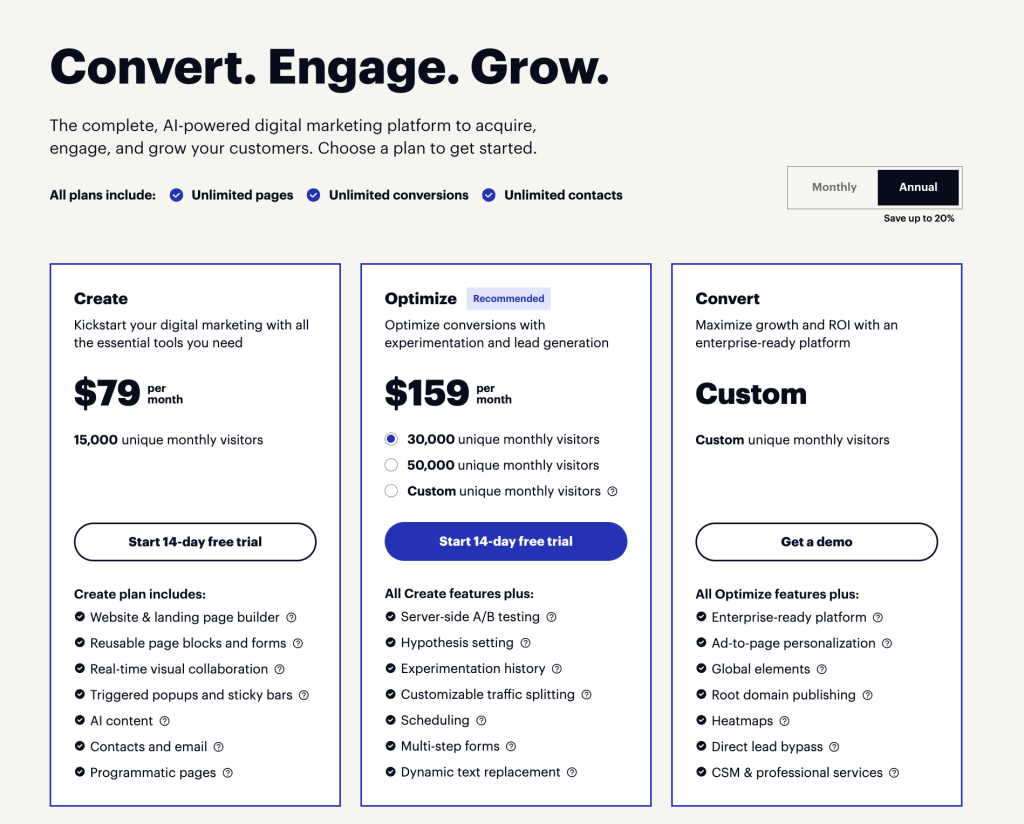
The free trial is 14 days.
If your team wants landing pages that are built for optimization rather than just launch speed, start with Instapage here.
Best Alternative Categories
1. General Website Builders
These are a good fit if you want to get a page online quickly and do not need deep experimentation. The tradeoff is that you may lose some of the conversion-specific workflow that Instapage is built around.
2. Lightweight Landing Page Tools
These are better if you run a smaller number of campaigns and just need a clean page with a form and basic tracking. They are usually simpler and cheaper, but they tend to give you less control over optimization.
3. Manual Custom Stack
If you already have design and engineering support, you can build a very custom system. The tradeoff is maintenance. Every new page becomes a project instead of a repeatable workflow.
4. Full Marketing Suites
These can be useful when landing pages are only one part of a larger acquisition system. The downside is that the landing page experience often becomes one feature among many instead of the center of gravity.
Feature Matrix
What Instapage Does Well
- Collaboration for cross-functional teams.
- Reusable page structure with Instablocks.
- Global blocks for consistency.
- Server-side A/B testing.
- AI-assisted content creation.
- Popups, sticky bars, and personalization.
- Lead routing and direct bypass.
What Simpler Alternatives Do Well
- Faster setup.
- Lower overhead.
- Easier pricing.
- Less training for small teams.
What Simpler Alternatives Usually Miss
- Deep experiment workflows.
- Collaboration controls.
- Strong page governance.
- Server-side testing infrastructure.
Pricing Comparison
The pricing page makes Instapage’s positioning obvious.
Create at $99 per month plan billed annually is the entry point for more serious page production. Optimize at $199 per month, billed annually, is for teams that care more about experiments and optimization. Convert is for larger teams that need custom capabilities and support.
That is not a casual price ladder. It is a signal that the product wants teams who value landing page performance enough to pay for it.
The best way to think about the price is to compare it against campaign value:
- If one page is tied to a paid media budget, optimization may easily justify the cost.
- If you only publish a handful of simple pages each quarter, the subscription may be harder to defend.
That is where alternatives come in. A lighter tool can be a smarter spend if your optimization needs are not heavy.
If you are still deciding whether the extra depth is worth it, start with Instapage here and compare the trial to your current page workflow.
Use Case Recommendations
Instapage is strongest for:
- Paid acquisition teams.
- Marketing teams are running frequent experiments.
- Agencies that manage many client landing pages.
- Teams that need governance and approval workflows.
- Organizations that care about conversions more than generic page publishing.
Alternatives are stronger for:
- Small teams with only occasional pages.
- Businesses that need a simple site builder first.
- Founders who want one less subscription.
The practical rule is easy: if conversion rate is a business KPI and landing pages are central to your campaigns, Instapage is worth a serious look. If landing pages are just a side task, a lighter alternative probably makes more sense.
[IMAGE: Instapage collaboration view with comments and approval workflow]
When To Stick With Instapage
Stick with Instapage if:
- Your team runs paid campaigns regularly.
- You need A/B testing and page-level optimization.
- Collaboration and approvals are part of the workflow.
- You want landing pages as a serious growth lever.
Consider alternatives if:
- You just need simple pages with minimal iteration.
- Your budget is more sensitive than your optimization needs.
- Your team already has a strong web stack and only needs occasional landing pages.
What The Product Feels Like In Use
Instapage feels like a conversion workspace more than a generic page editor.
The reusable blocks reduce repetition. The collaboration tools reduce handoff friction. The experimentation tools make it easier to test a hypothesis instead of just guessing. That is what the platform is really selling: a more disciplined page workflow.
The downside is that discipline can feel heavy if the team does not care about it. If the goal is just to publish a page and move on, a smaller tool will feel easier because it asks less of you.
That is the core difference between Instapage and its lighter alternatives. Instapage assumes you want to optimize. Simpler tools assume you want to ship.
Practical Alternative Map
If you are deciding between categories instead of brands, this is the cleanest breakdown:
- Use Instapage when you need collaboration, experiments, and page governance.
- Use a lighter landing page tool when the page is simple and the campaign volume is low.
- Use a general website builder when page publishing is part of a broader site strategy.
- Use a manual stack only when you have engineering support and very custom requirements.
That map usually solves the buying decision faster than comparing a dozen feature lists.
[IMAGE: Instapage landing page governance and optimization workflow]
First 30 Days
The first month after a switch is when the value becomes visible.
Week one is page migration and template setup. Week two is collaboration and approval flow. Week three is experiment creation. Week four is a review. If the team is using the product well, page creation should feel faster, and test feedback should be easier to interpret.
If the team never gets beyond “publish a page,” the platform is probably underused.
Common Mistakes
The most common mistakes are predictable:
- Buying the tool for one campaign and then underusing it.
- Ignoring collaboration features and treating it like a simple editor.
- Running tests without enough traffic to read the results.
- Comparing it only on price instead of campaign value.
Those mistakes usually lead teams to believe the platform is too expensive, when the real issue is that the workflow was never designed to use the platform properly.
The cleanest test is simple. If your landing pages are expected to support actual revenue or lead volume, the extra tooling has a purpose. If they are just informational pages, you are probably paying for a capability you do not need.
That is the point where a smaller tool usually wins. The right tool is the one that matches the amount of optimization work you actually plan to do.
That is why the trial matters more than the brochure.
The trial is where the real fit shows up.
If the team cannot see a clear path from page to conversion, the higher-end plan is probably not the right buy.
If they can, the extra depth is much easier to justify.
That is why serious teams use the trial to test workflow, not just design.
That small test usually decides the buy.
It is better to learn that before you commit to the budget.
That is the cheapest, most useful lesson in the whole evaluation.
It saves the team from paying for fits they do not need.
That matters now.
Verdict
Instapage is a strong 2026 choice for teams that treat landing pages as performance assets, not just web pages. The feature set is deep, the collaboration story is real, and the optimization tooling is better than what many lighter alternatives offer.
The downside is cost and complexity. If you do not need the deeper workflow, you may be paying for a lot of capability that sits unused.
If your landing pages matter enough to optimize seriously, start with Instapage here. If they do not, a simpler alternative will probably serve you better.
FAQ
Does Instapage offer a trial?
Yes. The pricing page shows a 14-day trial.
What is the starting price?
The Create plan starts at $99 per month, billed annually.
What does Optimize add?
Optimize is the tier for teams that want more experimentation and optimization depth.
Who should skip Instapage?
Teams that only need occasional pages and do not plan to run serious optimization workflows.
What is the biggest advantage over lighter tools?
The experiment and the depth.
When is a simpler alternative better?
When page volume is low and optimization is not a major KPI.
More on Instapage
Hand-picked guides to help you choose the right tool — no fluff.
 IntegrationsInstapage Integrations Guide 2026What it connects to and how well each link holds up.
 TutorialsInstapage Beginner's Guide 2026A clean start-here walkthrough with no jargon.
 Comparisons1Password vs Alternatives 2026The strongest competitors compared side by side.
 PricingairSlate Pricing 2026Real tier prices and what each plan actually includes.