

Quick Verdict
Freshservice is still one of the clearest enterprise-grade IT service management products for teams that want a modern service desk without turning the rollout into a consulting marathon.
The official site in 2026 positions it around proactive ServiceOps, built-in AI, IT service management, IT asset management, and broad integration support. The pricing page also keeps the public commercial ladder visible instead of hiding the whole product behind “contact sales.”
That is a strong combination.
My short verdict is this:
- Strong fit for serious IT teams that want scalable service management.
- Better than lightweight helpdesk tools when operations start getting complex.
- Most compelling when service management, asset visibility, and AI-assisted workflow improvement all matter together.
- Less ideal if your team only needs a tiny ticket inbox and nothing more.
If you want to look at the platform while you read, start with Freshservice here.
Product Facts And Overview
Freshservice’s official homepage frames the product around one big idea: proactive ServiceOps with built-in AI.
That message matters because it shows the platform is not trying to win as a basic inbox. It wants to be the operating layer for IT service delivery.
The main homepage themes include:
- Deliver proactive ServiceOps with built-in AI.
- Put AI to work in every IT workflow.
- Freshservice capabilities.
- Smarter ITAM for modern Service Operations.
- Integrations.
That gives buyers a useful first impression. Freshservice is positioned as a serious IT operations platform, not a glorified ticket board.
The page also references 74,000 plus companies improving their IT service and support, which reinforces that the product is being sold at a meaningful operational scale.
Pros And Cons
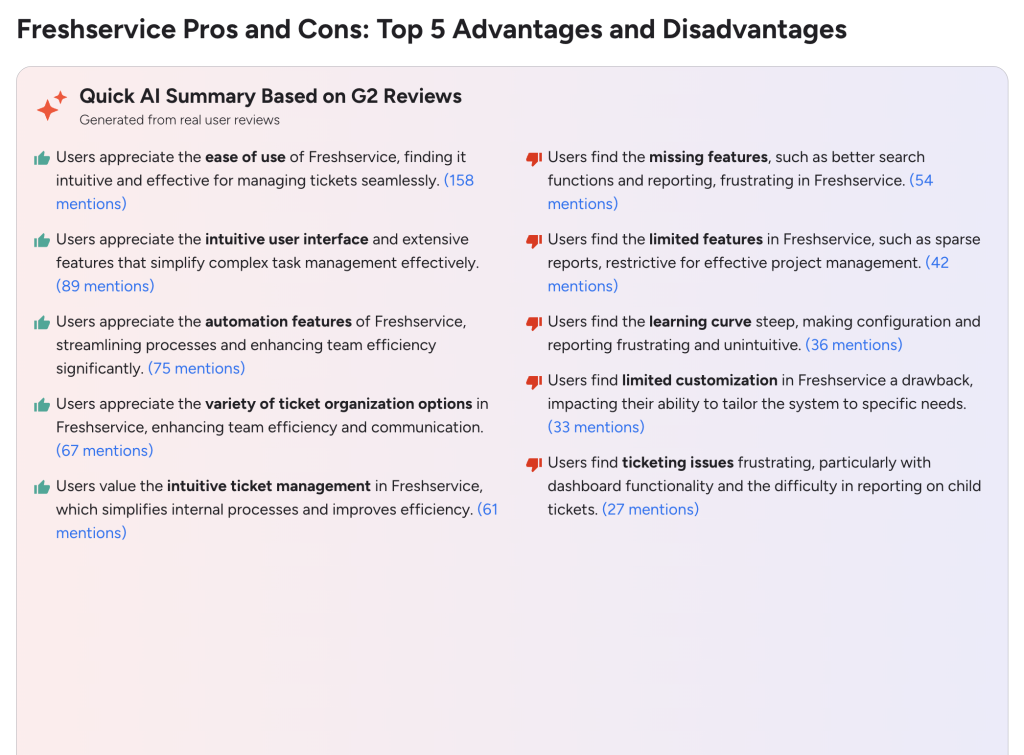
Pros
- Public pricing is visible and structured.
- The homepage clearly emphasizes AI across workflows, not as an afterthought.
- Freshservice combines ITSM and a stronger service-operations language than many lighter tools.
- IT asset management is part of the product story.
- The integration story is prominent, which matters in real IT environments.
Cons
- The product can be more than smaller teams actually need.
- Pricing rises meaningfully as you move from Starter to Growth to Pro.
- Enterprise capabilities and Freddy AI inclusion move the conversation toward bigger-team needs quickly.
- Teams wanting the absolute simplest low-cost helpdesk may find it broader than necessary.
Features Deep Dive
Service Management Core
Freshservice is still strongest when it comes to core service management.
The pricing page makes clear that even the Starter plan is intended for teams starting their first real service desk and moving away from shared inboxes. That alone gives the product a cleaner positioning than tools that pretend every team is already mature.
This is one of Freshservice’s biggest strengths. The platform acknowledges service maturity stages.
Built-In AI Across Workflows
The homepage repeatedly emphasizes AI, and the Enterprise tier on the pricing page explicitly mentions Freddy AI included.
That matters because AI in service management is only useful if it helps with real workflow friction:
- Routing.
- Triage.
- Support quality.
- Operational speed.
Freshservice’s messaging suggests it wants AI to be embedded into the workflow rather than sold only as a novelty badge.
IT Asset Management Relevance
The homepage specifically calls out smarter ITAM for modern Service Operations.
That is an important advantage because service management becomes much more valuable when the asset context is close to the incident, request, or change workflow.
This is one of the reasons Freshservice tends to feel more serious than lightweight support tools. It is trying to connect service operations, not only ticket status.

Integrations
The homepage also gives integrations visible space.
That matters because no real IT team runs in a vacuum. The stronger the integration layer, the easier it becomes to connect service management with communication, identity, endpoints, documentation, and broader operations tooling.
Multi-Stage Capability Growth
Freshservice’s public plans reflect a progression from basic service desk maturity to broader, more strategic operations:
- Starter for teams leaving shared inboxes.
- Growth for foundational IT teams moving toward streamlined service delivery.
- Pro for advancing teams unifying service management across functions.
- Enterprise for mature IT organizations with Freddy AI included and custom commercial structure.
That is a healthy feature ladder because it maps capabilities to organizational maturity instead of pretending every buyer needs the same thing immediately.
Pricing Breakdown
Freshservice’s official pricing page currently shows:
- Starter at $19 per agent per month, billed annually.
- Growth at $49 per agent per month, billed annually.
- Pro at $99 per agent per month, billed annually.
- Enterprise as custom pricing, with Freddy AI included.
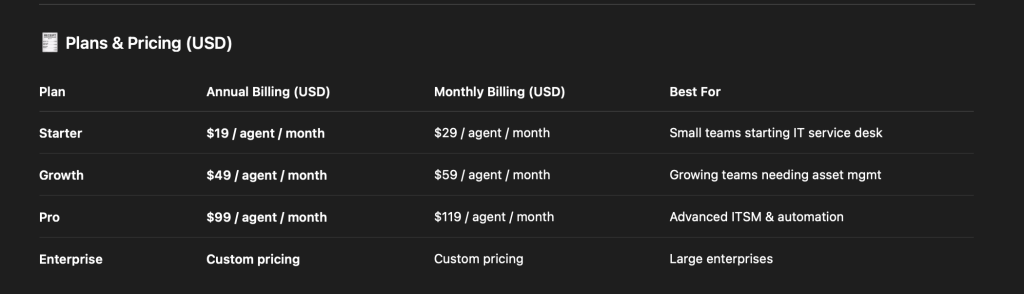
That is a clear public ladder.
The plan descriptions are also useful:
- Starter is for small teams starting their first service desk and moving away from shared inboxes.
- Growth is for IT teams building foundational practices to move from reactive to streamlined service delivery.
- Pro is for advancing teams, breaking silos, and unifying service management across functions.
- Enterprise is for mature IT organizations driving strategic impact with AI and enterprise-wide service excellence.
That is exactly the kind of pricing context buyers want, because it explains not just cost, but intent.
If you want to map that to your own team, start with Freshservice here and compare your current service maturity against the public Starter, Growth, and Pro plan descriptions before jumping straight to features.
Who Should Use Freshservice
Freshservice makes the most sense for:
- IT teams are leaving ad hoc support processes behind.
- Service desks that need a stronger operational structure.
- Organizations that want ITSM and asset management to live closer together.
- Teams that want AI-assisted workflow improvement, not only ticket tracking.
It is especially relevant for companies where IT service quality is becoming strategically visible rather than quietly tolerated.
Who Should Not Use Freshservice
Freshservice is less compelling for:
- Very small teams that only need a simple support inbox.
- Buyers who mainly want the lowest possible price.
- Teams with no real service-management maturity yet and no near-term plan to build it.
That does not make Freshservice overly complex by default. It just means the product shines brightest when the buyer has genuine service operations needs.
Another way to put it is this: Freshservice works best when the organization is ready to care about process quality, not only ticket volume.
If leadership wants better request handling, cleaner service ownership, stronger asset visibility, and more predictable internal support experiences, the product makes much more sense.
If the goal is simply replacing one inbox with another inbox, the value story gets thinner.

Real Cost In Practice
A simple example helps.
Imagine a 10-agent service desk:
- Starter would mean 10 x $19 = $190 per month billed annually.
- Growth would mean 10 x $49 = $490 per month billed annually.
- Pro would mean 10 x $99 = $990 per month billed annually.
That is a meaningful range.
It also makes the buying question much clearer:
- Are you just moving beyond a shared inbox?
- Are you building foundational workflows?
- Are you unifying service management at a broader level?
The stronger the operational need, the easier it becomes to justify the higher tier.
There is also a practical budgeting advantage to Freshservice keeping the public tier ladder visible.
An IT leader can estimate cost quickly, compare it with current support pain, and decide whether the move from Starter to Growth or Pro is justified by better service quality, cleaner internal workflows, and less operational rework.
That transparency will not decide the purchase by itself, but it does make evaluation easier.
What Deployment Actually Looks Like
One reason Freshservice stays compelling is that the official plan descriptions map to a very believable implementation path.
This is not a product that asks every buyer to think like a Fortune 500 company on day one.
A realistic rollout often looks like this:
- Start with ticket intake and service desk basics.
- Clean up routing, ownership, and response handling.
- Build repeatable processes around incidents and requests.
- Add stronger asset context and broader cross-functional service management later.
That is a healthier way to evaluate the product because it keeps the buying question grounded in maturity, not hype.
Freshservice’s public pricing language does a good job of reinforcing that. Starter is for teams leaving shared inboxes. Growth is for teams building foundations. Pro is for unifying service management more broadly. Enterprise is for mature, AI-forward operations.
That is exactly the kind of progression serious IT buyers want to see.
Where Freshservice Can Disappoint
Freshservice is strong, but there are still scenarios where it can feel like the wrong fit.
If your team mainly needs a simple support inbox, a few canned replies, and a basic ticket list, the broader ITSM framing may feel like overkill.
The same is true if leadership wants sophisticated service operations language but is unwilling to invest in process discipline. No ITSM platform fixes weak operating habits by itself.
That is why Freshservice works best when the team is actually ready to improve:
- Ownership.
- Response workflows.
- Service visibility.
- Asset context.
- Cross-team coordination.
If that readiness is there, start with Freshservice here and compare the public plan ladder to the real complexity of your incidents, requests, approvals, and internal handoffs.
That evaluation frame matters because the best Freshservice deployments usually happen when the team is honest about what stage it is in.
Trying to buy for a fantasy future can lead to overspending. Buying only for today’s pain can leave the service desk underpowered in a year.
Freshservice’s maturity-based plan story is useful precisely because it helps teams think more realistically about that balance.
That is one of the clearest signs of a product that understands real IT buying behavior.
It gives teams a more grounded way to evaluate value instead of buying only on buzzwords.
That makes the review conversation much more practical.
It also makes internal stakeholder alignment easier, because IT leaders can explain the purchase in terms of service maturity, workflow quality, and operational outcomes instead of only software features.
That kind of clarity is valuable when finance, leadership, and IT all want different things from the same platform decision.
It turns the buying conversation into a much healthier one.
Verdict And CTA
Freshservice is a strong ITSM product in 2026 because it combines a clear public pricing ladder, serious service-operations positioning, visible AI ambition, IT asset management relevance, and a maturity-based progression that makes practical sense.
The Starter tier is credible for real first-stage service desks. Growth looks like the likely home for many serious teams. Pro is where broader organizational maturity starts to show. Enterprise is clearly designed for more strategic, AI-forward environments.
If your team is trying to move from reactive support into more structured service operations, start with Freshservice here and compare the public plan ladder against the actual complexity of your incidents, requests, assets, and workflows today.

That real comparison is where the product’s value becomes easiest to judge.
If the current shared-inbox or lightweight-helpdesk approach is already slowing your IT team down, start with Freshservice here and test whether the Starter, Growth, or Pro positioning matches the stage your service desk is actually in.
That is usually a much healthier buying approach than chasing AI language in isolation.
FAQ
How much does Freshservice cost in 2026?
The official pricing page currently shows Starter at $19 per agent per month billed annually, Growth at $49, Pro at $99, and Enterprise as custom pricing.
Is Freshservice only for large enterprises?
No. The public plan ladder clearly includes Starter for smaller teams beginning their first service desk journey, not only Enterprise buyers.
What is Freshservice best at?
Freshservice looks strongest when service management, IT asset visibility, AI-assisted workflows, and operational maturity all matter together.
When is Freshservice too much?
It can be too much for very small teams that only need a basic support inbox and do not yet need broader ITSM structure.