

Why This Comparison Matters :
Plesk and cPanel are still two of the most familiar names in hosting control panels in 2026, but they are not identical products wearing different logos.
Their official pricing pages make that obvious.
Plesk frames itself as a complete solution for Linux or Windows with clear editions for administrators, developers, agencies, and hosters. cPanel frames its offer around account-based hosting scale, from Solo through Premier.
That means buyers are not really choosing only a feature list.
They are choosing an operating model.
If you want to look at Plesk while you read, start with Plesk here.

Quick Comparison Table :
- Plesk: Better for Linux or Windows flexibility, domain-based growth, and multi-infrastructure operations.
- The cPanel option is better for the classic Linux hosting workflow centered on account counts and WHM-style management.
- Plesk visible pricing: Web Admin at $15.49 per month, Web Pro at $26.99 per month, Web Host at $49.99 per month for VPS and $66.99 per month for dedicated.
- The cPanel pricing ladder shows Solo at $29.99, Admin at $35.99, Pro at $53.99, and Premier at $69.99 with extra accounts at $0.49 each.
- Best for agencies and developers: Often Plesk.
- Best for traditional Linux hosting providers: Often cPanel.
Plesk Deep Dive :
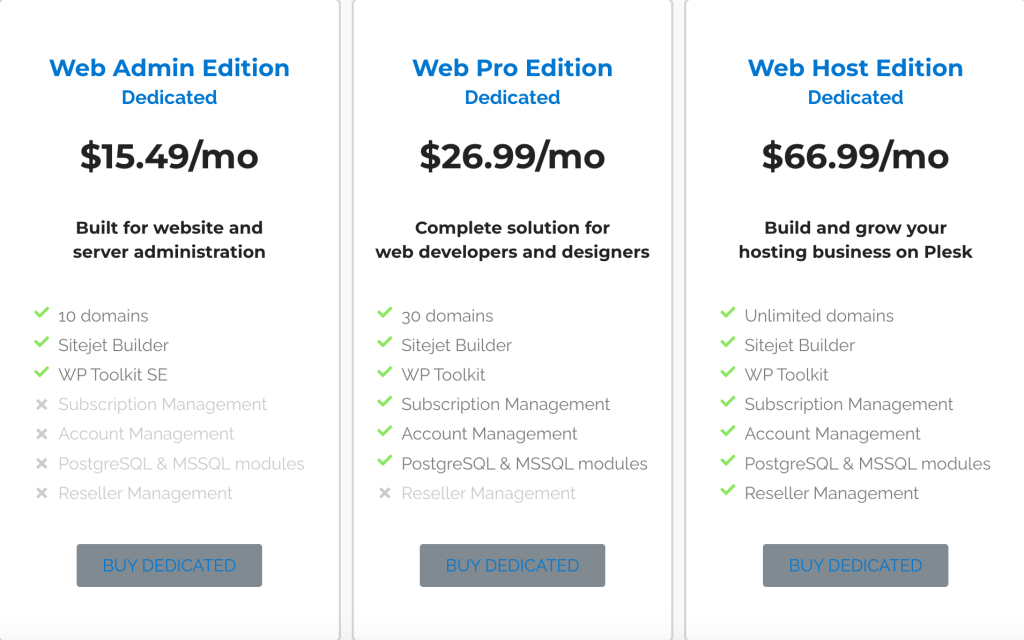
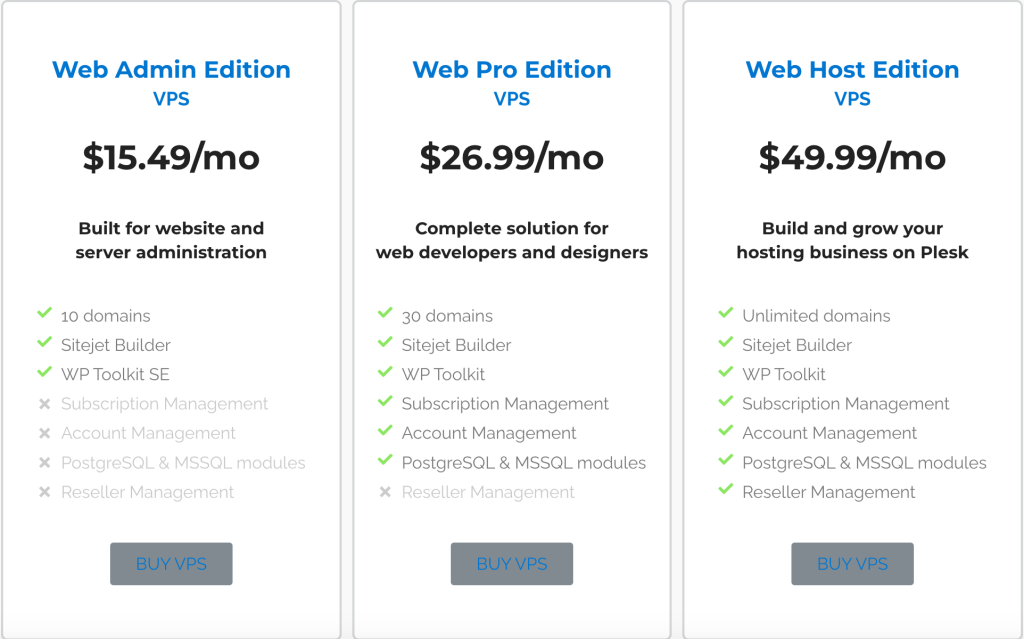
Plesk’s public license page is one of the cleaner examples of hosting pricing because it tells buyers exactly what each edition is supposed to do.
The page currently shows:
- Web Admin Edition at $15.49 per month.
- Web Pro Edition at $26.99 per month.
- Web Host Edition at $49.99 per month for VPS.
- Web Host Edition at $66.99 per month for dedicated.
The visible positioning also stays practical:
- Web Admin is built for website and server administration.
- Web Pro is positioned as a complete solution for web developers and designers.
- Web Host is built to grow a hosting business.
The domain allowances are also easy to understand:
- 10 domains on Web Admin.
- 30 domains on Web Pro.
- Unlimited domains on Web Host.
That is a straightforward ladder, which matters because hosting buyers usually want clarity more than clever packaging.
Plesk also pushes two other important ideas on the page:
- It works with Linux or Windows.
- It is certified to hyperscale into the cloud.
That second point is reinforced visually through references to AWS, Microsoft Azure, Alibaba Cloud, Google Cloud, Vultr, DigitalOcean, Linode, UpCloud, Oracle, and OVH across the broader page.
So Plesk is clearly pitching itself as a flexible panel that can travel across multiple environments without forcing one narrow deployment story.
cPanel Deep Dive :
cPanel’s public pricing page is just as readable, but it wants buyers to think in accounts rather than domains.
The visible tiers are:
- Solo at $29.99 per month for 1 account.
- Admin at $35.99 per month for up to 5 accounts.
- Pro at $53.99 per month for up to 30 accounts.
- Premier at $69.99 per month for up to 100 accounts.
The page also states that Premier adds:
- Additional accounts at $0.49 each.
That makes cPanel’s commercial model very direct for hosting providers. If you understand your account growth, you can forecast the license path quickly.
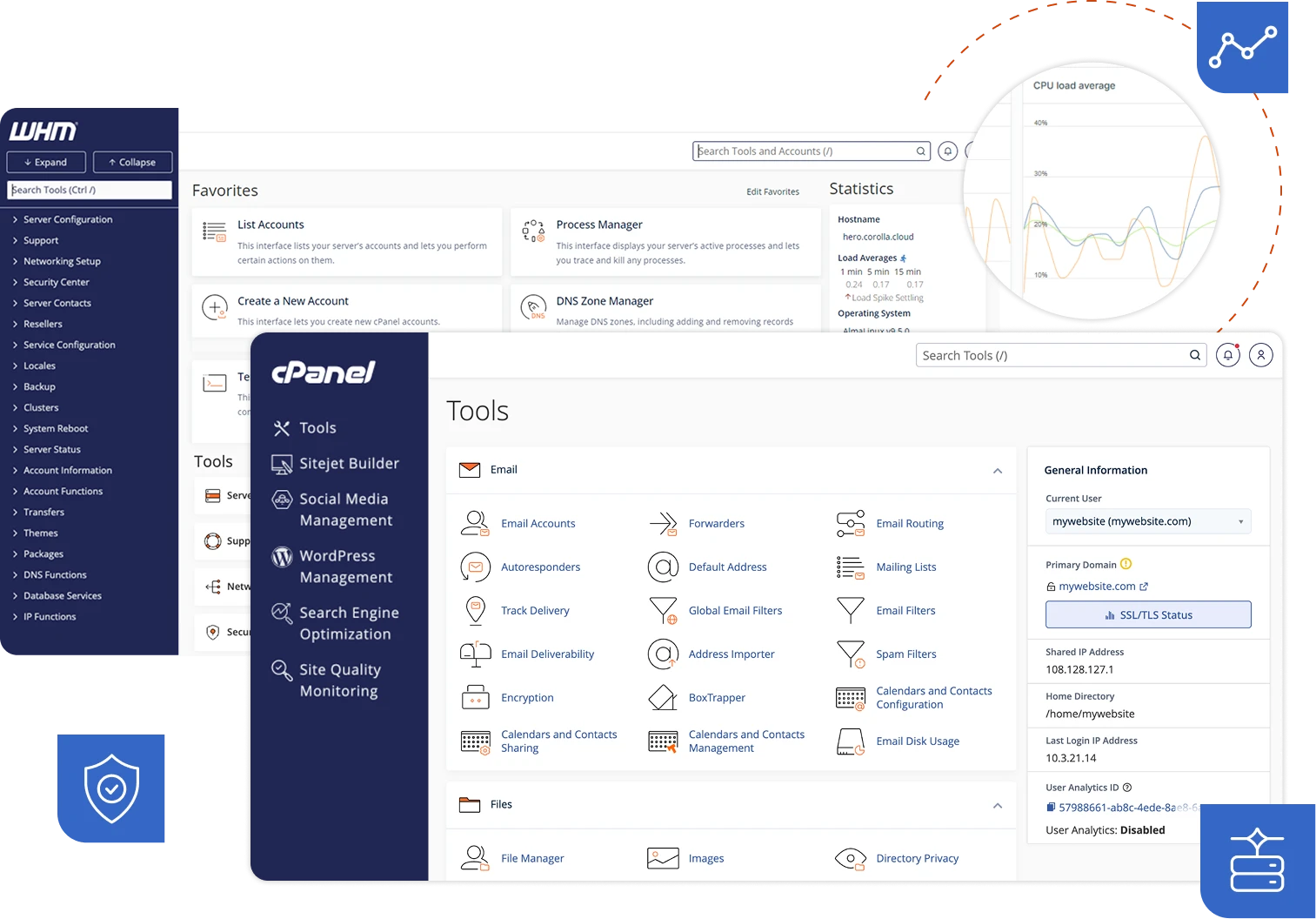
The official page also highlights features such as:
- Unlimited websites.
- WP Toolkit.
- Website builder.
- Website monitoring.
- Email accounts.
- SSL certificates.
- Self-guided migration.
- Custom branding.
That means cPanel is trying to present more than a bare control panel. It wants to be understood as a hosting operations environment.
Product A Strengths: Where Plesk Looks Better :
Plesk looks stronger when the buyer cares about operational flexibility.
Three strengths stand out from the official page:
1. Linux And Windows Support
This is the cleanest differentiator in the whole comparison.
Many buyers do not need Windows support at all. But the ones who do usually care a lot. Plesk makes that flexibility part of the visible commercial story instead of hiding it in documentation.
2. Domain-Based Edition Logic
Plesk’s 10-domain, 30-domain, and unlimited-domain ladder is intuitive for agencies, developers, and businesses managing projects rather than purely customer-account counts.
3. Broader Infrastructure Positioning
Plesk’s emphasis on hyperscalers and cloud compatibility gives it a more modern WebOps feel. It looks like a platform meant to sit across different infrastructure choices, not only one traditional hosting lane.
That matters if your team expects the stack to evolve.
Product B Strengths: Where cPanel Looks Better :
cPanel still has several obvious strengths too.
1. Familiar Account-Based Hosting Model
If you already think in hosting accounts, WHM, and reseller-style growth, cPanel’s pricing ladder is extremely easy to understand.
2. Straightforward Scale Path
Solo, Admin, Pro, and Premier make it simple to estimate what happens as customer count rises.
3. Hosting-Centric Tooling
The public page still leans heavily into practical hosting operations with migration support, monitoring, website builder access, email accounts, and SSL management. That keeps the offer grounded in day-to-day hosting administration.
For a lot of Linux-focused providers, that is not boring. It is exactly what they want.
It also reflects a very mature buyer assumption. cPanel is not trying to convince the market that hosting accounts are the wrong way to think. It is meeting hosting businesses where they already operate.
Feature Matrix :
The most useful side-by-side read is this:
- Plesk is edition-centric. cPanel is account-centric.
- Plesk supports Linux and Windows. cPanel’s public offer is built around the Linux hosting ecosystem.
- Plesk talks more like a cross-infrastructure WebOps platform. cPanel talks more like a mature hosting operations platform.
- Plesk’s public plans map well to agencies, developers, IT admins, and hosters. cPanel’s public plans map well to hosting businesses tracking account growth precisely.
That is why comparing them only as “control panels” can be misleading.
They are close in category, but not identical in worldview.
That difference becomes even more important once billing, support expectations, and customer packaging enter the conversation. A panel can look equal in screenshots and still feel completely different once you are actually selling hosting around it.
Pricing Comparison :
Plesk wins the low-end entry comparison on the visible page.
Its first public tier is $15.49 per month, which is materially lower than cPanel Solo at $29.99 per month.
But that does not automatically make Plesk cheaper for every real use case.
The buyer should compare:
- Domain count versus account count.
- VPS versus dedicated requirements.
- Windows needs versus Linux-only comfort.
- Agency or project management workflow versus customer-account hosting workflow.
For example:
- A developer managing a finite set of domains may find Plesk’s edition logic cleaner and more economical.
- A host with a predictable customer-account model may find cPanel’s ladder easier to map into margins and growth planning.
If you want to compare that with your own stack, start with Plesk here and measure the live public tiers against your domain count, server type, and operational model.
That exercise is especially valuable for agencies and smaller hosts that are tempted to compare only the headline entry prices. The cheaper first number is not always the cheaper real operating fit.
Use Case Recommendations :
Choose Plesk if:
- You want Linux or Windows flexibility.
- You are an agency or developer managing domain portfolios.
- You value cloud and hyperscaler compatibility.
- You want a control panel that feels broader than a traditional shared-hosting mindset.
Choose cPanel if:
- You already run Linux hosting operations.
- You think naturally in accounts, resellers, and hosting scale.
- You want a familiar operational model for customer growth.
- You value a clear ladder from 1 account to 100 plus overage expansion.
Another practical lens is staffing. Teams that already know cPanel and WHM deeply may not gain enough from switching unless they have a clear infrastructure or platform reason to do so.
That is not an emotional point. It is an operational one. Familiar tooling can still be the right tooling when training, support, and migration risk are factored into the decision.
Verdict :
Plesk vs cPanel in 2026 is less about who “wins” in the abstract and more about which model fits your real work.
Plesk looks stronger for teams that want Linux or Windows support, cloud flexibility, and edition logic based on administrative or project scope.
cPanel looks stronger for teams that want a traditional, account-based hosting path with highly legible scale points.
That is a healthier way to make the decision, because these platforms are not bought for entertainment. They are bought to keep websites, customers, and infrastructure manageable.
If Plesk’s operating model sounds closer to the way your team actually works, start with Plesk here and compare the current edition ladder with your domain load, operating system needs, and infrastructure plans.
That practical test is usually much more useful than arguing over brand familiarity.
If you want to sanity-check it in real terms, start with Plesk here and compare one live customer or project portfolio against the current edition table instead of debating the products only in abstract.
That is also the cleanest way to avoid buying the panel that seems more popular rather than the panel that actually fits your support load, customer structure, and infrastructure reality.
It is a more useful buying habit in general. Control panels become painful when they are chosen by reputation and not by the shape of the business they are supposed to support every day.
That is exactly why this comparison matters. A control panel is not a badge purchase. It is a workflow decision that shapes support, migration, packaging, and day-to-day administration for years.
The better panel is usually the one your team can run confidently, price cleanly, and support consistently.
That practical confidence is what usually saves the most time later.
It is also easier to scale.
FAQ :
Is Plesk cheaper than cPanel?
At the visible entry level, yes. Plesk starts at $15.49 per month, while cPanel starts at $29.99 per month, but the licensing models differ enough that the real cost depends on how you host.
What is the biggest difference between Plesk and cPanel?
The biggest difference is operational model. Plesk is edition-and-domain oriented with Linux or Windows support, while cPanel is account-and-hosting oriented.
Is Plesk better for agencies?
Often yes, because its Web Pro Edition and broader infrastructure story map well to agencies and developers handling multiple sites and environments.
When is cPanel the better choice?
cPanel is often the better choice for Linux-first hosting businesses that want pricing and scaling tied directly to account counts.