

Why Carepatron’s Features Matter
Carepatron is interesting in 2026 because its official site does not pitch one isolated clinical tool. It pitches a practice management system that tries to connect booking, documentation, payments, client communication, and compliance in one place.
That is a better feature story than a software company saying, “We also do scheduling.”
The homepage message is very clear:
- From first booking to final payment, all in one place.
- Software that works behind the scenes.
- Compliance you can trust.
- Eight hours saved per week, more care delivered.
That is the kind of positioning healthcare practices pay attention to, because time leakage and admin drag are usually bigger operational problems than any single flashy feature.
If you want to look at the platform while you read, start with Carepatron here.
Feature #1: End-To-End Practice Workflow
This is the biggest reason Carepatron stands out.
The homepage explicitly frames the product as handling the journey from the first booking to the final payment. That matters because healthcare practices do not usually suffer from one missing tool. They suffer from disconnected workflows:
- Booking in one place.
- Notes in another.
- Payments somewhere else.
- Client communication is scattered everywhere.
Carepatron’s strongest feature is really the attempt to reduce that fragmentation.
When software helps move a client from intake through care delivery and then through payment without constant platform switching, the operational value becomes much easier to feel.
Feature #2: AI Scribe And Note Support
The official pricing page makes this much more concrete by surfacing:
- AI scribe and note taker on the Free plan.
- AI token allocations that expand significantly on paid plans.
That is not a throwaway add-on. Documentation is a constant source of time pressure in care settings.
An AI-assisted note workflow matters because it can help reduce the repetitive part of record keeping without removing clinical oversight from the process.
That makes it one of Carepatron’s most practical features for real practitioners, not just administrators.
If documentation speed is one of your biggest bottlenecks, start with Carepatron here and compare the note-taking workflow against your current system before judging the platform only on generic practice-management labels.
Feature #3: Telehealth And Client Access
Carepatron also deserves credit for making telehealth and client-facing access part of the visible offer.
The public pricing details currently show:
- Telehealth on the Free plan.
- Group telehealth on Plus.
- Client portal access.
- Automated online payments.
That is a strong combination for practices that need care delivery and client administration to live closer together.
The telehealth layer matters because it turns the platform into more than a static admin tool. It becomes part of the care delivery environment itself.
The client portal matters because it reduces back-and-forth friction and gives patients or clients a more modern service experience.
Feature #4: Advanced Workflow Controls For Growing Practices
One of Carepatron’s best features is that the public plan ladder shows a realistic growth path.
On the official pricing page:
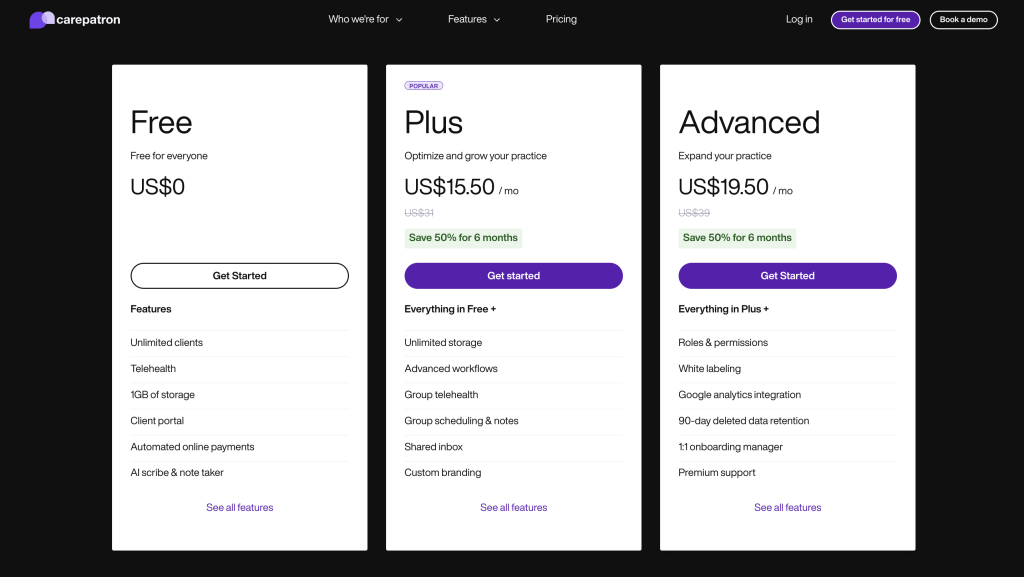
- Free gives unlimited clients, telehealth, 1GB of storage, client portal, payments, and AI note support.
- Plus adds unlimited storage, advanced workflows, group telehealth, group scheduling and notes, shared inbox, and custom branding.
- Advanced adds roles and permissions, white labeling, Google Analytics integration, 90-day deleted data retention, a 1:1 onboarding manager, and premium support.
That is a very clear feature progression.
It tells you exactly how the product matures as the practice grows:
- First: get the basics working.
- Then: improve collaboration and workflows.
- Then: add control, branding, governance, and support depth.
That kind of visible feature ladder is underrated.
Feature #5: Compliance And Trust Positioning
Carepatron’s homepage also leans into compliance you can trust.
In healthcare software, that is not decorative language.
Compliance matters because care teams are not only buying convenience. They are buying operational credibility around sensitive workflows, records, and communication.
A platform that treats compliance as part of the core value story usually understands the buying reality better than a vendor that only talks about productivity.
That does not remove the need for each practice to do its own due diligence, but it does make compliance a visible part of the product identity.
Feature #6: Shared Inbox, Branding, And Team Control
One thing I like about Carepatron’s public pricing page is that it does not pretend every practice stays in solo-practitioner mode forever.
The Plus and Advanced tiers explicitly move the product toward team operations with:
- Shared inbox.
- Custom branding.
- Roles and permissions.
- White labeling.
- A 1:1 onboarding manager on Advanced.
That matters because operational pain changes once a practice grows.
At that stage, the issue is not only “Can the platform handle notes and scheduling?”
It becomes:
- Can multiple team members work inside the same communication flow?
- Can leadership control who sees what?
- Can the client experience feel branded and organized?
- Can onboarding new staff happen without chaos?
That is where Carepatron starts looking less like a simple scheduling tool and more like infrastructure for a growing clinic or wellness business.
Pricing Context
Carepatron’s pricing page is quite readable in 2026.
The public plans currently show:
- Free at $0.
- Plus, at $15.50 per month on the visible discounted view, with $31 shown as the standard monthly figure.
- Advanced at $19.50 per month on the visible discounted view, with $39 shown as the standard monthly figure.
The page also promotes:
- A 14-day free trial.
- Monthly or yearly billing.
- A limited offer showing 50% off for 6 months.
That means Carepatron is trying to make adoption easy for smaller practices while still leaving a credible path for larger operational needs.
If you want to compare the feature ladder to your actual workflow, start with Carepatron here and map the Free, Plus, and Advanced tiers to your documentation load, telehealth needs, and team structure.
Who Gets The Most Value From These Features
Carepatron’s strongest feature mix makes the most sense for teams that are tired of juggling too many disconnected systems.
That usually includes:
- Solo practitioners who want one platform instead of five smaller tools.
- Small clinics trying to reduce admin drag around notes, scheduling, and payments.
- Hybrid or virtual-first practices that care about telehealth and portal access.
- Growing teams that now need permissions, branding, and shared workflow visibility.
That is the useful thing about the product’s public positioning. It is not only selling abstract efficiency. It is selling a cleaner operating model for care delivery.
If that is the pain your team feels every week, start with Carepatron here and test one real workflow from intake to payment instead of judging the product only on a feature checklist.
What Makes Carepatron Feel Different
A lot of healthcare tools do one piece well.
Carepatron’s public story is stronger because it tries to connect:
- Scheduling.
- Notes.
- Client portal access.
- Telehealth.
- Payments.
- Branding and permissions for larger teams.
That makes it feel more like operating software than a single-function widget.
For small and mid-sized practices, that can be a major advantage because fewer disconnected systems usually means less admin drag and easier staff onboarding.
Verdict
Carepatron’s best features in 2026 are the ones that reduce fragmentation across the care and admin workflow.
The strongest ones are the end-to-end booking-to-payment flow, AI scribe support, telehealth and client access, the visible growth path from Free to Advanced, and the clear compliance positioning.
If your practice is trying to simplify the operational side of care delivery without losing functionality, start with Carepatron here and compare the current plan ladder with the real way your team handles intake, notes, telehealth, and payments today.
That kind of real workflow comparison usually tells you more than any generic feature list ever will.
FAQ
What is Carepatron’s best feature in 2026?
For many practices, the best feature is the attempt to connect the workflow from booking through documentation to payment in one platform.
Does Carepatron have a free plan?
Yes. The official pricing page currently shows a Free plan at $0 with unlimited clients, telehealth, client portal access, payments, and AI support limits.
How much does Carepatron cost?
The official pricing page currently shows Free at $0, Plus at $15.50 per month on the visible discounted view with $31 shown as the standard monthly figure, and Advanced at $19.50 per month with $39 shown as the standard monthly figure.
Who should care most about Carepatron’s advanced features?
Growing practices that need shared inboxes, group telehealth, roles and permissions, white labeling, and stronger workflow control will care most about the upper tiers.