

When To Consider Alternatives :
Jibble is a strong product in 2026 if you want time tracking that starts free, scales simply, and stays focused on attendance, timesheets, and workforce visibility instead of trying to become an everything platform overnight.
The official pricing page and help center make that value proposition pretty clear:
- Free forever plan for unlimited users.
- Premium plan for more advanced controls.
- Ultimate plan for larger organizations needing deeper permissions and management layers.
- Enterprise for custom needs.
That is a good foundation. Still, not every team wants the same time-tracking workflow.
You may want alternatives if:
- You need heavier project accounting.
- You want deeper payroll alignment.
- You prefer a more freelancer-friendly interface.
- You need GPS and workforce management depth.
- You want a different balance between free access and advanced admin controls.
If you want to compare Jibble itself while you read, start with Jibble here.
Alternative 1: Clockify
Clockify is one of the most natural Jibble alternatives because it is also well known for a generous free entry point and broad time-tracking appeal.
Why it is relevant:
- Familiar time tracking workflow.
- Strong freelancer and team appeal.
- Useful for projects, billable hours, and reporting.
- Easy to understand for buyers moving off spreadsheets.
Compared with Jibble, Clockify often appeals more to project-time users. Jibble tends to feel stronger when attendance, shifts, and workforce controls are part of the core use case.
That difference matters because a team tracking shifts behaves very differently from a team tracking consulting hours.
The closer the product matches the operating reality, the less time the team wastes bending the software into shape.
Alternative 2: Toggl Track
Toggl Track remains a strong alternative for teams that care about ease of use and lighter, cleaner time logging.
Why buyers consider it:
- Very approachable experience.
- Good fit for agencies, consultants, and independent professionals.
- Strong focus on productivity and time visibility.
Compared with Jibble, Toggl Track can feel more individual- and project-productivity oriented. Jibble often feels more operational for team attendance and structured work-hour governance.
That makes Toggl Track especially attractive to teams that want a lighter daily experience and less operational oversight built into the product.
Alternative 3: QuickBooks Time
QuickBooks Time is a very relevant alternative when payroll alignment, scheduling, and broader SMB admin workflows matter.
Why it matters:
- Strong small-business familiarity.
- Useful for field teams and payroll-connected time tracking.
- Better fit for organizations already working around accounting workflows.
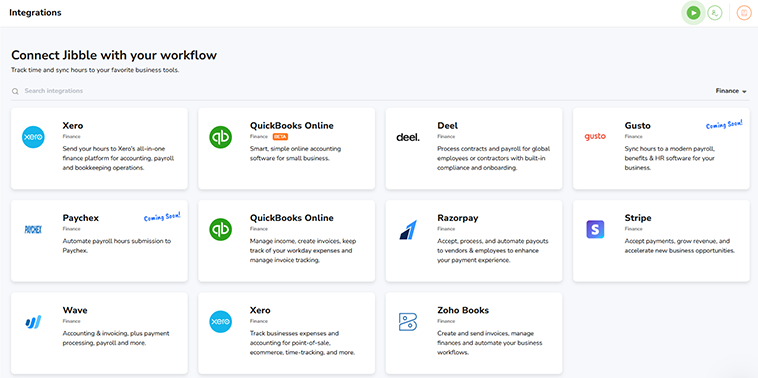
Compared with Jibble, QuickBooks Time often becomes more appealing when time tracking is tightly tied to payroll and business operations rather than just timesheets and attendance visibility.
It is a good reminder that time tracking is not one category. For some businesses it is about payroll hygiene. For others it is about project time, compliance, or workforce supervision.
Alternative 4: Hubstaff
Hubstaff is another meaningful alternative, especially for remote teams and businesses that want stronger productivity oversight, workforce tracking, and activity visibility.
Why buyers look at it:
- Strong remote-team relevance.
- GPS, productivity, and workforce-management appeal.
- Useful for field or distributed operations.
That makes Hubstaff more attractive when management visibility is the main requirement. Jibble often feels simpler and more straightforward when the goal is clean time and attendance control.
That is a meaningful tradeoff. More oversight can be useful, but it can also make a product heavier than some teams want.
That is why the right alternative often depends on management style as much as feature count.
Some businesses genuinely need that heavier oversight. Others just need accurate time records without creating a culture problem around surveillance.
That is one reason why alternative selection can be surprisingly emotional for teams, not just technical.
Alternative 5: Harvest
Harvest belongs in the conversation because it is still a respected option for teams focused on billable time, invoicing, and project-based work.
Why it is relevant:
- Good fit for agencies and service businesses.
- Better alignment with billable-hour workflows.
- Useful for teams that care about time-to-invoice flow.
Compared with Jibble, Harvest tends to win when financial project tracking matters more than workforce attendance structure.
That makes Harvest especially useful for agencies and service teams that think about time primarily through revenue and invoicing.
Comparison Matrix :
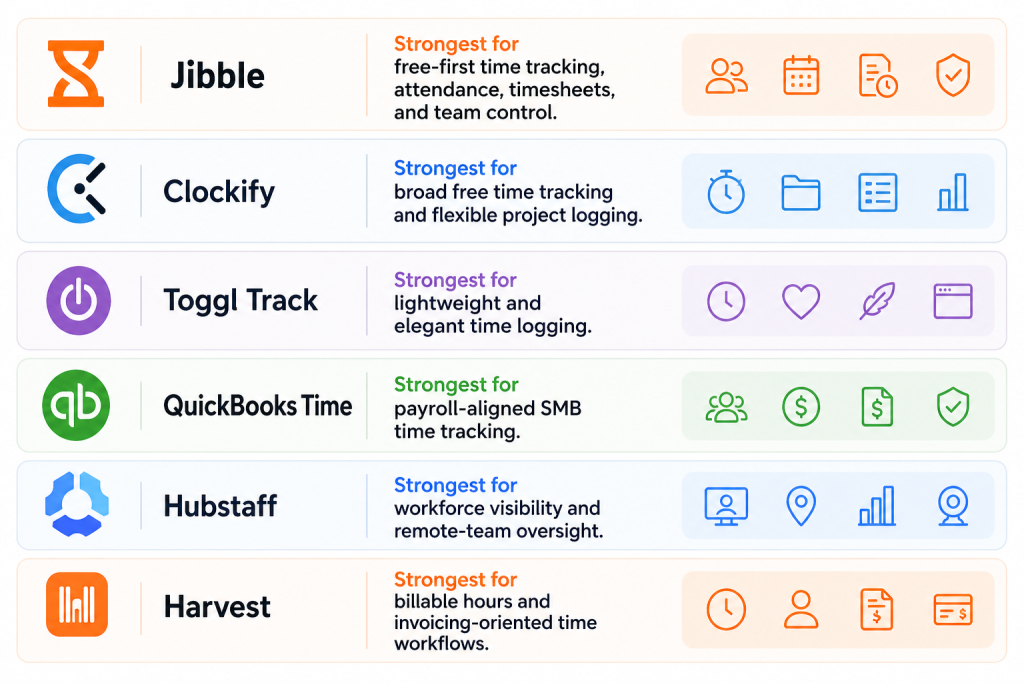
Here is the simple practical read:
- Jibble: strongest for free-first time tracking, attendance, timesheets, and team control.
- Clockify: strongest for broad free time tracking and flexible project logging.
- Toggl Track: strongest for lightweight and elegant time logging.
- QuickBooks Time: strongest for payroll-aligned SMB time tracking.
- Hubstaff: strongest for workforce visibility and remote-team oversight.
- Harvest: strongest for billable hours and invoicing-oriented time workflows.
That does not create one universal winner. It creates six different operating styles.
That is why alternatives research matters here. Time trackers can look interchangeable until you compare:
- Attendance control.
- Project accounting.
- Payroll alignment.
- Workforce oversight.
- Simplicity versus admin depth.
Those differences become expensive quickly if the wrong team buys the wrong category.
For example, a business that really needs attendance control may overpay for project-billing features it barely uses. A consulting firm may do the opposite and outgrow a pure attendance-first tool quickly.
Pricing Context :
Jibble’s official pricing page and help materials make the commercial story fairly clear:
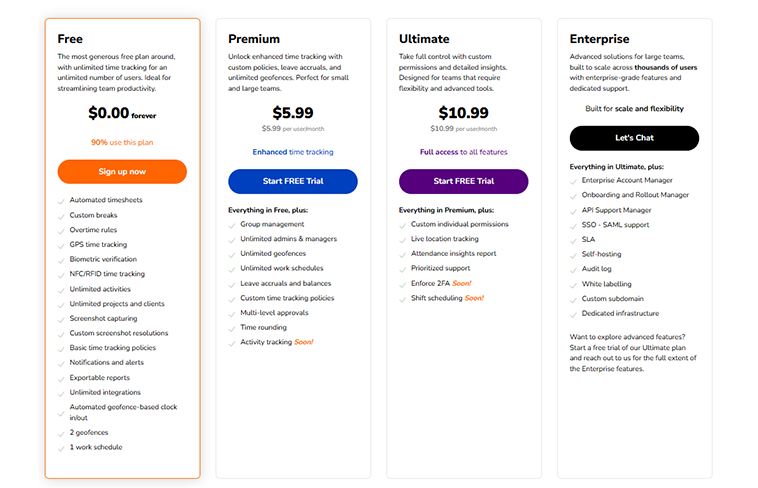
- Free plan: $0 and positioned as free forever for unlimited users.
- Premium: public pricing surfaces at $5.99 per user per month on monthly billing, or $4.49 per user per month on annual billing in the standard USD plan.
- Ultimate: public pricing surfaces at $10.99 per user per month on monthly billing, or $7.99 per user per month on annual billing in the standard USD plan.
- Enterprise: custom pricing.
That is a useful setup because it keeps the upgrade ladder understandable.
The help center also clarifies the role of each tier:
- Free for core time tracking and timesheets.
- Premium for more departments and stronger location restrictions.
- Ultimate for larger organizations needing unlimited layers of management, permissions, and locations.
That means Jibble’s pricing is not just about paying for “more features.” It is about paying for more organizational control.
That is a healthy pricing story because it matches how companies actually mature. Small teams usually start with basic tracking. Growing teams start needing structure, permissions, and visibility.
It also means Jibble’s upgrade pitch is easier to justify internally. Managers can explain exactly what extra control the paid plans are buying.
If your team wants to test that value directly, start with Jibble here and compare the free plan against the admin, attendance, and reporting needs your business actually has.
When To Stick With Jibble :
Jibble remains especially compelling if you want:
- Free forever access for unlimited users.
- Strong attendance and timesheet basics.
- Clean team tracking without huge setup friction.
- Straightforward upgrade logic into Premium and Ultimate.
- A product that feels operational, not overly bloated.
Another reason to stay is clarity. Jibble’s value is easy to understand. Some alternatives stretch into billing, accounting, remote monitoring, or larger workforce management categories. Jibble stays more focused.
That focus is a strength for plenty of teams.
Not every company needs time tracking to become a giant workforce-analytics project. Some teams just need a reliable system people will actually use.
That is one of Jibble’s biggest strengths. The product is easy to explain, easy to start, and still offers a clear path upward if the team grows.
If that sounds like your situation, start with Jibble here and test it against one real scheduling, attendance, or timesheet workflow before chasing a more complicated alternative.
It is also where the free plan becomes strategically useful. Teams can validate adoption before committing to deeper paid controls, which is a smart way to reduce rollout risk.
That can be a major advantage for organizations replacing informal timesheets or manual attendance habits.
It gives the rollout a safer on-ramp.
It also gives leadership room to evaluate behavior before buying complexity. If managers and staff are not consistently using the basic workflows, jumping into a heavier alternative usually creates more admin noise than real improvement.
Verdict :
The best Jibble alternatives in 2026 depend on what kind of time-tracking problem you are solving.
Clockify is attractive for broad free tracking. Toggl Track is attractive for clean usability. QuickBooks Time is attractive for payroll-connected SMB workflows. Hubstaff is attractive for workforce visibility. Harvest is attractive for billable-hour and invoice-focused operations.
Jibble itself stays attractive when you want a strong free plan, clean attendance control, and a direct upgrade path into more advanced admin features.
That is why the smart buying question is not “which time tracker has the longest feature page?” It is “which one matches the way my team records, manages, and acts on time?”
If Jibble still looks close to that answer, start with Jibble here and compare it against one live payroll cycle, one attendance flow, or one manager approval process.
That kind of real workflow comparison usually beats any generic software ranking.
It also helps separate “nice to have” features from the ones your managers and staff will rely on every week.
That distinction is what usually determines whether a time tracker becomes habit or friction.
That is exactly why workflow fit matters more than brand popularity.
The best alternative is usually the one that feels natural after the first week, not the one with the loudest feature page.
FAQ :
What are the best Jibble alternatives in 2026?
Strong alternatives include Clockify, Toggl Track, QuickBooks Time, Hubstaff, and Harvest, depending on whether you prioritize free access, simplicity, payroll alignment, workforce oversight, or billable-time workflows.
Is Jibble really free?
Yes. Jibble’s official pricing page positions the Free plan as free forever for unlimited users.
How much does Jibble Premium cost?
The official pricing materials surface Premium at $5.99 per user per month on monthly billing, or $4.49 per user per month on annual billing in the standard USD plan.
When should you choose Jibble instead of an alternative?
Choose Jibble when attendance, timesheets, and clean team tracking matter more than deeper accounting, invoicing, or heavy workforce-monitoring workflows.