

When To Consider Alternatives :
Getscreen.me is a strong product in 2026 if you want browser-based remote access with flexible business pricing, permanent access, and one-time support options. The official site leans into that browser-first convenience pretty hard, and that is a real selling point.
So why look at alternatives?
Usually for one of these reasons:
- You need a different pricing shape.
- You want a more familiar enterprise brand.
- You need a different balance of remote support versus permanent access.
- You prefer a simpler personal-use tool.
That means the best Getscreen.me alternatives are not automatically “better.” They are products that solve a slightly different remote-access problem.
If you want to compare Getscreen.me itself while you read, start with Getscreen here.
Alternative 1: TeamViewer
TeamViewer remains one of the most obvious alternatives because it is still one of the best-known remote-access brands in the world. Its official site focuses on remote connectivity for support, device access, and enterprise-scale remote operations.
Why it is relevant:
- Strong enterprise recognition.
- Remote support familiarity.
- Broad device coverage.
- Mature brand for IT and business teams.
The tradeoff is that TeamViewer often feels heavier and more enterprise-shaped than Getscreen.me. That is not bad. It is just a different fit.
That difference matters for small teams. If your company wants strong enterprise familiarity for procurement or IT leadership comfort, TeamViewer can still make sense. If you mostly want quick browser-based access without extra operational weight, Getscreen.me may feel faster to live with day to day.
Alternative 2: AnyDesk
AnyDesk is another very relevant alternative. Its official site emphasizes remote access, performance, lightweight usage, and support workflows across different devices.
Why buyers consider it:
- Fast remote connectivity.
- Leaner product feel.
- Broad platform support.
- Familiar option for technical support and admin use.
Compared with Getscreen.me, AnyDesk may appeal more to users who want a very established remote-desktop pattern rather than a browser-first access model.
That makes AnyDesk appealing for technicians who already know exactly how they like to work. It makes Getscreen.me more appealing for teams that want to reduce setup friction for both admins and occasional support users.
Alternative 3: Chrome Remote Desktop
Chrome Remote Desktop is still a meaningful alternative because it is simple, familiar, and free for many personal or lightweight use cases. Google’s official product positioning keeps it very straightforward.
It is most relevant when:
- Budget is the main concern.
- The use case is personal or very lightweight.
- You do not need a broader business control layer.
It is not the best fit for every professional workflow, but it is absolutely part of the alternatives conversation because “free and simple” is a real category.
It is a useful benchmark because it reminds buyers that “free” is only a win when the workflow remains simple. Once auditability, permissions, or repeatable support processes matter, free tools can become surprisingly expensive in staff time.
If you want to compare that simplicity against a more business-ready remote workflow, start with Getscreen here and look at what you actually need from team access and support.
Alternative 4: Splashtop
Splashtop is a very practical alternative because its official pricing pages are easier to reason about than some older remote-access vendors.
The official pricing page currently highlights business plans such as:
- Solo at $6 per month billed annually.
- Pro at $8.25 per month billed annually.
- Performance at $13 per month billed annually.
That makes Splashtop especially relevant for buyers who care about transparent pricing and a more traditional installed remote-access model.
Compared with Getscreen.me, Splashtop can look attractive if the team wants lower-cost structured access plans and does not mind a less browser-native identity.
It also gives Splashtop an edge with buyers who have already been burned by vague enterprise pricing. Getscreen.me can still win on browser-first convenience, but Splashtop wins points for making cost conversations feel less mysterious.
Alternative 5: RemotePC
RemotePC is another solid alternative in the pricing-first category. Its official site frames the product around always-on remote access for individuals, small businesses, and teams.
Why it matters in this comparison:
- Usually cost-conscious positioning.
- Clear always-on remote access messaging.
- Good relevance for small teams and SMBs.
RemotePC is especially worth considering if the buyer cares more about economical permanent access than about broader support workflows.
That makes it a strong comparison point for buyers who mainly want dependable device access without leaning heavily on collaborative helpdesk-style support patterns.
It may feel less modern than some browser-first products, but that does not automatically reduce its fit for cost-sensitive business use.
It is especially relevant for small businesses that care less about flashy support tooling and more about keeping a stable remote-access option available across a predictable set of machines.
Comparison Matrix :
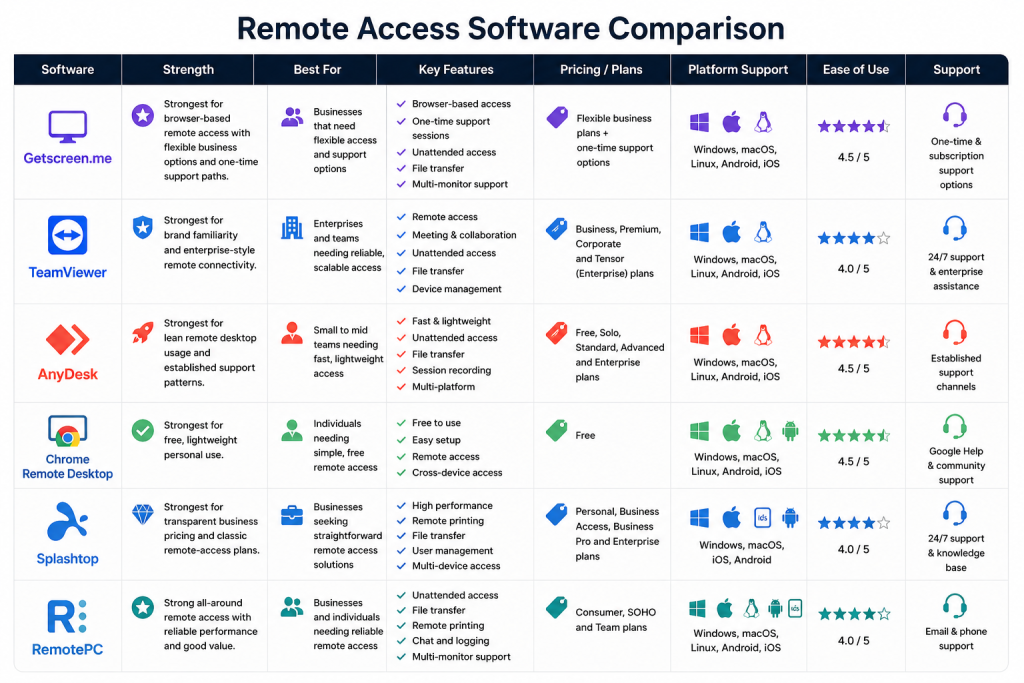
Here is the simple practical read:
- Getscreen.me: strongest for browser-based remote access with flexible business options and one-time support paths.
- TeamViewer: strongest for brand familiarity and enterprise-style remote connectivity.
- AnyDesk: strongest for lean remote desktop usage and established support patterns.
- Chrome Remote Desktop: strongest for free, lightweight personal use.
- Splashtop: strongest for transparent business pricing and classic remote-access plans.
- RemotePC: strongest for cost-conscious always-on access.
That does not produce one universal winner. It gives six different fit profiles.
It also highlights why alternatives research is worth doing here. Remote access tools can look interchangeable until you compare how they handle browser access, installation requirements, support flows, business permissions, and pricing structure. Those differences become obvious very quickly once a team moves from solo use to shared business use.
That is also why some tools feel better for IT support teams while others feel better for simple permanent-access use. The overlap is real, but the emphasis is not identical.
Another practical difference is buyer confidence. Some teams want the market-recognizable brand, others want a simpler rollout, and others mostly want a price model they can explain quickly to leadership. Those softer decision factors often matter just as much as raw remote-control capability.
Pricing Context :
Getscreen.me’s official pricing page is interesting because it is not a simple “three static plans and you’re done” setup. The page frames pricing around options, number of technicians, number of permanent-access devices, and broader business configuration.
That means Getscreen.me is strongest when the buyer wants:
- Browser-based access.
- Flexible business configuration.
- A team or technician model.
- One-time support and permanent access options under one umbrella.
By contrast, some alternatives are easier to understand on first read, but less flexible once the use case becomes more specific.
That is why a buyer should think about pricing model fit, not only sticker shock. A simpler plan table may look friendlier, but a configurable model can be better if the team’s technician count, device count, or support mix changes often.
This is especially important for SMBs that grow in uneven bursts. A remote access platform can feel inexpensive at five devices and awkward at fifty if the pricing model scales in the wrong direction.
It is also where comparison shopping becomes useful instead of distracting. If one team needs strict budget clarity, Splashtop or RemotePC may look better. If another team wants a recognizable enterprise brand, TeamViewer may feel safer. If a third team values frictionless access most, Getscreen.me may still come out ahead.
When To Stick With Getscreen.me :
The official Getscreen.me positioning is particularly compelling if you want:
- Browser-based remote desktop access.
- No heavy client-first identity as the main experience.
- Flexible business subscriptions.
- One-time support alongside permanent access.
- A strong comparison-led positioning against TeamViewer, AnyDesk, and Chrome Remote Desktop.
That is a healthy middle ground between ultra-light personal tools and heavier enterprise remote-support platforms.
If you want to compare that fit directly, start with Getscreen here and measure the product against the way your team actually accesses devices today.
Another reason to stay is if the browser-first experience genuinely saves your team time. That convenience sounds small until you compare it to tools that feel more installed-client-heavy in everyday use.
That daily convenience is easy to underestimate until the team starts using remote access every single day.
For lean teams, that matters a lot. A remote-access tool that feels simple enough for everyday use is often more valuable than a technically stronger platform that everyone quietly avoids unless absolutely necessary.
Verdict :
The best Getscreen.me alternatives in 2026 depend on what you actually need. TeamViewer is stronger for enterprise familiarity. AnyDesk is stronger for classic lightweight remote-desktop workflows. Chrome Remote Desktop is stronger for free personal simplicity. Splashtop is stronger for more transparent business pricing. RemotePC is stronger for economical always-on access.
Getscreen.me itself stays attractive when browser-based access, flexible business configuration, and mixed permanent-access plus support use cases matter more than brand familiarity alone.
That is why the smart question is not “which remote access tool is best?” It is “which one fits our workflow, budget model, and team structure without adding extra friction?”
If Getscreen.me still looks close to that sweet spot, start with Getscreen here and compare it against one real support or admin workflow instead of a generic checklist.
That workflow-first evaluation is usually what prevents expensive tool churn later.
It also leads to better adoption because the chosen product actually matches the way the team works.
That is a bigger advantage than it sounds. Remote-access tools are often judged only on technical capability, but team comfort, deployment friction, and day-to-day usability usually decide whether the tool becomes routine or irritating.
The more often a team relies on remote access, the more important that practical fit becomes.
That is why the best alternative is rarely the one with the loudest feature list. It is the one that fits the access style, deployment tolerance, and budgeting rhythm your team already has.
FAQ :
What are the best Getscreen.me alternatives in 2026?
Strong alternatives include TeamViewer, AnyDesk, Chrome Remote Desktop, Splashtop, and RemotePC.
Which Getscreen.me alternative is cheapest?
Chrome Remote Desktop is the obvious free option, while Splashtop and RemotePC are often appealing for more cost-conscious paid access.
Why would someone choose Getscreen.me over TeamViewer?
Getscreen.me’s browser-based model and flexible business setup can feel more convenient for teams that do not want a heavier enterprise-style remote support workflow.
When should you stay with Getscreen.me instead of switching?
Stay with Getscreen.me if browser access, technician-based business flexibility, and mixed permanent-access plus support scenarios matter more than brand familiarity.