

Who This Post Is For :
This post is for growing teams that have already outgrown the casual way most companies handle logins in the early days.
I am talking about teams that are dealing with some version of this mess:
- Founders still sharing credentials in chat.
- Contractors needing temporary access.
- Sales, marketing, and ops all using different SaaS tools.
- IT or operations teams getting dragged into constant password-reset cleanup.
That is the niche where 1Password looks strongest in 2026.
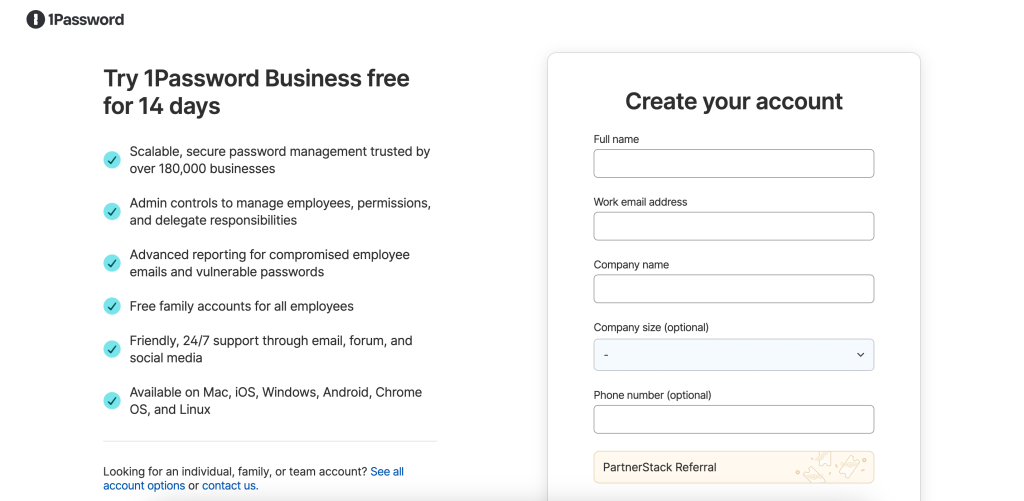
The official 1Password business security pages are not vague about who the product is for. They frame 1Password as a password manager for teams and businesses, and they also emphasize a business password vault, stronger security, helpdesk reduction, autofill, policy controls, reporting, and governance for passwords, secrets, apps, and access.
That combination tells you a lot.
1Password is not only for personal password storage. It is especially well suited to teams that need shared access discipline without turning day-to-day work into an IT headache.
If you want to inspect that official business positioning while you read, start with 1Password here.
Why 1Password Fits This Niche :
The reason 1Password fits growing teams so well is not hard to spot from the official product language.
The business page highlights several practical themes:
- Simplifying team security.
- Securing company data through a business vault.
- Cutting helpdesk tickets.
- Minimizing password resets.
- Autofilling account credentials.
- Adding visibility, control, and governance.
That is exactly the language a scaling team should care about.
Early-stage companies usually do not fail on access management because they do not know security matters. They fail because the everyday workflow is messy. One person owns too many shared credentials, another person keeps reusing old passwords, and nobody wants to stop work just to document access properly.
1Password looks strongest when the company has reached the point where that mess is no longer small enough to ignore.
The official page also says business and enterprise customers can create policies, custom rules, monitor sign-in attempts, and generate reports. That matters because the real shift for a growing team is not just secure storage. It is moving from informal access habits to a system the company can actually govern.
The Specific Niche: Growing Cross-Functional Teams
If I had to narrow the niche even further, I would say 1Password is especially well suited to growing cross-functional teams with shared SaaS access.
That includes:
- SaaS startups with 10 to 200 employees.
- Remote-first teams using many cloud tools.
- Agencies managing internal and client-facing accounts.
- Operations-heavy businesses with a lot of vendor logins.
Why this niche?
Because the official 1Password business messaging is clearly about balancing security with usability. It is not selling endless complexity. It is selling stronger access control without slowing the team down.
That matters for businesses that cannot afford to hire a giant security team just to fix credential chaos.
If your company mainly needs a personal password locker, 1Password may be more than you need. But if your team has a growing number of shared systems, more people touching sensitive tools, and increasing pressure to tighten access, then the fit becomes much clearer.
Top Features For This Niche :
1. Business Password Vaults –
This is the core fit signal.
The official business page explicitly talks about a company password vault. That matters because the problem for a growing team is rarely “where do I save my own password?” The real problem is “how does the company manage access safely when multiple people need entry to important systems?”
A business vault is a much better answer to that problem than a spreadsheet, a chat thread, or one overloaded admin account.
2. Reduced Helpdesk And Reset Burden –
1Password also emphasizes reduced helpdesk tickets and fewer password resets.
That is a very practical benefit for scaling teams. Security software sounds strategic, but the operational pain is often painfully ordinary:
- People forget passwords.
- Teams lose track of ownership.
- New hires need access fast.
- Departing teammates leave behind access confusion.
If a product lowers that burden, it saves time for both the employee and the person who would otherwise need to clean up the mess.
3. Autofill And Day-To-Day Usability –
The official page does not present 1Password as a governance tool only. It also stresses autofill and team productivity.
That is important because the best access tool is the one people will actually use. If security feels annoying, teams work around it. If the workflow is smooth, adoption improves.
That is another reason 1Password fits growing teams well. It is not only built to centralize control. It is also built to make everyday sign-in behavior easier.
4. Policies, Rules, Monitoring, And Reporting –
This is where 1Password becomes especially useful for companies that are maturing.
The official business information says customers can create security policies and custom rules, monitor sign-in attempts, and generate reports. That tells you the product is not only solving convenience. It is helping the business move toward auditable access management.
That is a real upgrade for teams that are starting to care about compliance, internal controls, or more disciplined onboarding and offboarding.
If you want to see that business fit in context, review 1Password here and compare the business-security language to the access problems your team is already dealing with.
A Real-World Scenario For This Niche :
Picture a 35-person remote SaaS company in 2026.
It uses:
- CRM tools.
- Ad accounts.
- Product analytics platforms.
- Payment systems.
- Support software.
- Internal documentation tools.
At first, access was informal. A few people set everything up. Over time, more team members needed access. Some systems ended up behind shared inboxes. Some credentials lived in notes apps. Some stayed in one founder’s browser profile. Nobody loved the situation, but nobody stopped long enough to fix it either.
That is the kind of company where 1Password makes sense.
The product is built for business use, and the official pages keep emphasizing visibility, governance, productivity, and reduced operational friction. That means the company can move from improvised access to a more deliberate working model without asking every employee to suddenly become a security specialist.
This is why I would not frame 1Password as “best for everyone.” I would frame it as best for teams that have already felt the pain of shared-access sprawl.
Pricing In Context :
I want to stay strict here.
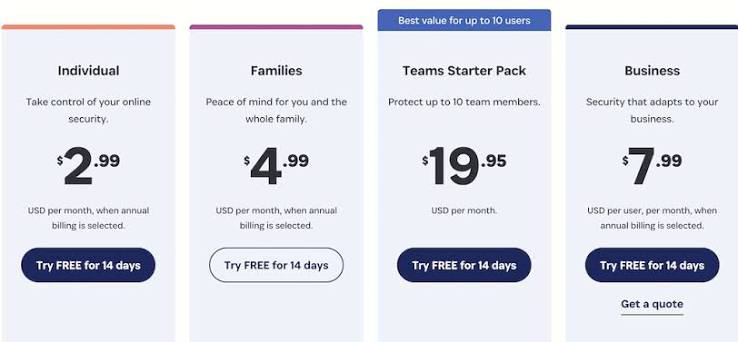
The official pages I reviewed make the business value clear, but they do not provide a clean public pricing table on the specific pages I used for this draft. So I am not going to invent numbers.
The more useful pricing question for this niche is:
What is bad access hygiene already costing the team?
That cost may show up as:
- Lost time during onboarding.
- Delays when people need credentials quickly.
- Repeat reset requests.
- Weak access offboarding.
- Higher risk around shared accounts and unmanaged secrets.
If 1Password helps reduce those repeated costs, the business case becomes easier to justify even before you compare plan details line by line.
If you want to evaluate the official business flow directly, open 1Password here and verify the current plan path on the live product pages.
Alternatives For This Niche :
The alternative question matters because not every growing team has the same needs.
Some teams may compare 1Password with:
- Lighter personal-first password tools.
- Larger identity and access management platforms.
- Internal documentation plus manual credential handling.
Here is the honest take:
Lighter tools may be easier to start with, but they may not give the governance signals that the official 1Password business pages emphasize.
Larger enterprise access platforms may be broader, but they can also be heavier than what a growing cross-functional team really needs.
That puts 1Password in a useful middle position for this niche. It looks strong when the team wants better structure, stronger policy control, and smoother access workflows without jumping immediately to a full-blown enterprise identity program.
Setup Steps For A Growing Team :
If I were rolling out 1Password for this niche, I would keep the first deployment practical.
Step 1: Start With Shared Business-Critical Systems
Do not try to organize every credential in one day. Start with the systems that multiple people already use and that would create real disruption if access were lost.
Step 2: Separate Personal Access From Team Access
The point is not to dump every password into one place. It is to make shared access easier to manage and easier to govern.
Step 3: Use The Product’s Business Controls Intentionally
Because the official business offering includes policies, custom rules, monitoring, and reporting, the rollout should not stop at storage. The real value comes when the business uses those controls to improve access discipline.
Step 4: Train For Daily Use, Not Just Security Theory
Adoption improves when the team sees the practical benefits: easier sign-ins, less reset chaos, and fewer access bottlenecks.
Where 1Password Is A Weaker Fit :
1Password is a weaker fit when:
- The business is still basically one person.
- Shared access is minimal.
- Governance is not yet a real need.
- The team wants a much broader enterprise identity stack than a password-manager-centered workflow.
That does not make the product weak. It just means the best-fit niche is specific.
And that is actually helpful. Good software is easier to buy when you know exactly where it shines.
Verdict :
1Password is not just “good for business” in a generic sense. In 2026 it looks especially well suited to growing cross-functional teams that need to bring order to shared access, reduce password friction, and add more governance without overwhelming users.
That is the niche where the official business positioning makes the most sense.
If that sounds like your team, try 1Password here and evaluate it against one real shared-access workflow instead of against abstract feature lists.
FAQ :
What Niche Is 1Password Best For In 2026?
1Password looks strongest for growing teams and businesses that need to manage shared access more safely without creating extra operational drag.
Is 1Password Mostly For Individuals Or Teams?
The official business materials clearly position it for teams and businesses, with business vaults, policies, custom rules, monitoring, and reports.
Why Does 1Password Fit Startups And Growing Teams?
Because the official product story focuses on reducing helpdesk work, minimizing resets, improving usability, and adding governance at the same time.
Does 1Password Show Public Business Pricing On The Pages Reviewed?
Not in a simple pricing-table format on the pages used here, so current plan details should be verified directly on the official site.
When Should A Team Choose 1Password?
Choose it when shared SaaS access is growing, access chaos is becoming expensive, and the team needs better control without a heavyweight rollout.