


In this guide
Pricing Overview :
Runpod does not price like a normal flat-fee SaaS tool, and that is the first thing buyers need to understand.
Disclosure: Stack99 earns a commission if you buy through links on this page. It costs you nothing extra and never changes our assessment.
The official pricing page splits the product into different workload models:
- Pods.
- Serverless.
- Clusters.
That means the real question is not “What is the monthly price?” The real question is “What kind of compute job are you paying for?”
Runpod’s official messaging also emphasizes:
- Per-second billing.
- Dedicated GPU instances for Pods.
- API inference through Serverless.
- Multi-node jobs through Clusters.
- Enterprise support for larger capacity needs.
That makes Runpod much easier to understand if you evaluate it as infrastructure pricing rather than app-subscription pricing.
If you want to inspect the official product while you read, start with Runpod here.
How The Pricing Model Works :
Runpod charges based on the workload category and the GPU resource you choose. This is good news for buyers who hate paying for idle capacity.
The official pricing pages and docs make a few things clear:
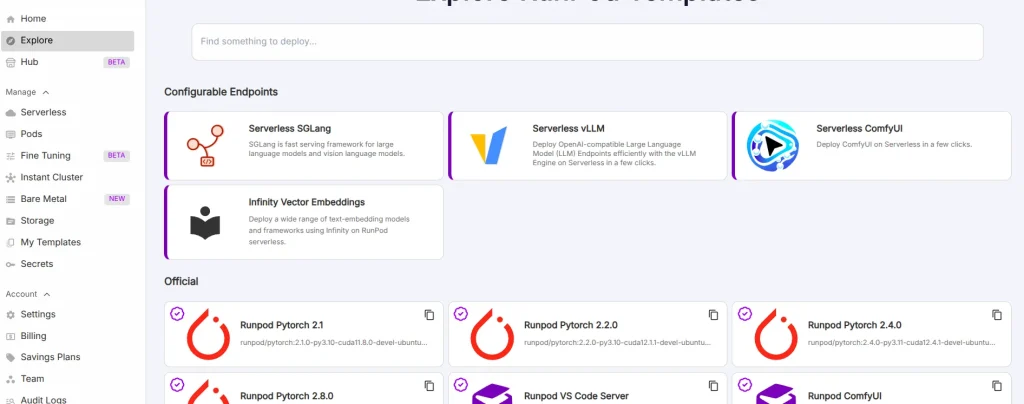
- Pods are for dedicated GPU machines.
- Serverless is for inference-style API workloads.
- Clusters are for larger distributed jobs.
- Billing is usage-based rather than a neat flat monthly box.
That model has a practical upside. A team can prototype on one kind of resource, ship on another, and only pay for the level of compute it actually uses.
It also creates a practical downside. If you are shopping for a single neat price tag, you will not get one.
Pods Pricing :
Pods are the most direct pricing model because they look like classic cloud GPU instances.
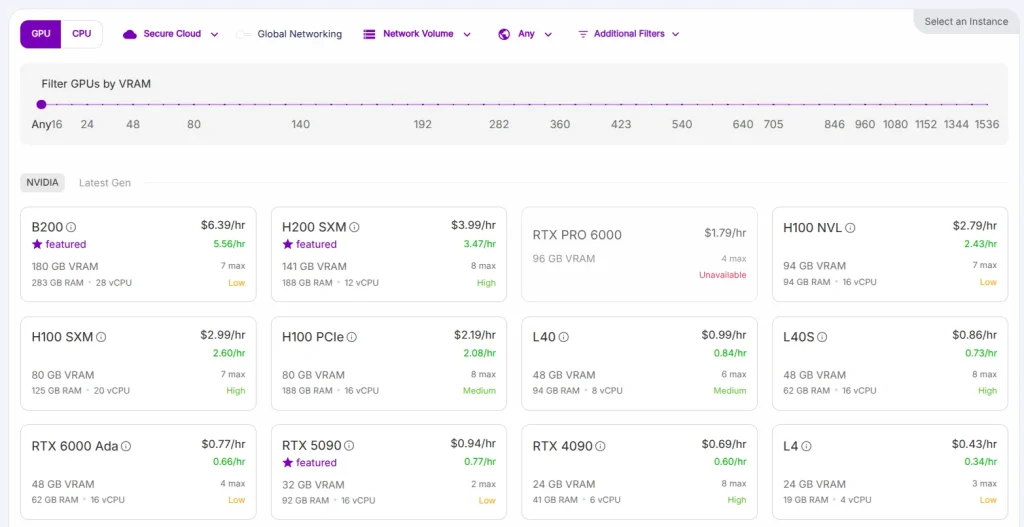
The official product material highlights on-demand cloud GPUs with sample rates including:
H100 PCIefrom$2.89/hr.A100 PCIefrom$1.39/hr.
Other official Runpod comparison material also shows transparent on-demand pricing examples for GPUs like:
L40S.L4.V100.
The exact number depends on the GPU class, but the important thing is the pricing logic:
Pods are for users who want a dedicated environment they can control directly.
That makes Pods easier to justify when you need:
- A hands-on dev machine.
- Long-running experiments.
- Notebook work.
- Stable training or prep environments.
If you want to compare the live options yourself, open Runpod here and judge the current GPU mix against the workload you actually run.
Serverless Pricing :
Serverless is a different kind of cost analysis.
The official documentation says Serverless uses pay-per-second pricing with no upfront costs. You are billed from when a worker starts until it fully stops, rounded up to the nearest second. The docs also note that enterprise or large-scale workloads may use custom pricing paths.
That is a meaningful distinction because Serverless pricing is less about reserving a machine and more about paying for inference activity.
This model makes sense when:
- Traffic is bursty.
- You do not want idle GPU bills.
- The product is API-shaped.
- You need scaling behavior that is more dynamic than a fixed instance.
Serverless can look more expensive on a headline hourly-equivalent basis than a dedicated machine, but that does not automatically mean it costs more in real life. For many teams, the true cost depends on how often the workload sits idle.
Clusters Pricing :
Clusters are where Runpod’s pricing gets more infrastructure-heavy.
The official pages describe Clusters as multi-node jobs with fast launch, shared storage options, and scale that can go well beyond a single machine. That is not a casual use case. It is for workloads that are already starting to look like real compute systems.
The practical pricing logic here is straightforward:
- You pay more because the job is bigger.
- You justify it only when a single-node setup stops being enough.
That means Clusters are usually best for:
- Distributed training.
- Large batch jobs.
- Temporary high-capacity experiments.
- Teams that need bigger bursts without buying permanent infrastructure.
This is also where enterprise support and reserved or larger capacity conversations become more relevant.
Hidden Costs And Gotchas :
Runpod’s public pricing story is refreshingly direct, but a few cost realities still matter.
Workload Choice Matters More Than The GPU Brand Name –
Buyers sometimes obsess over whether they want an H100 or an A100 before they have even decided whether the job belongs in Pods or Serverless.
That is backward.
The first pricing question should be:
What kind of workload is this?
Only then does GPU selection start to mean something financially.
Usage-Based Pricing Can Drift –
Usage-based pricing feels great when a team is disciplined. It feels less great when people leave resources running longer than planned or choose oversized capacity for convenience.
That is not a Runpod-specific problem. It is a cloud-pricing reality.
Enterprise Capacity Is Not The Same As Casual Testing –
The official docs and pricing materials both signal that large or enterprise needs may move into custom support or capacity conversations. That is normal, but it means a buyer should not assume the small-test experience looks exactly like a scaled production agreement.
ROI Example :
Imagine a startup shipping a GPU-backed AI feature with uneven usage.
Option one is to keep a dedicated GPU online all day, every day, just in case traffic arrives.
Option two is to:
- Use Pods for testing and debugging.
- Use Serverless for live inference.
- Use larger capacity only when demand really shows up.
That second path is usually the more logical Runpod story.
The ROI is not only lower idle spend. It is also decision flexibility. A team can learn what the product actually needs before locking itself into a heavier cloud pattern.
If you want to test that kind of workflow, start with Runpod here and compare one real use case instead of theoretical benchmark shopping.
Cost Comparison To Alternatives :
Runpod is often compared to three things:
- Big cloud GPU instances.
- Other specialized GPU clouds.
- Doing nothing until the AI project “gets bigger.”
The official Runpod comparison pages are very aggressive about one point: transparent pricing and lower on-demand GPU costs compared with some large cloud platforms.
That is a strong selling point, but the smarter comparison is broader than the headline number.
Runpod tends to look strongest when the buyer wants:
- Faster GPU access.
- Less infrastructure overhead.
- A pay-for-what-you-use model.
- A cleaner path from prototype to inference to bigger workloads.
It also tends to look better when the team values deployment speed. A slightly higher short-run price can still be the better deal if it helps a team ship faster, test more often, and avoid infrastructure drag.
That is especially true for smaller AI teams. A platform that removes waiting, setup friction, and oversized commitments can create financial value even before the raw compute bill looks “optimized” on paper.
That is why cost discipline on Runpod is partly a product-choice issue and partly an operational habit issue. Teams that match the workload model to the real job usually get better value faster.
That habit matters more than buyers expect. Good pricing decisions usually come from boring workload discipline, not from chasing the fanciest GPU on the page every single time a new job appears unexpectedly later that week somewhere new internally, either there first alone.
Best Value Tier Or Model :
There is no single best-value tier because Runpod is not a single-tier product.
The cleanest recommendation is this:
- Choose Pods if you need a controllable GPU machine.
- Choose Serverless if you are serving inference or API workloads.
- Choose Clusters if the workload has outgrown a single box.
That is the best-value rule because it maps the pricing model to the actual job.
The worst-value move is picking a bigger or more complex model before the workload needs it.
Discounts, Reserved Capacity, And Annual Billing :
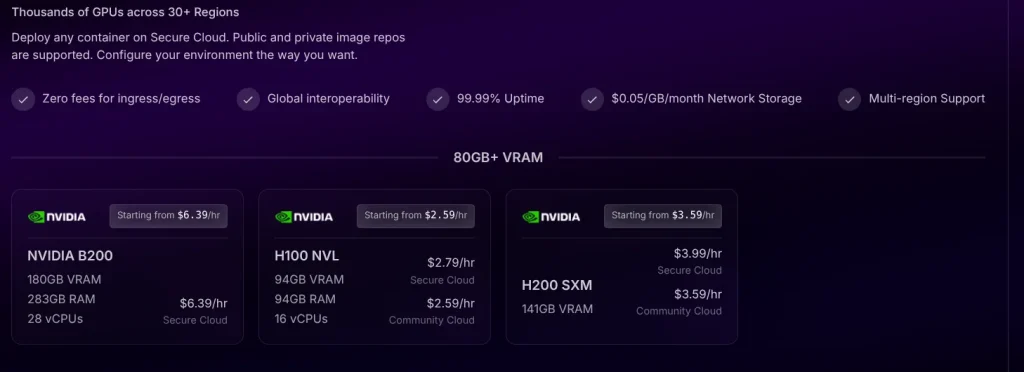
Runpod’s pricing does not revolve around classic annual SaaS discounts. Instead, the official pages point to the more relevant infrastructure concept:
- On-demand pricing for flexible use.
- Reserved pricing discussions when you need guaranteed capacity at lower rates.
- Custom enterprise support for larger environments.
That is a much more honest fit for GPU infrastructure than forcing everything into “monthly versus annual plan” language.
Verdict :
Runpod pricing makes sense once you stop treating it like ordinary SaaS.
In 2026, the platform is best understood as a workload-based GPU cloud with three practical buying paths:
- Pods for direct machine control.
- Serverless for elastic inference.
- Clusters for heavier distributed work.
That is a good pricing model for teams that want flexibility and do not want to keep paying for idle capacity they barely use.
If you want to see whether that model fits your stack, try Runpod here and match the pricing path to one real compute job before you scale further.
FAQ :
Does Runpod Have A Flat Monthly Price?
No. The official pricing is workload-based and depends on whether you are using Pods, Serverless, or Clusters.
Is Runpod Billed By The Second?
Yes. The official pricing materials and docs say billing is usage-based, and Serverless is billed by the second with no upfront cost.
What Is The Official H100 Starting Price?
The official product material I reviewed shows H100 PCIe on-demand pricing from $2.89/hr.
Is Serverless Cheaper Than Pods?
Not automatically. It depends on the workload shape. Serverless is often stronger for bursty inference, while Pods are stronger for dedicated hands-on environments.
Does Runpod Offer Reserved Or Enterprise Pricing?
Yes. The official materials point to reserved pricing discussions and custom enterprise support for larger capacity needs.
Before You Choose, Compare These
Hand-picked guides to help you choose the right tool — no fluff.
 IntegrationsRunpod Integrations Guide 2026What it connects to and how well each link holds up.
 TutorialsRunpod Beginner's Guide 2026A clean start-here walkthrough with no jargon.
 ReviewsBouncer Review 2026Hands-on verdict with the pros, cons and who it fits best.
 ReviewsDiginius Review 2026Hands-on verdict with the pros, cons and who it fits best.