

When It Makes Sense To Look Beyond Gamma :
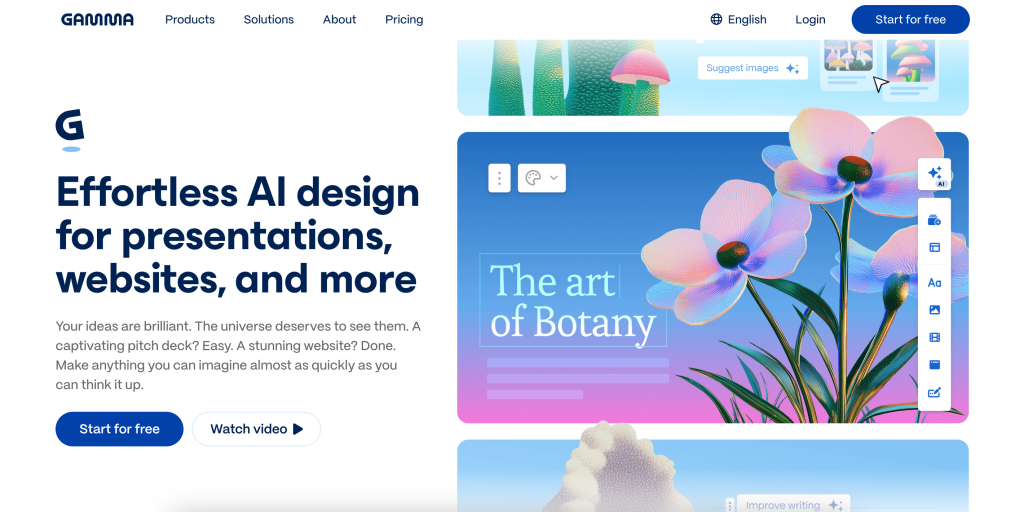
Gamma is a strong AI-first content creation platform, but it is not automatically the right fit for every team. The official Gamma site makes that pretty clear once you read the product and pricing pages carefully.
Gamma officially covers:
- Presentations.
- Websites.
- Social Media.
- Documents.
- API.
- Graphics.
It also offers a Free plan plus paid tiers that unlock branding control, analytics, API access, and custom domains. That is a broad and modern feature set. Still, there are valid reasons to consider alternatives.
You may want more template depth, a more traditional slide environment, stronger brand-guardrail behavior, heavier collaboration around decks, or tighter alignment with tools your team already lives in.
That is where alternatives come in.
If you want to compare against the official product first, start with Gamma here.
Alternative #1: Canva
Canva is the easiest alternative to recommend for teams that want breadth, familiarity, and a giant creative ecosystem.
According to Canva’s official pages, its AI presentation workflow uses Magic Design for Presentations and can generate drafts quickly while letting users apply brand styling and then keep editing inside Canva’s broader design environment.
Why teams choose Canva instead of Gamma:
- Massive Template And Media Ecosystem.
- Familiar Drag-And-Drop Editing.
- Strong Broader Design Suite Beyond Slides.
- AI Presentation Generation Inside A Wider Creative Platform.
Why teams may still prefer Gamma:
- Gamma is more explicitly AI-native in how it structures and lays out content from a prompt.
- Gamma’s product family is centered around generated decks, docs, sites, and visual content in a more guided workflow.
So Canva is best when your team wants one giant creative workspace. Gamma is better when your team wants a more AI-led presentation and content-generation flow.
Alternative #2: Beautiful.ai
Beautiful.ai is a very strong official alternative if your team cares more about presentation polish and slide guardrails than about Gamma’s wider multi-format content spread.
Beautiful.ai’s official site describes it as an AI presentation platform for teams, with Smart Slides, brand controls, analytics, collaboration, and a guided “Create with AI” workflow. It also emphasizes presentation quality and brand consistency more directly than many AI-first tools do.
Why teams choose Beautiful.ai instead of Gamma:
- Smart Slides That Keep Layouts Structured.
- Guided Outline-To-Deck Workflow.
- Strong Brand Controls For Teams.
- Analytics And Team Presentation Features.
- PowerPoint Integration Support.
Why Gamma still wins for some buyers:
- Gamma covers websites, social content, docs, graphics, and API positioning in a more unified AI-creation product family.
- Gamma feels more flexible if your team wants outputs beyond classic decks.
Beautiful.ai is the cleaner choice when the main job is making business presentations look polished without letting every user destroy the brand.
Alternative #3: Pitch
Pitch is one of the best official alternatives when collaboration around decks matters as much as the generation step.
Pitch’s official homepage positions it as an AI presentation workspace where teams collaborate to create and deliver winning slide decks. Its AI product messaging also highlights Pitch Agent for prompt-based deck generation, branded templates, file attachments for context, and team editing.
Why teams choose Pitch instead of Gamma:
- Presentation Workspace Built For Team Collaboration.
- Stronger Presentation-Specific Focus.
- AI Agent For Deck Creation With Brand Inputs.
- Good Fit For Startup, Sales, And Client-Facing Teams.
- Free, Pro, And Business Plan Path For Teams.
Why Gamma still has an edge in some situations:
- Gamma goes wider than presentations into websites, docs, social, and graphics.
- Gamma’s web-native content style can feel less tied to traditional deck expectations.
Pitch is especially attractive when your team still thinks in “decks,” just smarter ones.
Alternative #4: Microsoft PowerPoint
PowerPoint is the obvious official alternative for teams that cannot or will not leave a traditional slide environment.
Microsoft’s official pages now describe PowerPoint as having AI-driven design and collaboration tools, and Microsoft Support pages point to Copilot features for outlines, slide design, and content organization.
Why teams choose PowerPoint instead of Gamma:
- Existing Microsoft 365 Adoption.
- Traditional Slide Workflow.
- Broad Enterprise Familiarity.
- Copilot Features Inside A Known Environment.
- Easier Hand-Off In Organizations Standardized On Office.
Why Gamma can still be better:
- Gamma feels faster when starting from a prompt and building a modern, web-native visual document.
- Gamma avoids some of the manual slide-management overhead that traditional deck tools still carry.
If your organization already breathes Microsoft 365, PowerPoint can be the more realistic choice even if Gamma looks more modern on paper.
Alternative #5: Google Slides
Google Slides is the clean alternative for teams that prioritize simplicity, collaboration, and Google Workspace compatibility over more aggressive AI-led generation.
The official Google Slides page emphasizes polished presentations, templates, video and animation support, and easy collaboration inside Workspace. That sounds basic next to Gamma’s AI pitch, but basic is not always bad. Sometimes teams just want frictionless collaboration in a familiar browser workflow.
Why teams choose Google Slides instead of Gamma:
- Native Google Workspace Collaboration.
- Low Learning Curve.
- Simple Browser-Based Editing.
- Easy Template And Sharing Workflow.
- Better Fit For Teams Already Standardized On Google Apps.
Why Gamma still wins for many creative or fast-moving teams:
- Gamma offers a much more advanced AI-first generation experience.
- Gamma adds websites, social output, docs, and graphics to the same platform.
Google Slides is rarely the most exciting option. It is often the easiest option to get approved and adopted.
Quick Comparison Matrix :
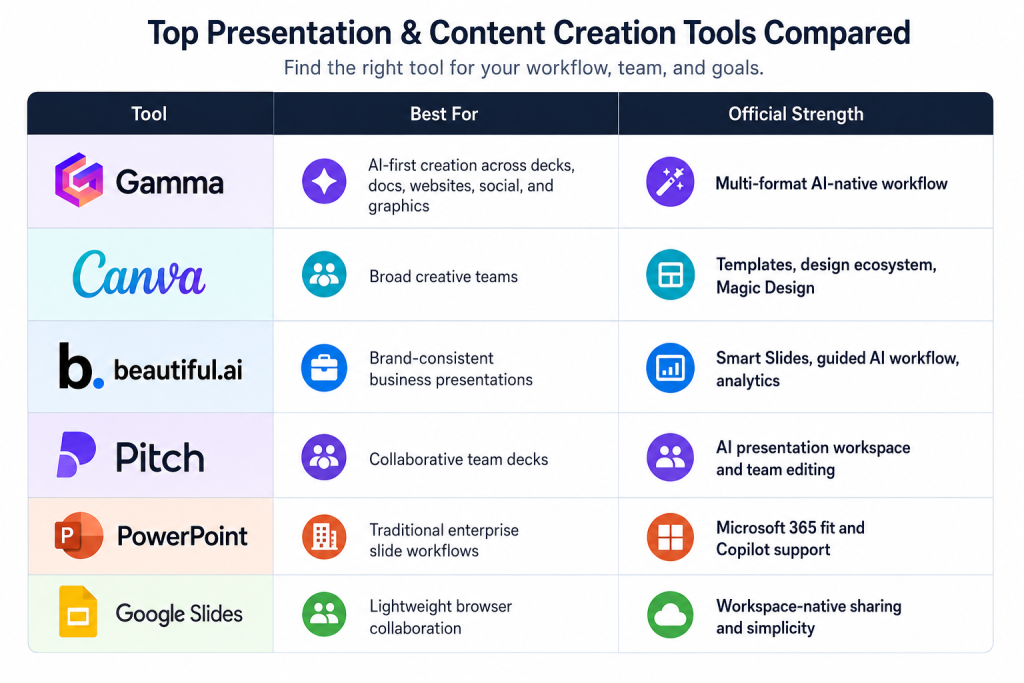
That table tells the real story. “Best alternative” is not one product. It depends on whether you want:
- More Design Breadth.
- More Presentation Guardrails.
- More Team Collaboration.
- More Enterprise Familiarity.
- Or More Simplicity.
When You Should Stick With Gamma :
You should probably stay with Gamma if your team wants one platform that can generate and adapt several kinds of visual content quickly.
The official Gamma pages are strongest when your workflow looks like this:
- Start From A Prompt, Outline, File, Or URL.
- Generate A Working Draft Fast.
- Publish As A Deck, Site, Social Asset, Or Document.
- Keep The Workflow Inside One Web-Native Environment.
Gamma also gets more compelling as you move up the plans:
- Plus removes branding and adds stronger AI image options.
- Pro adds custom branding, analytics, custom domains, and API access.
- Ultra expands the limits further and adds the most advanced model access.
That is not the best setup for every team, but it is a very good setup for teams that want speed without living inside classic slide software forever.
If that is your use case, open Gamma here and compare one real project against the alternatives instead of debating in the abstract.
How To Choose Between Them :
The fastest way to choose is to ask one blunt question:
What actually needs to happen after the first draft exists?
If the answer is “our design team keeps refining across many asset types,” Canva becomes stronger.
If the answer is “our business team needs polished decks that stay on brand,” Beautiful.ai becomes stronger.
If the answer is “our team collaborates heavily on presentations together,” Pitch becomes stronger.
If the answer is “we live inside Microsoft and cannot break that habit,” PowerPoint becomes stronger.
If the answer is “we just need lightweight browser collaboration inside Workspace,” Google Slides becomes stronger.
If the answer is “we want the AI to do more of the heavy lifting across several formats,” Gamma stays very compelling.
There is also a pricing shape question that buyers often skip too fast.
Gamma’s official plans make more sense when your team wants one paid workspace to cover several output types from one creation flow. Canva can look cheaper if the team already uses it heavily for general design work. PowerPoint and Google Slides can look cheaper on paper when they piggyback on suites the company already pays for. Beautiful.ai and Pitch make the most sense when presentation quality or collaborative deck work is the main job, not just one use case among many.
That is why “best alternative” often comes down to operational overlap. If another tool only solves one piece of the workflow, the sticker price can be misleading. A cheaper slide app is not really cheaper if the team still needs a separate landing-page builder, graphics tool, or AI drafting layer next to it.
If you want to see Gamma’s official plan structure before deciding where it fits, start with Gamma here and compare what you would actually replace versus what you would still need.
Verdict :
The best Gamma alternatives in 2026 are Canva, Beautiful.ai, Pitch, PowerPoint, and Google Slides. They are not interchangeable, and that is the whole point.
Canva wins on design breadth. Beautiful.ai wins on polished deck guardrails. Pitch wins on collaborative presentation work. PowerPoint wins on enterprise familiarity. Google Slides wins on simple Workspace-native teamwork.
Gamma still holds a strong position when the team wants an AI-first, multi-format creation environment rather than just a better slide editor.
That is why the right decision is less about hype and more about workflow fit.
If you want to benchmark Gamma against the field with a real project, start with Gamma here and compare the draft quality, editing friction, and publishing options side by side.
FAQ :
What Is The Closest Alternative To Gamma?
Pitch and Beautiful.ai are usually the closest if your main concern is presentation creation. Canva is the closest if your team wants a broader creative platform.
Is Canva Better Than Gamma?
It depends on the workflow. Canva is stronger for broad design work and template variety. Gamma is stronger for AI-native, multi-format generation and web-native content workflows.
Is Beautiful.ai Better For Enterprise Teams?
For many brand-sensitive presentation teams, yes. Its official positioning around Smart Slides, brand consistency, and analytics makes it especially strong for controlled business presentation workflows.
Should A Microsoft 365 Team Just Use PowerPoint?
Sometimes yes. If the organization is deeply standardized on Microsoft tools, PowerPoint plus Copilot may be easier to adopt than a new platform.
When Should I Stay With Gamma?
Stay with Gamma if your team values prompt-first generation, modern web-native output, and the ability to create presentations, sites, docs, graphics, and social content in one environment.