


Quick Verdict :
QuickBooks is still one of those products that shows up in real businesses for a reason. It is not just bookkeeping software. The official pages position it as a platform for invoices, cash flow, reports, payments, payroll, and broader business operations. That is why people keep comparing it to lighter accounting tools and then quietly end up back here when they need something more complete.
The tradeoff is familiar too. QuickBooks can be very useful, but the price and complexity can rise as your business grows. If you only need to track a few invoices, it may be more system than you need. If you want accounting, reporting, and team collaboration in one place, it starts to look a lot more reasonable.
If you want to inspect the official product while you read, open QuickBooks here and compare the current plan structure with the way your business runs today.
Product Facts And Overview :
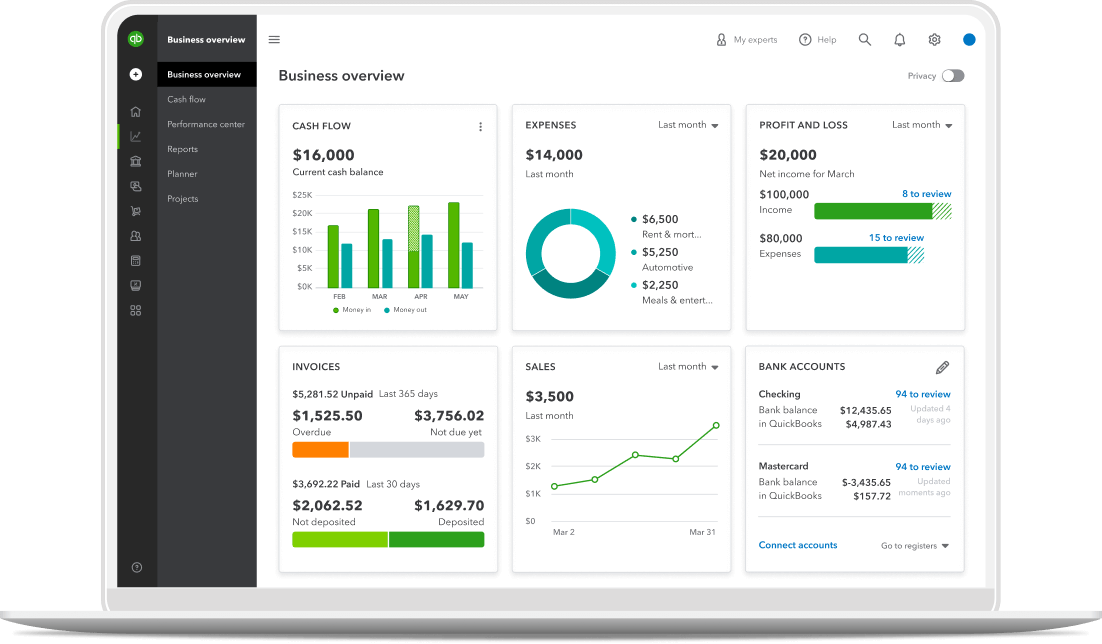
The official product pages say QuickBooks Online helps you track cash flow, create invoices, accept payments, see what is selling, and make better business decisions. The broader product pages also show a clear ladder of products: QuickBooks Online, Solopreneur, Workforce, contractor payments, and QuickBooks Desktop Enterprise for more complex cases.
That is useful because it means QuickBooks is not pretending every business looks the same. A solo operator, a growing service team, and a larger company with inventory or payroll needs are all going to use a different slice of the product family.
The current public products page shows QuickBooks Online tiers with promotional pricing on the page itself: Simple Start at $19 per month, Essentials at $37.50 per month, Plus at $57.50 per month, and Advanced at $137.50 per month, each shown with limited-time savings. The broader site also says QuickBooks is a monthly subscription service and that pricing varies by product.
If that sounds like the kind of structure you want to compare, start with QuickBooks here and match the tiers against your business size.
Pros And Cons :
What QuickBooks Does Well –
- Invoicing And Cash Flow Tracking.
- Familiar Accounting Workflow.
- Strong Report Visibility.
- Options For Payroll, Time, And Contractor Payments.
- Broad Product Family For Different Business Sizes.
- Easy Collaboration With Accountants And Bookkeepers.
Where It Can Be Frustrating –
- Pricing Can Climb As You Add Features.
- Higher Plans Make More Sense Than Lower Plans Once You Grow.
- The Platform Can Feel Like A Lot If You Only Need Basic Bookkeeping.
- Add-Ons And Promo Pricing Can Make The Buying Decision Harder To Read Quickly.
That mix is exactly why QuickBooks still wins. It is good enough to be the default for many businesses, but not so simple that it ignores real operational needs.
Feature Deep Dive :
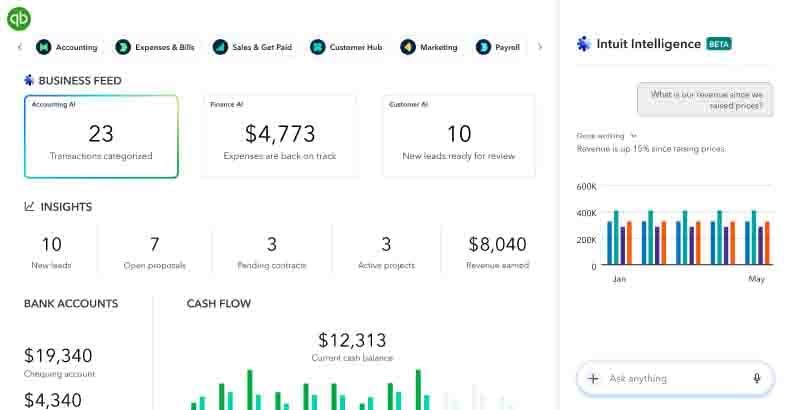
The official product pages focus on the pieces that actually matter to owners and finance teams.
Invoices are a big one. So are cash flow tracking and bank feeds. If you are running a business that lives and dies by who paid, who owes, and what is due next, those features are not nice extras. They are the system.
The product pages also make it clear that reporting is central. That matters because a lot of accounting software can store data without making it useful. QuickBooks leans into reports, summaries, and visibility so you can actually interpret what is happening inside the business.
Then there is the broader family of tools: payroll, time tracking, contractor payments, bookkeeping support, and desktop enterprise features for more complex teams. That spread is important because it shows why QuickBooks sticks around. It can grow with the business instead of getting discarded the moment the business gets more serious.
If you want to test whether the feature mix fits your operations, open QuickBooks here and compare the product family against the tasks you do every week.
Pricing Breakdown :
The current pricing story is easy to summarize but still worth reading carefully.
On the products page, QuickBooks Online currently shows:
- Simple Start At $19 Per Month.
- Essentials At $37.50 Per Month.
- Plus At $57.50 Per Month.
- Advanced At $137.50 Per Month.
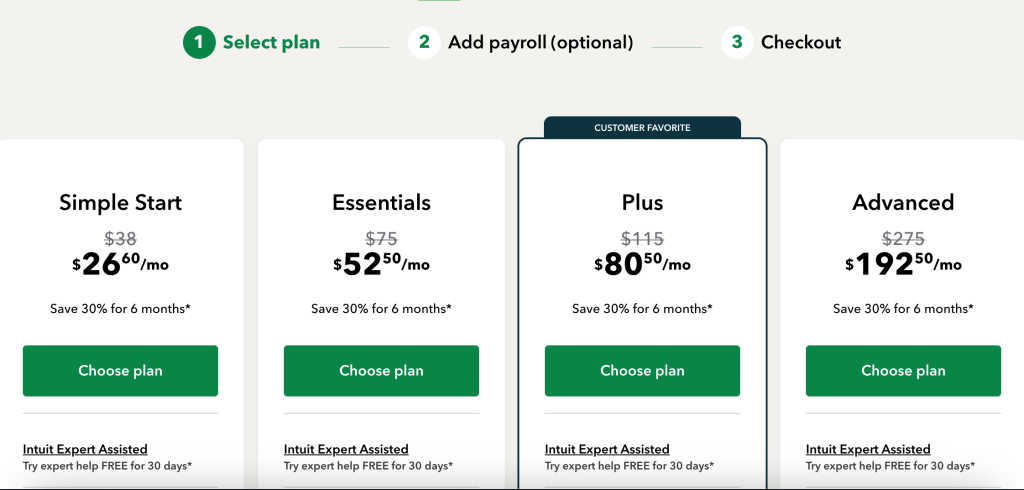
The same pages show promotional discounts for a limited period, which is common for QuickBooks. That means you should always check the live pricing page before you buy, because the real cost can depend on the current offer as well as the tier you choose.
The Canadian site adds a useful subscription reality check: QuickBooks is month-to-month, there is no contract, and cancellation is allowed anytime. The site also highlights a 30-day free trial on the current offer flow. That is the kind of flexibility you want when you are deciding whether the platform is worth it.

For a tool this central to finance, pricing is not just about the sticker number. It is about whether the workflow saves enough time to justify the monthly burn. You want the plan to feel boring in the best way, because boring finance software is usually the kind that keeps the books clean and the team calm.
Who Should Use It :
QuickBooks is a strong fit for freelancers who need reliable invoicing, service businesses that want cash flow visibility, teams that need accountant collaboration, and growing companies that are moving toward payroll or more complex reporting.
It is also a good fit if you want the finance stack to be recognizable. One of QuickBooks’ biggest hidden strengths is that accountants and bookkeepers already know how to work with it. That can save a lot of onboarding pain.
The product is less appealing if your business is tiny and you want the lightest possible system. In that case, you might spend more than you need to. But if you care about a system that can grow with you, QuickBooks has a very strong case.
The Real Alternative Stack :
The real alternative to QuickBooks is usually not another named accounting brand. It is a patchwork of invoices in one app, expenses in a spreadsheet, payroll somewhere else, and reports nobody fully trusts.
That stack can work when the business is small. It gets annoying when the business grows. People spend time reconciling numbers, cleaning exports, and arguing about which sheet is the source of truth. QuickBooks exists to remove a lot of that argument.
There is still a judgment call, though. If you only need the simplest possible bookkeeping, a lighter tool may be enough. But once payroll, reporting, cash flow, and accountant collaboration matter, the cost of a fragmented stack usually shows up somewhere else in the business.
What To Watch Before You Buy :
The smartest QuickBooks buyers do not just compare the monthly price. They compare how much of the financial workflow the platform actually absorbs.
Ask whether you need bank feeds, invoices, payroll, contractor payments, project tracking, or deeper reporting. Then ask whether the tier you choose still feels comfortable once the promo pricing ends. That second question matters more than people expect, because the software only feels “affordable” when you ignore the features you will need next quarter.
That is why QuickBooks has such staying power. It is not only an accounting product. It is a system that can absorb more of the financial operations as the business becomes more complex.
Practical Workflow Notes :
The most useful way to evaluate QuickBooks is to ignore the marketing and trace one real business process.
Take one invoice from creation to payment. Take one expense from capture to categorization. Take one payroll or contractor payment flow if that applies. Then look at the reporting output. If the workflow feels clean, the product is earning its keep.
The reason QuickBooks still works so well for many teams is that it reduces the number of places finance information can drift. Instead of having invoices in one place, reports in another, and payroll somewhere else, the business gets a more centralized view.
That does not mean it is perfect. It just means the platform solves a real operational problem better than a random stack of small tools usually does.
If that is the kind of workflow you want to stress test, open QuickBooks here and run one real month of finance work through the product before you commit.
What A Real Setup Looks Like :
A good QuickBooks setup is usually not complicated, but it is disciplined.
Invoices should follow one naming convention. Expenses should be categorized the same way every time. Payroll should be reviewed on the same cadence. Reports should be checked before the month closes, not after someone realizes the numbers are off. That sounds obvious, but obvious process rules are often what make the software valuable.
The platform starts to pay off when the team stops arguing about where the numbers live. Instead of spreadsheet versions floating around the business, there is one place to check. Instead of retyping the same financial data in several tools, there is a central system.
That is why QuickBooks is still such a strong default. It does not just store financial data. It makes the finance process easier to standardize. Once that happens, owners spend less time chasing numbers and more time using them.
Add-On Reality :
The other thing to remember is that QuickBooks tends to expand with the business.
That can be good because you do not have to rip and replace the system when the company grows. It can also be annoying because the total cost can creep upward as you add the things you actually need. The answer is not to ignore the add-ons. It is to budget for the real workflow instead of the cheapest possible starting point.
That mindset keeps the purchase honest. You are not buying accounting software in the abstract. You are buying a financial operating layer.
For most growing businesses, that is the right way to think about it from the start. It keeps the conversation focused on workflow, not just on subscription math, and that is usually where the real decision gets made.
That is the part that owners remember after the sales page fades.
Verdict :
QuickBooks is still the default answer for a lot of businesses because it handles the work that matters: money in, money out, reporting, and the operational details that keep the business alive. The platform is broad, familiar, and capable of scaling beyond the basics.
It is not the cheapest option, and it is not always the simplest one. But if you want a finance system that grows with the business and stays recognizable to accountants and bookkeepers, it remains very hard to beat.
For the right business, that is the whole point. Open QuickBooks here and compare the current plan against the work your finance process actually needs to do.
FAQ :
What is QuickBooks?
QuickBooks is accounting and business management software that helps with invoices, cash flow, reporting, payments, payroll, and related operations.
How much does QuickBooks Online cost?
The current public products page shows Simple Start at $19 per month, Essentials at $37.50 per month, Plus at $57.50 per month, and Advanced at $137.50 per month, with promotional savings shown on the page.
Does QuickBooks have a free trial?
Yes. The official Canadian site shows a 30-day free trial on the current offer flow.
Is QuickBooks only for accountants?
No. It is built for business owners too, especially those who want invoices, cash flow, and reports in one place.
Is QuickBooks good for growing businesses?
Yes. The product family includes tiered online plans plus payroll, contractor payments, and desktop enterprise options for more complex needs.
Is QuickBooks expensive?
It can be if you keep adding features, but the value often comes from how much manual finance work it removes.