


Why Integrations Matter In WebCatalog :
WebCatalog is a little different from most “integrations” posts because the product is not pretending to be a Zapier clone or a traditional API-first workflow engine.
Its official 2026 positioning is more practical than that.
WebCatalog is built to turn websites into desktop apps, help you manage multiple accounts, organize work into separate spaces, and run a cleaner app-and-browser workflow from one desktop environment. So when we talk about integrations here, we are really talking about how WebCatalog connects your existing web apps, identities, and workflows inside one structured desktop layer.
That distinction matters.
The official pricing page and help center consistently emphasize:
- Spaces.
- Profiles.
- Custom Apps.
- Extensions.
- Shared Spaces.
- Roles And Permissions On Team Plans.
In other words, WebCatalog’s biggest integration value is operational organization, not webhook theater.
If you want to test the workspace yourself while you read, start with WebCatalog here.
What Counts As An Integration In WebCatalog :
The official site treats WebCatalog as a container for the web apps you already use.
That means the platform “integrates” with work mostly by helping you:
- Run multiple web apps as desktop apps.
- Separate accounts and identities cleanly.
- Group related apps into focused spaces.
- Standardize a team workspace through shared spaces.
- Layer browser-like capabilities such as extensions and custom app setup onto those workflows.
That may sound less flashy than “1,000 native integrations,” but honestly, it can be more useful for teams drowning in browser chaos.
The product is especially interesting for people who manage several accounts across the same services and need strong context separation.
Top Workflow Pairing #1: Spaces
The most important WebCatalog workflow feature is Spaces.
The official help center says Spaces are self-contained workspaces that help you organize apps, accounts, and browsing data into completely separate environments. Each space gets its own window and can hold multiple apps.
That makes Spaces a very real workflow integration layer for teams who need to separate:
- Work And Personal Accounts.
- Client A And Client B Environments.
- Shared Team Work And Private Work.
- Different Departments Or Projects.
WebCatalog’s official guidance is pretty simple: if apps, accounts, or data should never mix, they belong in different spaces.
That is smart advice. It prevents exactly the kind of cross-account mess that burns time and creates avoidable mistakes.
Top Workflow Pairing #2: Profiles
Profiles are the second major integration building block.
According to WebCatalog’s help center, profiles let you create multiple isolated identities inside an app. Each profile has its own cookies, settings, login session, and browsing data.
This is where WebCatalog starts becoming genuinely useful for:
- Multiple Gmail Accounts.
- Different Slack Workspaces.
- Admin And User Views For The Same Tool.
- Separate Roles Within The Same Client Stack.
The official docs even use examples like multiple Gmail or Slack accounts inside one space. That is exactly the sort of friction the platform is built to reduce.
If you bounce across several accounts every day, WebCatalog’s profile system is not just a nice add-on. It is the feature that keeps your workflow sane.
Top Workflow Pairing #3: Shared Spaces
Shared Spaces are one of the strongest team-oriented features in the public docs.
The official help center says shared spaces let a team share app setups, bookmarks, and space structure while still keeping individual login sessions and browsing data local to each person.
That is a pretty elegant middle ground.
You get:
- A Shared Organizational Layout.
- Consistent App And Bookmark Setup.
- Faster Team Onboarding.
- Less Manual Workspace Configuration.
But you do not have to share actual account sessions across the team.
For agencies, internal ops teams, and customer-facing organizations, that can be a much cleaner way to standardize workflow without forcing everyone into a messy one-size-fits-all browser setup.
Top Workflow Pairing #4: Extensions And Custom Apps
WebCatalog’s pricing page makes both extensions and custom apps visible across the product story, and that matters because it turns the tool into more than a simple launcher.
The official pricing highlights include:
- Custom Apps.
- Extensions.
- Menu Bar Integration.
- Cross-platform support on macOS and Windows.
That means teams can take a web tool they already rely on and shape it into a more focused desktop workflow instead of keeping it lost inside a sea of browser tabs.
This is especially useful when you have internal tools, dashboards, portals, or niche SaaS apps that do not deserve a full standalone desktop app but still need a cleaner home.
Top Workflow Pairing #5: Team Controls
On higher tiers, WebCatalog’s pricing page adds:
- Team Management.
- Shared Spaces.
- Roles And Permissions.
- Centralized Billing.
This is where the product moves from personal productivity tool to team operations software.
For a team lead, those controls matter because the real integration problem is often not “Can two apps talk?”
It is:
- Can Everyone Start From The Same Workspace?
- Can We Avoid Account-mix Mistakes?
- Can We Make Onboarding Less Manual?
- Can We Control Who Can Change Shared Structure?
WebCatalog’s public pricing page suggests the answer becomes much stronger once you reach the team-capable plans.
Popular Tech Stacks For WebCatalog :
The official docs describe the product in a way that makes a few clear stack patterns obvious.
Multi-account Communication Stack –
This is the classic Gmail, Slack, and calendar-heavy setup where one person is managing multiple accounts and contexts.
Client-service Stack –
This works well when each client gets a separate space, its own app list, and distinct profiles for the team members who support it.
Shared-team Workspace –
This is where shared spaces, roles, and centralized layout make the most sense for onboarding and process consistency.
Focused Creator Or Solo Stack –
Even individual users benefit from separate spaces for work, school, and personal life, especially when the same tools are used across different identities.
If your current workflow is “one overloaded browser, too many tabs, and constant account switching,” WebCatalog is built to fix exactly that.
If you want to see whether the workspace model fits the way you already work, start with WebCatalog here.
Setup Guide :
The official help center makes the setup logic straightforward.
For a clean WebCatalog rollout in 2026, the best sequence looks like this:
- Create Your First Space.
- Decide Which Apps Belong In That Context.
- Create Profiles For Any Multi-account Apps.
- Add Extensions Or Custom Apps Where Needed.
- Repeat The Same Structure For Other Spaces Or Teams.
The help center says you can create a new space from the sidebar, configure its name and icon, and then build from there. That sounds basic, but it matters. Naming and separating spaces properly is the whole point.
The best beginner move is to start small:
- One Work Space.
- One Personal Space.
- One Or Two Critical Apps.
- One Multi-account Profile Example.
Once that feels clean, the rest of the system makes much more sense.
If you want to try that structure with your own mix of apps and accounts, start with WebCatalog here and build one focused work space before you expand into client or team layouts.
API And Automation Reality Check :
One honest note: WebCatalog’s official public pages are much stronger on desktop workflow, spaces, profiles, and team structure than on a public automation/API story.
So if you came here expecting a deep Zapier or developer-API article, that is not really the product’s center of gravity.
The better way to think about WebCatalog automation is this:
- It Automates Context Separation.
- It Reduces Re-login Friction.
- It Standardizes Workspace Setup.
- It Cuts Browser Clutter.
That is workflow automation in a very practical sense, even if it does not look like an API-first developer tool.
Pricing Context :
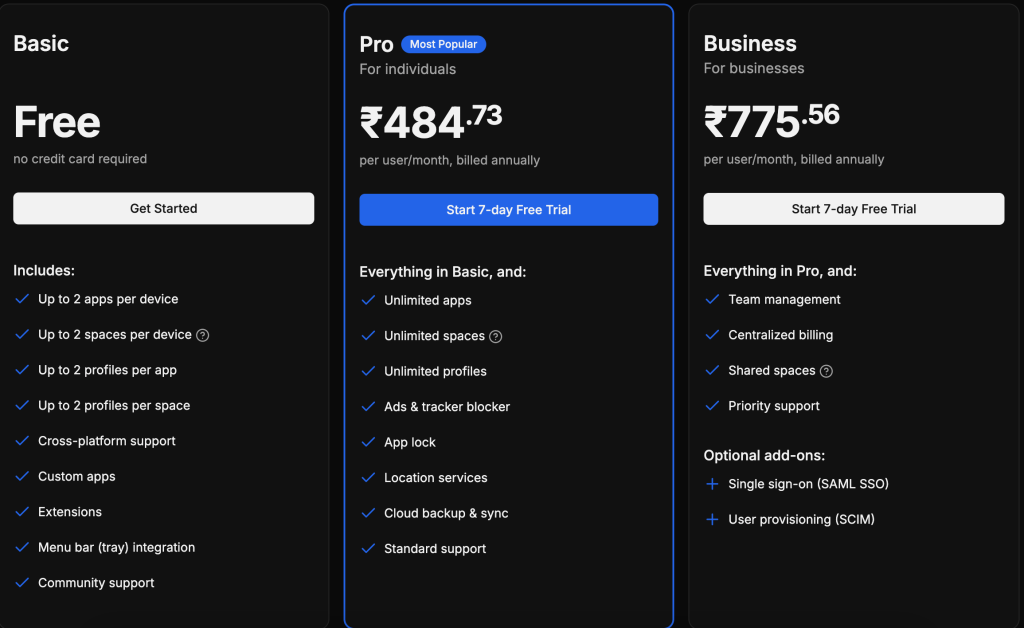
The official pricing page shows a simple public ladder in 2026:
- Basic is free.
- Pro starts at
$5per user per month billed annually.
The same page also shows free-tier limits such as:
- Up to
2apps per device. - Up to
2spaces per device. - Up to
2profiles per app. - Up to
2profiles per space.
Higher-tier highlights then move into:
- Unlimited apps, spaces, and profiles.
- Ads and tracker blocker.
- App lock.
- Location services.
- Cloud backup and sync.
- Team management.
- Shared spaces.
- Roles and permissions.
- Centralized billing.
That pricing ladder makes sense. Free lets you test the concept. Paid plans start making more sense once you need serious multi-account structure or team standardization.
One practical way to think about the pricing is this:
- Free Is For Proving The Concept.
- Pro Is For People Who Need Serious Multi-account Control.
- Team-capable Plans Are For Standardizing Shared Workspaces Across An Organization.
That framing is useful because WebCatalog’s value compounds when more accounts, more contexts, and more people are involved.
Verdict :
WebCatalog’s integration story in 2026 is not about giant connector catalogs. It is about turning a messy web-app workflow into a structured desktop environment with spaces, profiles, custom apps, extensions, and team-ready shared spaces.
That makes it much more practical than it first appears.
If your workday is full of account switching, tab overload, and context confusion, start with WebCatalog here and test whether spaces plus profiles solve more friction than another browser extension ever will.
FAQ :
What is WebCatalog best at integrating?
It is strongest at organizing existing web apps, accounts, and workflows into spaces and profiles rather than acting like a classic API-integration platform.
What are Spaces in WebCatalog?
According to the official help center, Spaces are isolated workspaces with their own apps, settings, accounts, bookmarks, browsing data, and history.
Can WebCatalog handle multiple accounts?
Yes. Profiles are designed to let you manage multiple isolated identities inside the same app or workspace.
How much does WebCatalog cost?
The public pricing page shows a free Basic tier and Pro starting at $5 per user per month billed annually, with higher-value features unlocked as you scale up.