

Intro for Beginners :
Bolt for Business is easier to understand once you stop thinking of it as “just a ride account.” In 2026, the official Bolt Business pages position it as a central control layer for company travel, team rides, office perks, expenses, and invoicing. That is the part beginners often miss.
You are not only booking a car. You are setting rules around who can travel, how billing works, how receipts flow back into finance, and how your team avoids messy reimbursement threads.
Bolt’s official business page highlights four beginner-friendly outcomes:
- Save Time With Automated Ride Reports.
- Cut Travel Costs With Competitive Per-ride Pricing.
- Gain Full Control And Visibility With Rules And Limits.
- Simplify Payments With Centralized Invoicing.
If you want to explore the setup flow while you read, start with Bolt for Business here.
What Bolt for Business Actually Covers :
The official site explains the platform in practical terms. It is built for:
- Work rides to the office, meetings, and airports.
- Bolt Drive car rental for company use.
- E-scooters and e-bikes for shorter trips.
- Bolt Food for Business for team meals and office perks.
That matters because beginners usually assume the product is only for a sales team taking taxis. In reality, Bolt is trying to make company mobility feel like one operating layer instead of four separate admin headaches.
The homepage also says Bolt for Business is used by more than 50,000+ businesses, which tells you the product is not a side experiment. It is clearly meant to support repeatable team travel workflows at scale.
Account Setup :
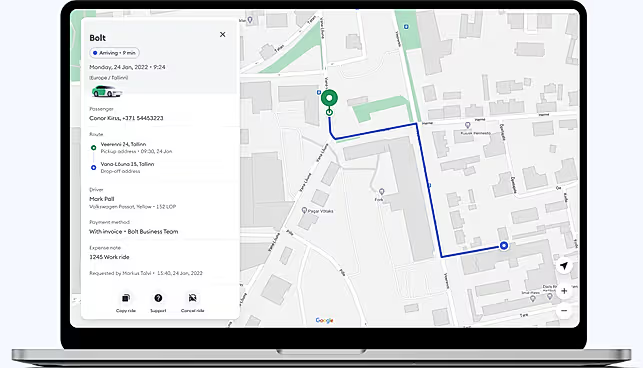
The cleanest place to start is Bolt’s three-step business setup flow.
According to the official business page, the starting process in 2026 is:
- Enter your business details and select your preferred payment method.
- Add team members and optionally set spend and usage limits.
- Start booking work travel for the team.
That sounds simple, but the real beginner decision is billing.
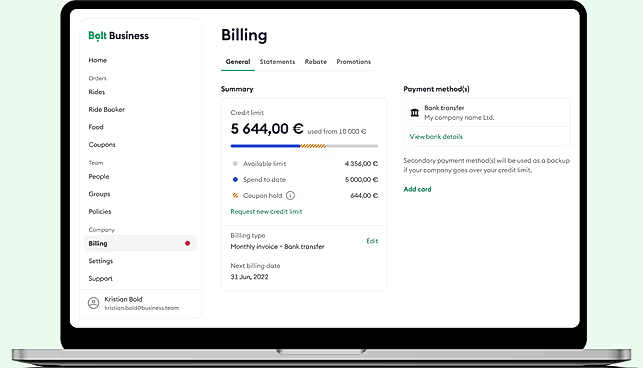
Bolt’s support article on company billing explains there are two core payment approaches:
- Credit Card Billing: Ride charges happen after each trip, all company rides can charge to one card, and no credit check is required.
- Postpaid Billing: You get monthly credit, receive a single invoice, and pay by the
15thof the month to renew credit.
For a small team, credit card billing is the easier first setup because it removes extra approval cycles. For a company that wants invoice-based finance control, postpaid billing may fit better, but it comes with credit-limit management.
If you want to test the setup yourself, start with Bolt for Business here and compare the payment model with the way your finance team already handles travel spend.
Dashboard Overview :
Bolt’s public pages do not expose every dashboard screen, but they do make the operating model clear.
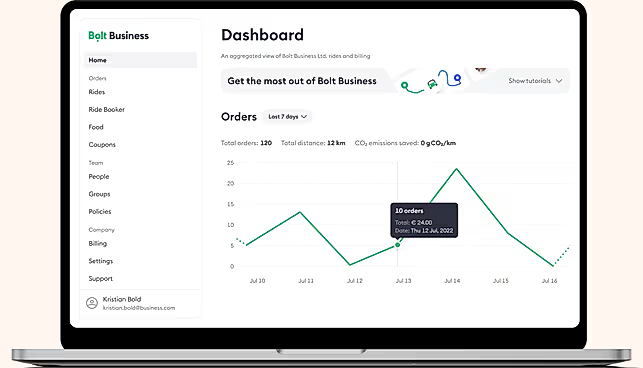
The business account is designed to give admins:
- Billing visibility.
- Group and employee controls.
- Spending limits.
- Payment-method management.
- Centralized invoices or card-based charging.
The company billing article specifically mentions the Billing tab in the Company Dashboard. That is where you review current payment information, add payment methods, switch preferred billing type, and manage cards.
Beginners should think of the dashboard as the place where travel policy turns into actual controls.
The useful mental model is:
- Riders need a smooth booking experience.
- Managers need oversight.
- Finance needs clean billing.
Bolt for Business tries to meet all three at once, which is why the dashboard matters more than the ride-booking piece.
First Workflow Walkthrough :
The easiest first real workflow is not a huge rollout. It is one team, one payment method, one policy set, and one reporting loop.
Here is the beginner-friendly sequence that makes the most sense in 2026:
Step 1: Create The Business Account
Use the main Bolt for Business signup flow and add your company details. Choose whether you want card billing or a postpaid arrangement.
Step 2: Add Team Members
Invite a small pilot group first. Do not dump your whole company into the platform on day one if you have never tested the controls.
Step 3: Set Spend Rules
Bolt’s business page says you can organize employees into groups with specific limits. That is the right time to create policies for:
- Airport rides.
- Customer meetings.
- Late-night safe transport.
- Office commute perks.
Step 4: Run A Ride And Check The Admin Trail
Book a real work trip. Confirm that the receipt lands correctly, the payment method behaves the way you expect, and the travel appears in your admin flow.
Step 5: Review Billing Output
If you are using a Work Profile or business account for expenses, make sure receipts and reporting flow back into your finance process the way Bolt promises.
This is where Bolt’s Work Profile page becomes useful even if you are focused on the larger business product. Bolt says the Work Profile can:
- Keep personal and business rides separate.
- Add company details onto receipts.
- Email receipts automatically.
- Forward receipts into tools like SAP Concur, Rydoo, Expensify, and Zoho Expense.
That means smaller teams can start with Work Profile habits while larger teams grow into the full Bolt for Business account structure.
Best Practices For New Teams :
The beginners who get the best result from Bolt are usually the ones who treat setup as policy design, not app installation.
The best practices are pretty straightforward:
- Start With One Department First.
- Pick One Billing Model And Document Why.
- Define Spend Limits Before Broad Rollout.
- Separate Work And Personal Rides Immediately.
- Test Your Receipt And Invoice Trail Early.
The Work Profile page is especially useful here because it solves a common beginner mistake: mixing personal and work rides and then trying to untangle reimbursements later.
Bolt also has a helpful sustainability angle for teams that care about ESG messaging. Its business page says Bolt for Business rides on business accounts are certified CarbonNeutral®, and Bolt scooters and e-bikes carry the same claim. That does not replace travel policy, but it can be useful for teams that want a greener short-trip option.
If you want a clean trial run, start with Bolt for Business here and test a small ride workflow before you scale it company-wide.
Common Beginner Mistakes :
The first mistake is assuming there is no meaningful setup work. There is. The product is simple to start, but the billing and policy decisions still matter.
The second mistake is choosing postpaid billing without understanding the operational implications. Bolt’s support page makes it clear that postpaid accounts work with monthly credit, invoice timing, and limits. That is fine when finance wants invoice control, but it can create confusion if the travel team expects unlimited booking flexibility.
The third mistake is rolling out to too many people before validating receipts, expense forwarding, and group-level rules.
The fourth mistake is ignoring Work Profile for employees who are not on the full company account yet. Bolt’s own page treats Work Profile as a very practical bridge for business travel and reimbursements.
The fifth mistake is treating support as a last resort. Bolt explicitly promotes dedicated multilingual customer support for business users, so it is smarter to use that channel early when billing or setup details are unclear.

Pricing And Billing Context :
Bolt for Business is a little unusual because its public pages focus more on billing models than on a standard SaaS-style monthly plan card.
The official business page says there are:
- No activation costs.
- No minimum commitment.
- Centralized invoicing for teams.
The official company billing article then adds the real operating detail:
- Credit card billing charges rides individually.
- Postpaid billing gives monthly credit and one invoice.
- Payment by bank transfer should be completed by the
15thof the month to renew postpaid credit.
That makes Bolt easier to adopt than a tool with a heavy upfront contract, but it also means you should ask a more practical pricing question:
“Which billing model will create less friction for our company?”
For some teams, that answer is clearly card billing.
For others, especially businesses with tighter travel controls, a postpaid invoicing structure will feel cleaner.
Support Resources :
Bolt gives beginners three strong support paths:
- The Main Bolt for Business Website For Account Setup.
- The Work Profile Guide For Employee-Level Business Travel.
- The Support Center For Billing And Payment Questions.
The support article is especially helpful for billing changes, card removal issues, failed payments, and switching between billing types. It is one of those pages that saves time precisely because it answers annoying operational questions before they become a ticket.
If your goal is to move quickly without building reimbursement chaos, start with Bolt for Business here and pair that with the Work Profile and billing help pages during rollout.
Final Take For Beginners :
Bolt for Business is a good beginner option in 2026 because the official product story is clear. It helps teams move people around, centralize billing, automate reporting, and keep policy control in admin hands.
The product makes the most sense for companies that want a lighter entry point into business travel management instead of a giant procurement-heavy rollout.
The sweet spot looks like this:
- Companies That Want Faster Ride Setup.
- Teams That Need Cleaner Expense Management.
- Managers Who Want Spending Rules.
- Finance Leads Who Want One Billing View Instead Of Random Receipts.
If that sounds like your setup, start with Bolt for Business here and begin with one team, one payment model, and one reporting loop.
FAQ :
Is Bolt for Business hard to set up?
No. The official site presents it as a three-step rollout: add company details, choose payment, add team members, and start booking. The real work is choosing the right billing model and limits.
What is the difference between credit card billing and postpaid billing?
Credit card billing charges after each ride to a single card. Postpaid billing gives monthly credit and one consolidated invoice that should be paid by the 15th of the month to renew credit.
What is Bolt Work Profile?
It is a free feature in the Bolt app that keeps personal and business rides separate and sends pre-filled work-ride receipts to your chosen email.
Can Bolt connect to expense tools?
Yes. The Work Profile page specifically mentions SAP Concur, Rydoo, Expensify, and Zoho Expense.