

Intro For Beginners
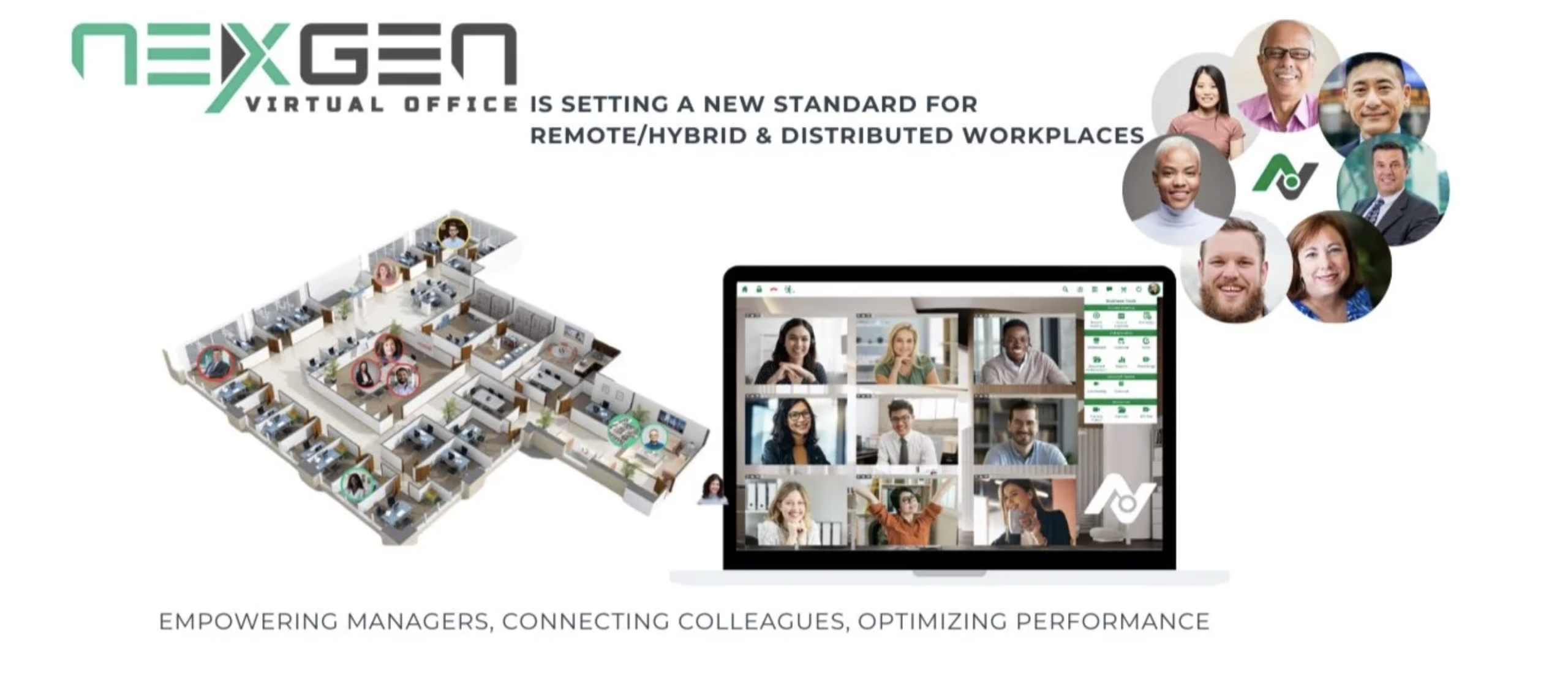
NexGen is one of those products where the official messaging immediately tells you this is not a lightweight chat app or another generic remote-work dashboard. On the NexGen Technologies site, the company describes its virtual office platform as an all-in-one solution for managing hybrid and in-office work environments in real time. On the newer NexGen Virtual Workplace site, the product is framed around collaboration, community, culture, and workforce visibility.
That gives beginners an important clue right away: NexGen is not just about joining a call. It is about recreating more of the operating feel of a workplace inside a virtual environment.
For new users, that can sound exciting and slightly overwhelming at the same time. Fair enough. Platforms that promise “everything in one place” sometimes turn into a maze before lunch. The good news is that NexGen’s official positioning is quite consistent. It wants to help teams collaborate, see who is available, manage workforce presence, and reduce the friction of hybrid or remote operations.
If you want to look at the product while you read, start with NexGen here.
What NexGen Is Trying To Solve
The official sites repeat a few themes over and over: accountability, collaboration, community, and visibility. That is useful because it helps beginners understand what problem NexGen thinks it solves.
It is not just trying to host meetings. It is trying to make distributed teams feel more organized and more visible to one another in day-to-day work.
That is a different pitch from the usual remote stack. Many teams already have chat, video, and project software. What they still lack is the sense that people know where to go, who is available, and how to work together in a more real-time shared environment.
If your company struggles with hybrid coordination, remote visibility, or support-team availability, NexGen’s positioning starts to make more sense. If you are simply looking for a basic meeting tool, this is probably more platform than you need.
Account Setup Basics
NexGen’s official sites lean toward demo-booking and contact-driven onboarding rather than a self-serve consumer-style signup story. That means beginners should expect a more guided introduction than they would get from a lightweight SaaS tool.
That is not automatically a downside. For platforms that affect team structure and workflow, guided onboarding can actually help. It usually means the vendor expects setup to be connected to business needs, not just casual browsing.
For a beginner, the practical setup sequence should look like this:
- Review the product overview and solution pages first.
- Decide which environment description matches your team best: SMB, enterprise, BPO, or CCaaS style use cases.
- Book a demo or product conversation if you need clarity on fit.
- Define one pilot team or department before wider rollout.
The product looks easiest to adopt when a company knows exactly which team problem it wants to solve first. Beginners should avoid the trap of trying to roll out a “virtual workplace transformation” all at once. That phrase alone is how IT teams end up needing aspirin.
If you want to start the process with the official team, check NexGen here and review the use-case fit before you expand internally.

Dashboard And Workspace Overview
Based on the official site language, NexGen’s workspace concept is meant to help teams operate with real-time awareness and a stronger sense of presence. The product description highlights integrated business-management tools, collaboration, and an immersive digital workplace feel.
For beginners, that means the product should be approached less like a single-purpose app and more like a team environment.
What that likely translates to in practice is:
- A way to see who is present or available.
- A way to support communication and collaboration across teams.
- A structure that helps hybrid or remote staff feel more connected to the operating flow.
- A better visibility layer for support-heavy or coordination-heavy environments.
That is why NexGen shows solution categories like SMB, enterprise, BPO, CCaaS, and Webex-related environments. The platform is clearly being sold as something operational, not merely communicative.
As a beginner, the easiest way to understand the dashboard is to ask one simple question: does this help my team know where work is happening and who can help right now? If the answer is yes, the product’s structure will probably feel intuitive faster.
Your First Workflow To Try
The smartest beginner rollout is not “let’s move the entire company.” It is one focused use case.
Three especially realistic first workflows stand out from the official solution pages:
Hybrid Team Presence And Availability
If your team needs better visibility into who is available and working where, NexGen’s workplace concept is an obvious starting point.
Contact Center Or Support Escalation
The official messaging around BPO, CCaaS, and real-time collaboration makes this a strong first use case. Teams that need to know which advanced agents are available can benefit quickly from improved visibility.
Cross-Department Collaboration
If one team keeps losing time trying to figure out where conversations belong, a shared workplace layer can help reduce routing confusion and response delays.
Beginners should pilot one of those instead of trying to build a perfect digital office on day one. Start narrow. Prove value. Expand later.
Best Practices For New Users
Here is the beginner advice I would give any team evaluating NexGen.
- Pick one department first.
- Define what “success” means before rollout.
- Use the product to solve a visibility problem, not to impress people with a fancy remote-work concept.
- Keep the first implementation tied to real collaboration pain.
- Document the before-and-after impact for response speed, visibility, and team coordination.
Why so much emphasis on focus? Because workplace platforms can become fuzzy if the company never decides what they are for. A tool like this needs a mission inside the organization.
One good sign from the official site is that NexGen is not trying to hide practical business outcomes. Testimonials mention cost reduction, remote-user visibility, and a more realistic sense of working together. Those are the kinds of results beginners should measure during the first rollout.

Common Beginner Mistakes
Treating NexGen as if it were only a video tool
That undersells the platform. The official messaging is about workplace management, presence, collaboration, and integrated tools.
Rolling It Out Too Broadly Too Fast
A large rollout without a clear use case can make the platform feel abstract and heavy. Start with one operational problem.
Ignoring The Solution Pages
NexGen clearly segments use cases like SMB, enterprise, BPO, and CCaaS. If beginners skip that framing, they may miss the configuration or positioning that best matches their team.
Expecting Consumer-Style Self-Serve Simplicity
This does not look like that kind of product. It appears to be designed for guided commercial adoption. Beginners should work with that rather than fight it.
Pricing Context
One important note for beginners: public pricing is not front-and-center in the way it is with many self-serve SaaS tools. The official experience emphasizes booking a demo, contacting the team, and exploring solution fit.
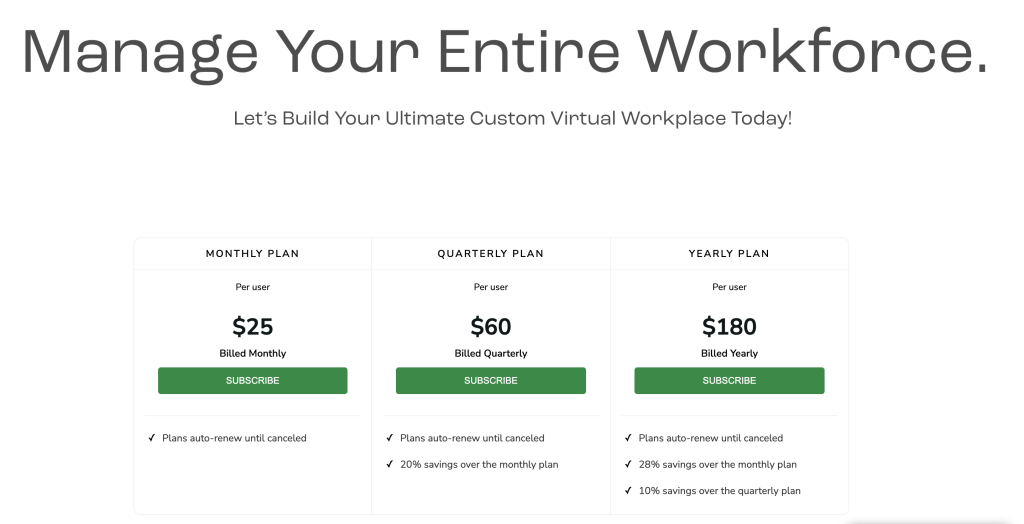
That usually means pricing depends on scope, environment, or deployment context. So if you are looking for a quick public plan table, you may not get the neat little answer you want.
That does not make the product expensive by default. It just means evaluation has to happen in context. For beginner teams, the right move is to clarify:
- Team size.
- Use case.
- Required environment.
- Collaboration and visibility needs.
Then you can judge the commercial fit properly.
If you are ready to start that conversation, review NexGen here and approach it as an operational platform decision, not a casual app signup.
Support Resources And Signals Of Credibility
The official sites give beginners a few confidence signals worth noting:
- Dedicated solution pages by environment.
- Blog and resource sections.
- White papers and FAQs.
- Contact and demo paths.
- G2 badges and customer-review style testimonials are shown on the site.
I would not treat badges alone as proof that a platform is perfect. Nobody should. But they do suggest the product is trying to serve serious business contexts rather than acting like a brand-new experiment with nice gradients and zero traction.
For beginners, the existence of use cases, solution pages, and support-oriented materials is probably the more important signal. It suggests the company expects onboarding questions and has structured the site around them.
Verdict
NexGen makes the most sense for beginners when the goal is not simply communication, but workplace visibility and real-time collaboration across hybrid, remote, or support-heavy teams. The official messaging around community, accountability, availability, and integrated tools makes that use case pretty clear.
It is probably too much platform for teams that just need a lighter meeting or chat app. It is much more compelling for organizations trying to recreate some of the operational coherence of a real workplace in a distributed environment.
If your team is struggling with visibility, escalation flow, or hybrid coordination, start with NexGen here and pilot one department before you scale.

FAQ
What is NexGen Virtual Office for beginners?
It is best understood as a virtual workplace platform for collaboration, visibility, and workforce coordination rather than just a simple video or chat tool.
Is NexGen meant for small teams or large teams?
The official solution pages show options for SMBs, enterprise environments, BPO teams, and CCaaS scenarios, so it appears designed for a range of business contexts.
Does NexGen show public pricing?
Not in a simple self-serve plan-table format on the main official experience. Beginners should expect a demo or contact-based pricing discussion.
What is the best first use case for NexGen?
A focused pilot around hybrid visibility, support escalation, or team availability is usually the smartest place to start.