


Lindy is worth a close look if your startup team is already feeling the usual early-stage squeeze: too many meetings, too much inbox cleanup, too many follow-ups living in someone’s head, and not enough time left for the work that actually moves revenue or product forward.
On its official site, Lindy positions itself as an AI assistant for inbox, meetings, and calendar work. That framing matters. This is not a generic chatbot dressed up in office clothes. It is being sold as an operations layer for busy professionals who want repetitive coordination work handled more proactively.
That makes Lindy a better fit for startups than for hobby projects. If your team has real customer conversations, a founder doing sales, a lean operations stack, and constant scheduling overhead, Lindy starts to make practical sense. If you are still so early that there is barely a workflow to automate, it may feel like buying a personal assistant before you even have a desk.
If that startup pain sounds familiar, try Lindy here and look at it as time recovery, not as one more shiny AI subscription.
Why Lindy Fits Startups Better Than Bigger Teams Expect
The official homepage leans hard into one core promise: getting time back every day. Honestly, that is exactly the language that tends to land with startup teams. Startups are not short on ambition. They are short on uninterrupted hours.
Here is where Lindy looks most startup-friendly in 2026:
- It is focused on work coordination, not just content generation.
- It highlights inbox, meetings, and calendar management right on the homepage.
- It has templates, integrations, and an app-builder-style layer that suggest teams can start simple and expand later.
- It advertises a 7-day free trial and “cancel anytime,” which lowers the risk for lean teams testing a new workflow.
The last point matters more than people admit. Startups do not just evaluate features. They evaluate friction. If a tool is expensive to trial, slow to set up, or unclear to explain to the rest of the team, it usually dies in the group chat by Friday.
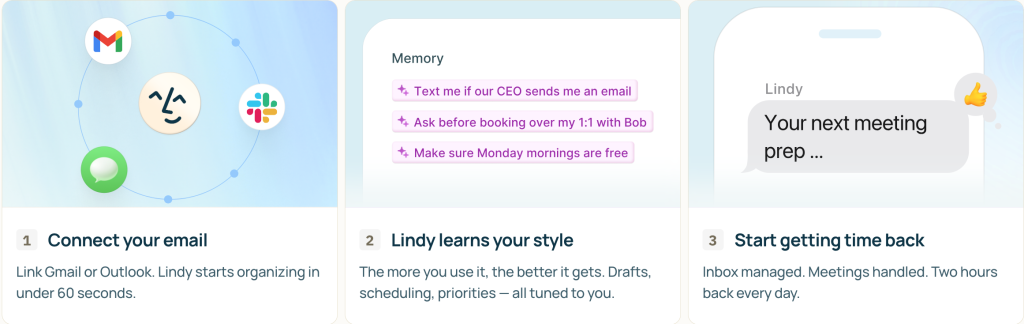
Lindy feels better suited for teams that want to start with one or two high-friction problems and then expand. A founder can use it for follow-ups. A recruiter can use it for scheduling. A customer-facing lead can use it to stay on top of replies. Then the team can decide whether it deserves a bigger role.
If you want to test whether that kind of fit is real for your company, start your Lindy trial here and map it to one concrete workflow first.
The Startup-Friendly Features That Stand Out
The official product experience highlights three areas that are especially useful for young teams: templates, integrations, and app-building flexibility. That combination matters because most startups do not need a giant automation program on day one. They need one repeatable win, then another, then another.
Proactive Inbox And Meeting Support
This is the most obvious startup use case. Early-stage companies live in email and meeting churn. Sales conversations, investor updates, hiring loops, customer questions, and internal alignment all pile into the same calendar week. Lindy’s homepage makes inbox, meetings, and calendar management central to its value proposition, which is exactly where many startup founders leak time.
The practical benefit is not glamorous, and that is why it matters. Founders do not need another tool that gives them interesting ideas. They need fewer dropped balls.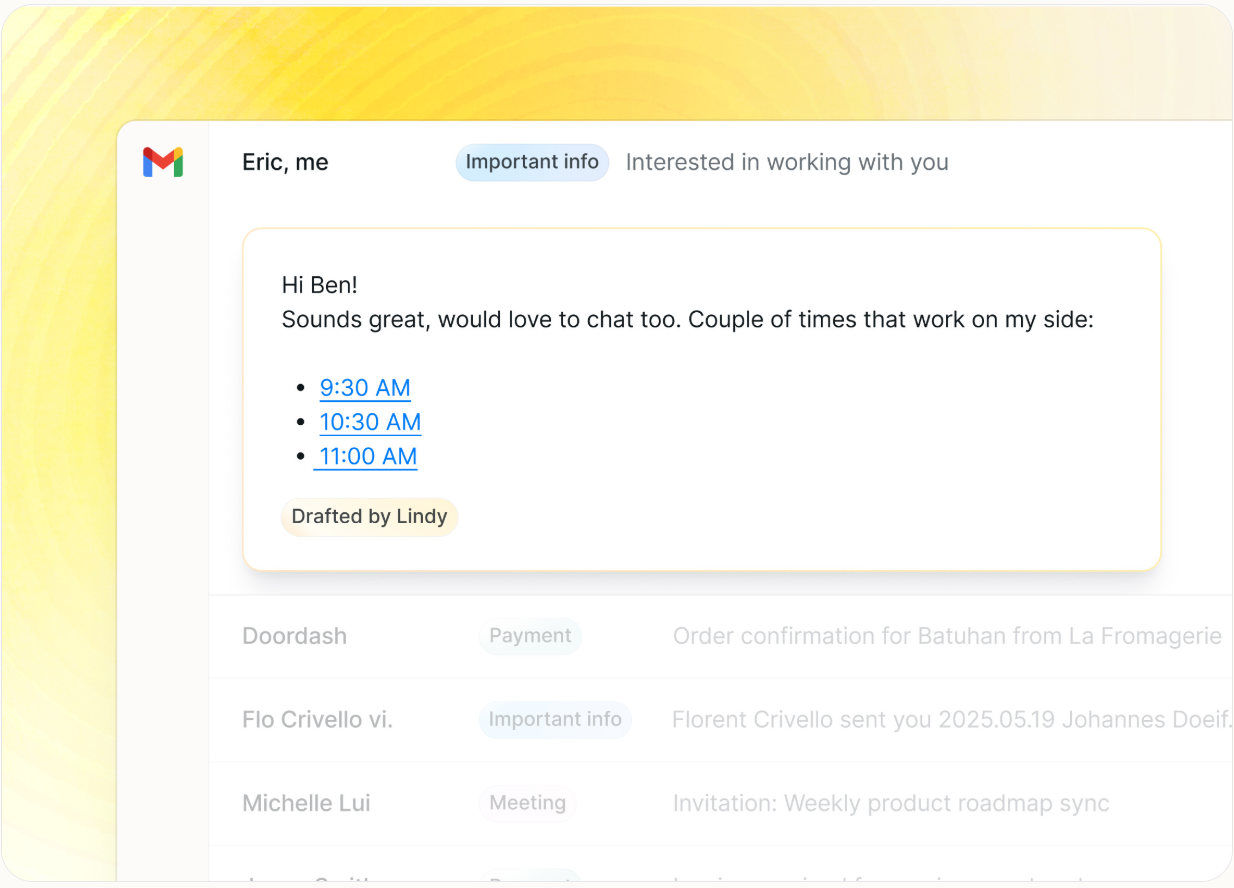
Templates For Fast Starts
Lindy surfaces templates prominently on the site, which is a strong sign that the company understands one of the biggest adoption blockers for startups: nobody has time to build everything from scratch. Templates lower the setup burden, reduce blank-page syndrome, and help teams test specific use cases without an operations consultant sitting next to them.
Integrations That Help It Fit An Existing Stack
The integrations emphasis is important because startups rarely run on one pristine system. It is usually a stack held together by speed, duct tape, and good intentions. A tool that can connect into that reality has a much better chance of surviving longer than a pilot week.
Expandability Through App Builder Positioning
The site’s app-builder framing suggests, Lindy is meant to grow from assistant behaviour into more customised workflow behaviour. For startups, that is a plus. It means you can begin with founder-level productivity and later turn the platform into something more team-shaped.
A Real-World Startup Scenario
Picture a twelve-person SaaS startup where the founder is still handling pipeline calls, the head of growth is juggling partner outreach, and the operations lead is forever rescheduling meetings and chasing confirmations. Nobody is technically “doing admin,” but everybody is losing time to admin.
That is the kind of company where Lindy can look better than a big, vague AI platform. The use case is clear:
- Summarize important inbound messages.
- Keep meetings from slipping through the cracks.
- Reduce manual back-and-forth on scheduling.
- Support repeatable communication patterns without sounding robotic.
What I like about that scenario is that the value is easy to measure. If a startup saves a few hours per person every week on coordination drag, that is real operating leverage. If it only produces clever summaries that nobody acts on, then it is just another AI toy with a nice landing page.
Real talk: Startups should test Lindy against a painful workflow, not against curiosity. Curiosity creates weak trials. Friction creates honest trials.
If you want to run that kind of real test, give Lindy a spin here and put one founder or ops-heavy role through a full week with it.
Pricing In Startup Context
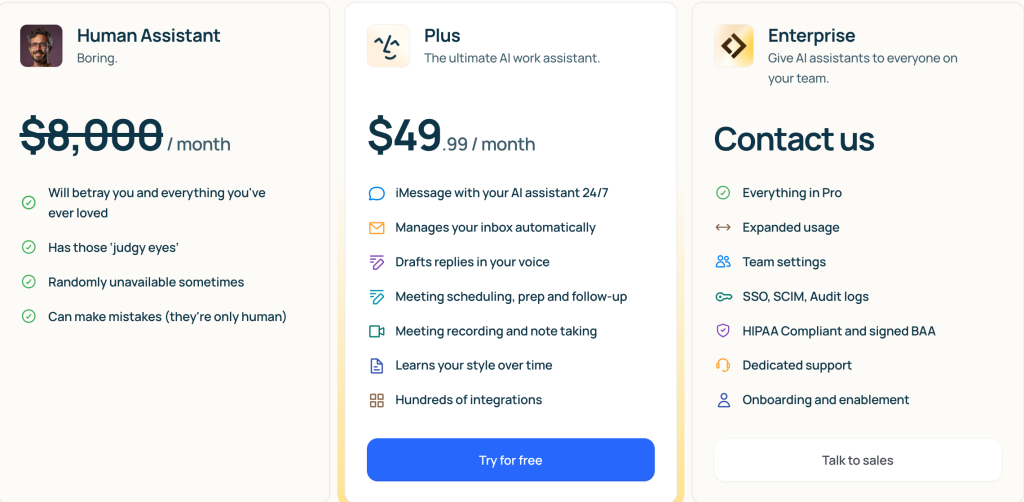
The official site makes pricing discoverable and also promotes the 7-day free trial with cancel-anytime language on the homepage. That is already better than the usual “book a demo to learn whether you can afford it” routine.
What matters for startups is not just list pricing. It is ramp cost. Can a team try it without process drama? Can one person test it without a procurement detour? Can the company learn fast enough to decide whether it deserves wider use?
That is where Lindy looks startup-friendly. A free trial gives small teams room to validate fit before they commit. The public pricing page also signals maturity. Even if a startup eventually needs stronger controls or more custom setup, it can at least begin with a self-serve mindset.
I would still recommend that startups evaluate pricing against saved time and avoided follow-up chaos, not just the sticker. If Lindy clears a real workflow bottleneck, the math gets easier. If the team only uses it occasionally, the price will feel heavier fast.
Alternatives Startups Might Consider
Startups looking at Lindy are usually trying to solve one of three problems: personal productivity, workflow automation, or team coordination. That means the alternative set is messy.
Some teams will look at basic AI assistants and think, “Good enough.” Others will compare it to classic automation tools. A few will simply keep patching things together with their inbox, calendar, and good intentions. That last option is free, but it is also how people wind up missing calls and promising follow-ups they never send.
What makes Lindy interesting is the way it blends assistant behavior with workflow structure. It is not just “ask AI something.” It is closer to “set up an assistant that keeps part of your workday moving.” For startups, that is the more relevant comparison.
So when should you look elsewhere?
- Choose a simpler assistant if you only need occasional drafting help.
- Choose a broader automation stack if your main problem is systems integration rather than human coordination.
- Choose Lindy if your pain is mostly around inbox, meetings, and follow-up execution.
Setup Steps For A Startup Team
If I were rolling Lindy out inside a startup, I would not start company-wide. I would start with one role and one workflow.
Step 1: Pick One Painful Repeating Task
Use Lindy for one narrow job first. A founder follow-up loop. Recruiting coordination. Meeting prep and recap flow. One lane only.
Step 2: Use Templates Before You Customize
The site gives templates a prominent role for a reason. Use them. Early customization is usually where startup pilots go to die.
Step 3: Connect Only The Needed Systems
Do not wire the whole company into a trial. Connect the tools needed for the first workflow and prove value quickly.
Step 4: Measure Time Saved And Follow-Through
Do not judge the pilot by “cool factor.” Judge it by whether emails get answered faster, meetings stay on track, and fewer next steps fall through the floor.
Step 5: Expand Carefully
Once one workflow works, add another. Founders often over-rollout AI tools. Slow expansion tends to create better retention and less internal eye-rolling.
Where Lindy Might Not Fit
Lindy is not automatically right for every startup.
If your team is still pre-process, there may not be enough structure for it to amplify. If nobody owns follow-ups, a tool will not magically create accountability. If the team mainly needs deep CRM automation or broader back-office orchestration, Lindy may feel too centered on human work coordination.
There is also a cultural fit issue. Some startup teams love testing assistant workflows. Others hate feeling like they are one setup mistake away from added complexity. Lindy looks strongest in teams that already know where the repetitive drag lives.
Verdict
Lindy looks genuinely promising for startups in 2026 because it aims at one of the most expensive early-stage problems: coordination overload. The official positioning around inbox, meetings, calendar support, templates, integrations, and expandable workflows makes sense for lean teams that need leverage more than they need another dashboard.
It is probably not the first tool I would buy for a startup with no clear process. It is much easier to justify for a startup that already has real volume, real follow-up pressure, and real calendar chaos.
If your team wants to recover time without building a giant internal automation project, try Lindy here and test one painful workflow before you scale it.
FAQ
Is Lindy good for startups in 2026?
Yes, especially for startups dealing with inbox overload, scheduling complexity, and repeated follow-up work. Its official messaging is clearly aimed at helping professionals recover time from coordination-heavy tasks.
Does Lindy offer a free trial?
Yes. Lindy advertises a 7-day free trial on its homepage and says you can cancel anytime.
What type of startup team gets the most value from Lindy?
Teams with active sales, recruiting, support, or operational coordination needs are more likely to feel the payoff than teams that are still too early to have structured workflows.
Is Lindy better as a founder tool or a team tool?
It can start as a founder productivity tool, but the templates, integrations, and app-builder positioning suggest it can grow into a broader workflow tool if the initial use case proves valuable.