

Intro For Beginners :
Aircall is the kind of software that feels less intimidating once you understand what it is really replacing. It is not only a business phone number with a prettier dashboard. On its official site, Aircall positions itself as an AI-powered platform for customer communications that brings together voice, automation, integrations, and coaching features. That is a bigger promise than a basic VoIP line, and for a lot of beginner teams, that is exactly why it is interesting.
If your company is moving away from scattered phones, shared mobiles, or a patchwork of random call tools, Aircall offers a more structured way to handle conversations. The beginner appeal is pretty obvious: one system for numbers, routing, users, integrations, and reporting, with AI features layered on top instead of bolted on later.
This guide is for first-time users who want a clear picture of what Aircall does, how to set it up, what to configure first, and where beginners usually trip themselves up in 2026.
If you want to test the platform while reading, start with Aircall here.

What Aircall Actually Is :
Aircall is a cloud phone and customer conversation platform built for support, sales, and operations teams that need more than a plain calling app. On its official pages, Aircall emphasizes:
- voice and call center workflows
- 100+ integrations and API access
- IVR, call recording, and click-to-dial
- desktop, Android, and iOS softphones
- unlimited simultaneous outbound calls
That mix matters because it tells you where Aircall is strongest. It is designed for teams that want calls to live inside a broader workflow rather than sit off to the side as their own little island.
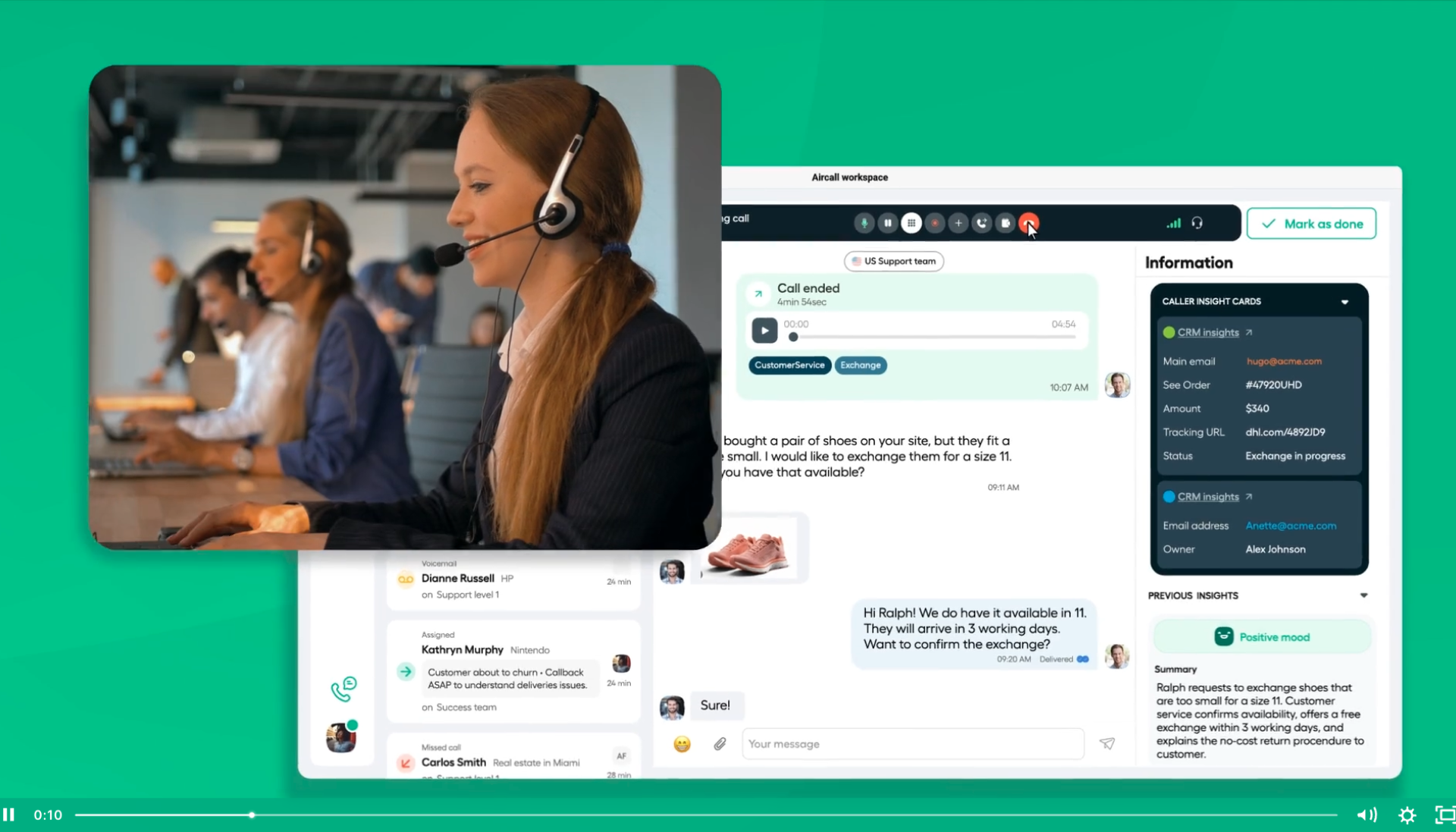
The official onboarding materials also make it clear that Aircall separates the admin side from the day-to-day usage side. You will see references to the Aircall Dashboard and Aircall Workspace, which is honestly a smart setup for beginners. Admins handle numbers, users, routing, settings, and integrations. Reps and agents focus on conversations, queues, and follow-up actions. That separation makes training less chaotic.
Account Setup :
Aircall’s onboarding resources outline a beginner-friendly setup path:
- Log in and learn the dashboard.
- Invite users and group them into teams.
- Create or port numbers.
- Run the network check.
- Install integrations.
- Add call tags and workflow basics.
That sequence is better than the usual “click around and hope for the best” experience a lot of communication tools quietly force on new users.
Step 1: Learn The Dashboard
Before touching advanced routing or AI features, spend a little time learning where the main controls live. Beginners who skip this usually end up doing setup twice. The faster you understand the difference between admin settings and day-to-day workspace activity, the smoother the rollout feels.
Step 2: Add Users And Teams
User setup is not just a box to tick. It shapes ownership, permissions, reporting, and routing later on. Early in the process, decide:
- who needs admin access
- who will take calls as agents or reps
- which teams need separate numbers or queues
- who is responsible for monitoring quality and tags
If you want to see how that structure looks inside the platform, try Aircall here and set up one small pilot team first.
Step 3: Numbers And Routing
One of the first real decisions is whether you will create new numbers or port existing ones. For a new team, starting with one line and one simple workflow is the safer move. Real talk: nobody wins an award for building a giant phone tree on day one.
Dashboard Overview :
The most useful way to understand Aircall is to think of it in building blocks. From the official documentation and pricing pages, the main beginner-facing areas are:
- users and teams
- phone numbers
- call routing
- integrations
- call tags
- billing and usage
Aircall also highlights features that matter right away for new teams:
- IVR
- call recording
- click-to-dial
- SMS and MMS support on supported plans
- API access
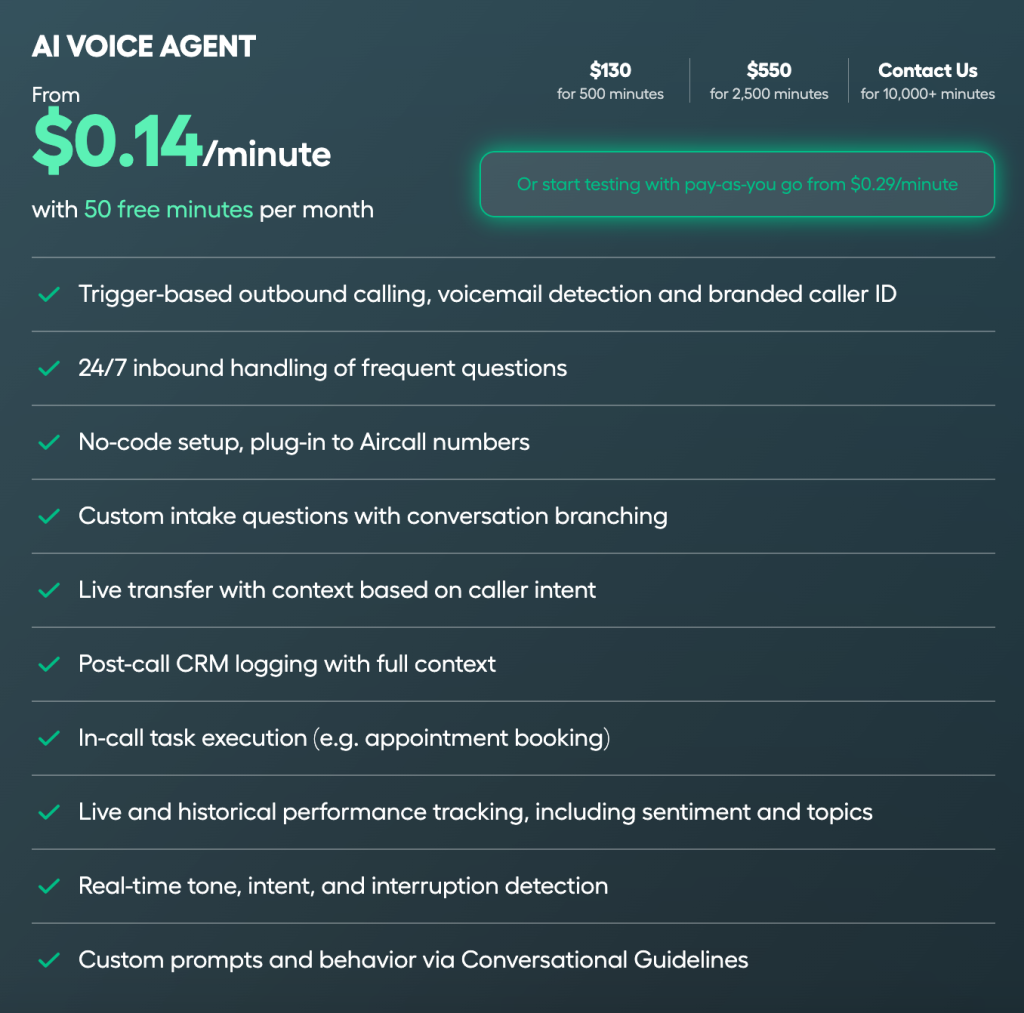
- AI Voice Agent minutes
This is why the platform feels more operational than a simple dialer. You are not only buying a number. You are building a repeatable conversation system that can plug into the rest of your stack.
First Workflow Walkthrough :
If I were guiding a new team through its first Aircall rollout, I would keep it boring on purpose:
- Create the account and invite one admin plus a tiny pilot team.
- Add or port one number.
- Set up one call route with either a direct path or a simple IVR.
- Connect one or two important tools, such as a CRM or support desk.
- Test inbound and outbound calling.
- Add tags so reporting starts cleanly.
That is enough to validate whether the product fits without creating unnecessary complexity.
One beginner mistake I see a lot is trying to design the perfect setup before the team has used the product for a full day. Aircall looks strongest when you launch a small live workflow first, then improve it after you have actual call volume and team feedback.
Best Practices For Your First Week :
Your first week in Aircall should be about confidence, not perfection. Here is the practical checklist I would use:
- keep your first routing tree simple
- run the network check before blaming the software
- document who owns numbers, tags, and integrations
- connect your main CRM or help desk early
- review call recordings to catch workflow mistakes fast
The reason this matters is simple: when call quality, ownership, and tagging are fuzzy, teams start distrusting the system. Once that happens, adoption gets harder.
If you want a hands-on way to learn the flow, start with Aircall here and test one small team workflow end to end.
Pricing And Plan Context :
Aircall’s pricing page currently highlights two main plans:
- Essentials
- Professional
The same page also notes:
- annual billing can save up to 25 percent
- there is a 3-license minimum
- 100+ integrations and API access are highlighted as core value points
One especially useful detail from Aircall’s official support content is that AI Assist became included in the Professional plan starting in February 2026. That matters because new buyers comparing tiers might otherwise assume AI capabilities are always an extra purchase.
For beginners, the plan split looks fairly clear:
- Essentials fits smaller teams that mainly need reliable calling and core workflow features.
- Professional makes more sense for teams that want deeper performance, conversation intelligence, and AI support.
The better question is not “which plan is cheapest?” It is “which plan fits the way my team actually communicates?” A cheaper plan is not a win if the team outgrows it immediately or avoids using it.
Common Beginner Mistakes :
Doing Too Much On Day One –
Beginners often overbuild. They configure every queue, every tag, every route, and every integration before they have learned the basics. That creates confusion fast.
Ignoring Network Checks –
Aircall’s own onboarding path calls out the network check for a reason. If your network quality is weak, the platform will feel worse than it really is, and users will blame the software first.
Delaying Integrations –
Aircall positions integrations as one of its strongest advantages. If you postpone them too long, you are not really seeing the full workflow benefit.
Not Defining Ownership –
If nobody knows who owns setup, numbers, tags, and routing decisions, the admin side becomes messy very quickly.
Support Resources And Who Aircall Fits Best :
Aircall offers pricing documentation, onboarding resources, role-based getting-started paths, and broader help content. That support structure is genuinely helpful for beginners because it lowers the learning curve.
I think Aircall makes the most sense for:
- support teams that want cleaner call handling
- sales teams that need calling plus CRM connectivity
- growing businesses replacing old-school phone setups
- operations teams that want shared visibility across conversations
It makes less sense for teams that barely use the phone, do not need structured routing, or are only looking for the cheapest possible number.
That fit matters more than people admit. A modern phone platform is great when the team actually needs collaboration, reporting, routing, and integrations. If not, the extra structure can feel like overkill. Beginners should judge Aircall based on how often the team handles live conversations and how much visibility the business needs around them.
If Aircall sounds like the right fit, try Aircall here and judge it based on one real workflow, not just a quick dashboard tour.
FAQ :
Is Aircall beginner-friendly in 2026?
Yes. The official onboarding resources are clear, the admin and user workflows are separated sensibly, and the setup path is easier to follow than a lot of older business phone tools.
What should beginners configure first?
Start with users, teams, numbers, network checks, one simple route, one or two integrations, and basic call tagging.
Does Aircall include integrations?
Yes. Aircall highlights 100+ integrations plus API access on its official pricing and product pages.
Which plan should most new teams look at first?
Most smaller teams should compare Essentials and Professional based on whether they need deeper AI and performance support right away.
Is Aircall worth trying for a new team?
If your team needs a modern cloud calling workflow with integrations, routing, and room to grow, yes. The easiest next step is to start with Aircall here and launch a small pilot before doing a bigger rollout.