


Why Integrations Matter :
InboxAlly is not the kind of tool that becomes valuable only after a complicated platform migration. Its integration story is much more practical: add seed contacts to the email platform you already use, send campaigns that include those seeds, and use InboxAlly to help train mailbox providers to treat your sending domain more favorably.
That matters in 2026 because email teams rarely work from one clean system. A SaaS company may send lifecycle emails through one platform, newsletters through another, cold outreach through a third, and CRM emails from a sales tool. If a deliverability product only works with one sending platform, the integration promise breaks quickly.
InboxAlly’s official integration materials say it works with any email platform that can send to a list of addresses. They also highlight dedicated paths for platforms such as Klaviyo and HubSpot, plus an API for teams that need programmatic control over seeds, sender profiles, and broadcast data.
If you want to evaluate the setup while you read, start InboxAlly here.
Top Integrations :
The most important InboxAlly integration is the universal workflow. It is not flashy, but it is the reason the product can fit many stacks. If your email tool can send to a list or segment, you can add InboxAlly seed addresses and include them in your campaigns.
That universal setup is useful for:
- Email service providers that do not have a native InboxAlly connector.
- Custom SMTP sending systems.
- Sales or marketing stacks with multiple sending tools.
- Agencies managing different tools across clients.
InboxAlly also has more guided integration paths for common platforms. The official integrations page calls out HubSpot and Klaviyo, and the docs list additional guides for Mailchimp, AWeber, GetResponse, Google Postmaster Tools, and API-based use cases.
The practical takeaway: InboxAlly’s integration model is not one single connector. It is a set of connection paths depending on how your team sends email.
Popular Tech Stacks
E-commerce Stack –
For e-commerce teams, Klaviyo is the obvious example. InboxAlly’s integration materials describe syncing seed contacts into Klaviyo so teams can include those addresses in campaigns and support inbox placement work. That makes sense for e-commerce because a lot of revenue depends on promotional, lifecycle, and recovery emails actually reaching the inbox.
The key workflow is simple: keep your usual campaign process, add the InboxAlly seed setup, and monitor whether placement improves over time.
CRM-Led Stack –
HubSpot is a clean example for CRM-led teams. InboxAlly’s HubSpot docs describe connecting through the account integrations area, syncing seed contacts into HubSpot lists, validating contacts, and monitoring sync activity.
That is useful when marketing and sales teams already live inside HubSpot. The deliverability layer can support the system without asking users to abandon the CRM.
Custom Or Agency Stack –
Agencies and high-volume senders often need more than a native connector. InboxAlly’s API documentation says the REST API gives programmatic access to seeds, sender profiles, and broadcast data. That opens up workflows such as syncing seed lists into internal tools, automating seed shuffling, pulling broadcast placement data, or updating sender engagement rules.
For an agency, this can be the difference between a manual client-by-client setup and a repeatable operations process.
[IMAGE: InboxAlly dashboard showing seed contacts and sender profiles]
Quick Integration Comparison :
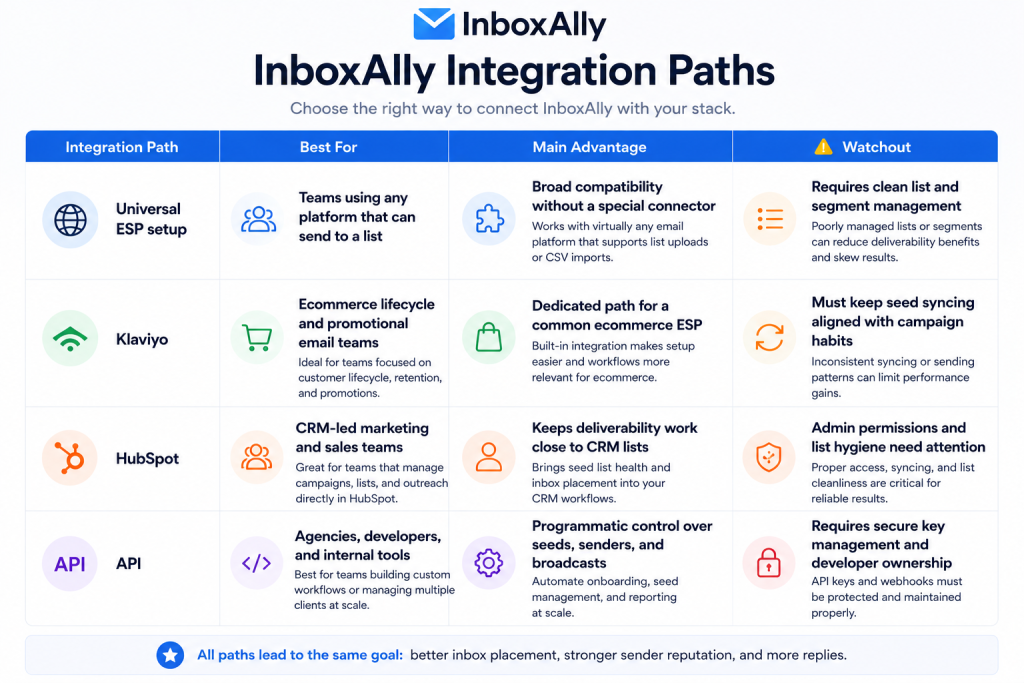
The right choice depends less on the brand name of your email platform and more on who owns the sending workflow.
Setup Guide :
Start by choosing the lowest-friction path. If your email platform has a dedicated InboxAlly guide, use it. If it does not, use the universal setup. If your team needs automation across accounts or reporting systems, consider the API.
Step 1: Confirm Your Sending Source
List every platform that sends email from your domain. Include marketing automation, newsletter tools, CRM sequences, transactional systems, and any custom sender. Deliverability work gets messy when one hidden sender damages the domain while everyone else is optimizing the visible campaigns.
Step 2: Add Seed Contacts Correctly
For a universal setup, download or copy the InboxAlly seed addresses, create a dedicated list, segment, tag, or group inside your email platform, and include those seed contacts in campaigns. The official guidance emphasizes that if your platform can send to email addresses, it can generally work with this method.
Step 3: Keep Seeds Separated From Buyers
Do not mix seed contacts casually with customers, leads, or suppression rules. Name the list clearly, document who owns it, and make sure campaign managers know why those contacts are present.
Step 4: Monitor Broadcast And Placement Data
InboxAlly’s API docs describe broadcast data that can include placement breakdowns across primary inbox, promotions, spam, and inboxing percentage. Even if you are not using the API, the point is the same: integration is only useful if the team reviews the output and adjusts sending behavior.
Step 5: Turn The Setup Into A Routine
Deliverability is not a one-time install. Assign a recurring review cadence for seed status, sender profile health, and campaign placement. If you are managing several domains, document the workflow so it is repeatable.
If you want to test this with your current stack, open InboxAlly here.
Automation Examples :
Agency Client Reporting –
An agency can use InboxAlly’s API to pull broadcast data into an internal dashboard. That gives account managers a single place to review inbox placement signals across clients instead of logging into every account separately.
Seed Shuffling Workflow –
InboxAlly’s API documentation describes seed shuffling and notes that the API can be used to trigger and check shuffling status. That is useful for teams that want a controlled monthly maintenance process rather than manual reminders.
Sender Profile Management –
The API also covers sender profiles and engagement rules. For agencies or multi-brand operators, that means profile updates can be handled in a more structured way, especially when domains move from warmup to normal sending or need repair-oriented settings.
Broadcast Data Export –
Broadcast data can be pulled for reporting or analysis. A growth team could combine it with campaign performance data to understand when poor engagement is a messaging problem, a list problem, or a placement problem.
API Overview :
The InboxAlly API is the integration path for teams that need more control than the dashboard or native guides provide. The official API documentation says requests use an API key in the X-API-KEY header and go to https://api.inboxally.com.
The API is organized around three main resource groups.
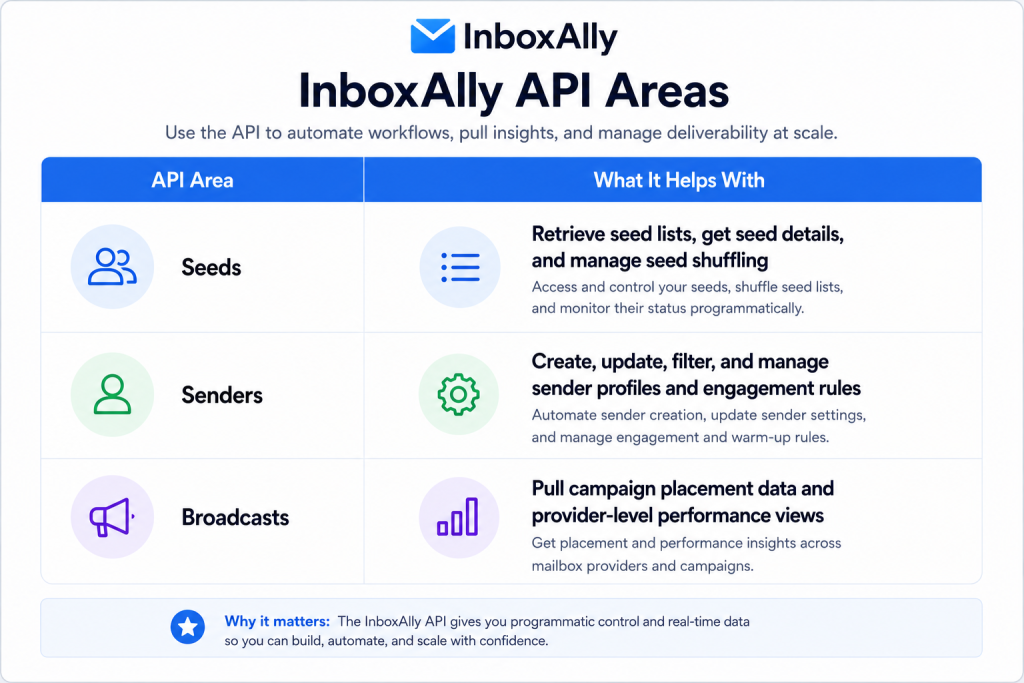
That makes the API especially useful for developers, agencies, platforms, and power users. It is probably unnecessary if your only goal is to add seeds to one ESP. In that case, the universal setup or native guide is likely enough.
The biggest API caution is security. API keys provide account-scoped access, so they should never be placed in client-side code or public repositories.
Pros And Cons :
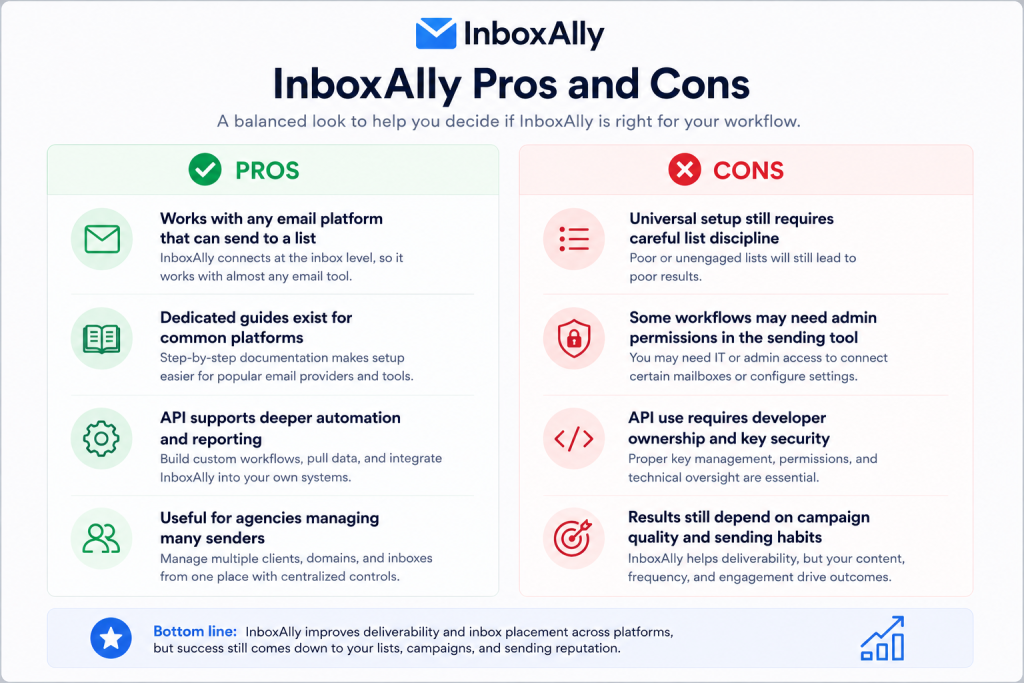
The honest view is that InboxAlly’s integration strength is flexibility. The tradeoff is that flexible systems need clear internal process.
Troubleshooting :
If an InboxAlly integration is not behaving as expected, start with the basics.
First, confirm the seed contacts are actually included in the campaigns you care about. A seed list that exists but is not mailed will not help the workflow.
Second, check whether your email platform suppresses, filters, or excludes the seed contacts. Some platforms can silently skip contacts based on consent, bounce, segment, or suppression rules.
Third, verify sender identity. If one domain or subdomain is being monitored but another is sending the actual campaign, the data will be confusing.
Fourth, for API setups, verify authentication, endpoint usage, and pagination. InboxAlly’s docs describe API key authentication and cursor-based pagination for larger lists.
Finally, do not judge the setup from one campaign. Deliverability work needs a pattern of sends, reviews, and adjustments.
Best Fit :
InboxAlly is best for teams that already send meaningful email volume and need better control over placement. It is especially useful for e-commerce brands, B2B marketers, agencies, and teams managing multiple senders.
It is less useful if your email problem is mainly poor copy, weak targeting, old lists, or inconsistent sending. InboxAlly can support deliverability work, but it cannot make a bad campaign strategy healthy by itself.
If your team is serious about improving inbox placement, try InboxAlly here and start by mapping every tool that sends from your domain.
FAQ :
Does InboxAlly work with any email platform?
Yes. InboxAlly’s official integration guidance says it works with any email platform that can send to a list of email addresses.
Does InboxAlly have native integrations?
InboxAlly provides dedicated guidance for platforms such as Klaviyo and HubSpot, and its docs also reference guides for tools such as Mailchimp, AWeber, GetResponse, and Google Postmaster Tools.
Does InboxAlly have an API?
Yes. The InboxAlly REST API provides programmatic access to seeds, sender profiles, and broadcast data.
Who should use the InboxAlly API?
The API is best for agencies, developers, platforms, and power users who want to automate seed management, sender configuration, engagement tuning, or reporting.
Is InboxAlly a replacement for good email practices?
No. It supports deliverability workflows, but you still need clean lists, relevant campaigns, consistent sending behavior, and proper domain management.