

Why Nickel’s Best Features Deserve A Close Look :
Nickel is one of those products that looks easy to summarize until you actually study the official site. At first glance, it sounds like a payments tool. Then you realize it combines accounts receivable, accounts payable, business cash balance, international and domestic payments, QuickBooks syncing, and an inbox-based AI finance agent called Penny.
That mix matters because most finance teams are not short on tools. They are short on clean workflows.
The official homepage frames Nickel around cash flow for “America’s core businesses,” and the public pricing and feature pages make the use case very concrete: free ACH on every plan, payments across 135+ countries, 2% APY on Nickel Balance, QuickBooks integrations, large transaction handling, and AI support through Penny.
That is a strong feature story because every one of those items maps to a real finance pain point.
If you want to inspect the product while reading, start with Nickel here.
Feature #1: Free ACH On Every Plan :
This is the feature that jumps off the page first because Nickel does not hide it in tiny print. The official site says ACH is free on every plan. The public pricing FAQ also states that Core is $0 per month and includes unlimited free ACH with no transaction fees.
That is a big deal because ACH costs quietly pile up in a lot of B2B payment systems.
Nickel’s public pricing details go further:
- Core Is $0 Per Month.
- ACH Is $0 On Every Plan.
- Core Has A $25,000 Per-Transaction Limit.
- Plus Raises That Limit To $1M.
- There Is No Monthly Minimum.
That changes the buying conversation. Instead of asking whether the platform can technically send a payment, buyers can ask whether Nickel removes enough payment friction to simplify day-to-day operations.
Real talk: free ACH is not a “nice extra.” For many businesses, it is the part that makes the whole product worth taking seriously.
Feature #2: Penny, The AI Finance Agent In Your Inbox
The official Nickel site gives Penny a lot of space, and that makes sense. Penny is positioned as an AI finance teammate that lives in your inbox, not as a separate dashboard you have to remember to open.
According to the official homepage, Penny can:
- Follow Up On Unpaid Invoices.
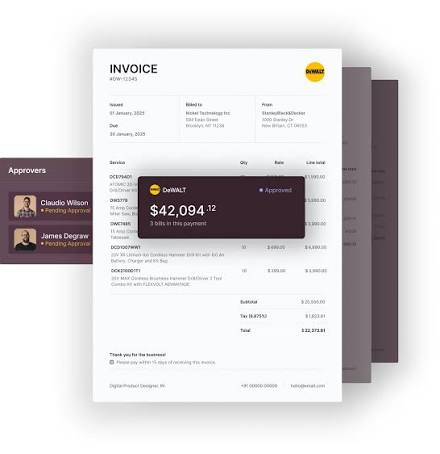
- Prep Bills For One-Click Approval.
- Build Reports On Request.
That is a smart feature direction because financial work is full of repetitive communication loops. Someone has to chase a payment, confirm a bill, gather data, or answer a “what happened here?” question. Nickel’s public framing is that Penny handles a meaningful share of that grunt work inside the place most teams already operate: email.
I like this feature because it is practical. It is not “AI” in the vague investor-deck sense. It is AI aimed at collections, payables prep, and reporting support.
If that inbox-native model is what your team needs, open Nickel here and look at how the Penny workflow is explained from the source.
Feature #3: AR And AP In One Flow
A lot of products are good at one side of the money movement and awkward on the other side. Nickel’s public site is stronger because it plainly covers both:
- Accounts Receivable To Request And Collect Payments.
- Accounts Payable To Pay Vendors And Contractors.
That matters because cash flow pain rarely respects software categories. A business can be great at invoicing customers and still bad at managing outgoing payments. Or the reverse. Nickel’s appeal is that it tries to keep both sides inside one operating model.
The official site also lists multiple payment methods:
- ACH.
- Credit And Debit Cards.
- US And Global Wires.
- Paper Checks.
Combined with the 135+ country support noted on the homepage, that gives Nickel a much broader feature footprint than a basic invoice sender.
The best part is that the official positioning stays understandable. Nickel is not trying to make finance feel mystical. It is saying: get paid, pay people, keep books synced, reduce the chase, and stop losing time to payment friction.
Feature #4: Nickel Balance With 2% APY
The official site says Nickel Balance lets businesses earn 2% APY on idle cash, accrued daily, while still allowing funds to be withdrawn or spent.
That is a quietly strong feature.
A lot of finance platforms focus only on payment rails. Nickel adds a working cash-balance story on top of those rails. That can matter for operators who do not want idle operating cash to sit completely flat while still needing the liquidity to move money quickly.
Public Nickel materials also tie this into speed:
- Incoming And Outgoing Payments Settle Instantly On Nickel Balance.
- Expedited ACH Is Available On Balance.
- Plus And Pro Improve Settlement Timing.
This feature will not matter equally to every buyer. If your balances stay tiny or move out instantly, the APY piece is less relevant. But if your business regularly holds meaningful operating cash between collections and disbursements, it becomes much more interesting.
Feature #5: QuickBooks Sync And Finance Ops Cleanup
The official site and pricing FAQs make a strong point about QuickBooks:
- QuickBooks Online Is Supported.
- QuickBooks Desktop Is Supported.
- Invoices, Payments, Vendors, And Chart Of Accounts Stay Matched Automatically.
That is a real power-user feature because broken accounting sync is where a lot of payment tools become annoying.
Nickel also highlights:
- 1099 Handling.
- Real-Time Reconciliation Positioning.
- No Batch Deposit Confusion.
- Books That Stay In Sync.
Those details matter more than flashy marketing claims because they reduce financial cleanup work after the payment is already sent or received. Plenty of platforms help you move money. Fewer helps you avoid the bookkeeping mess that follows.
If your team lives inside QuickBooks already, start with Nickel here and compare the official sync story against the manual work you still do today.
Features That Are Easy To Miss :
Nickel has a few other official features that deserve mention because they are easy to overlook:
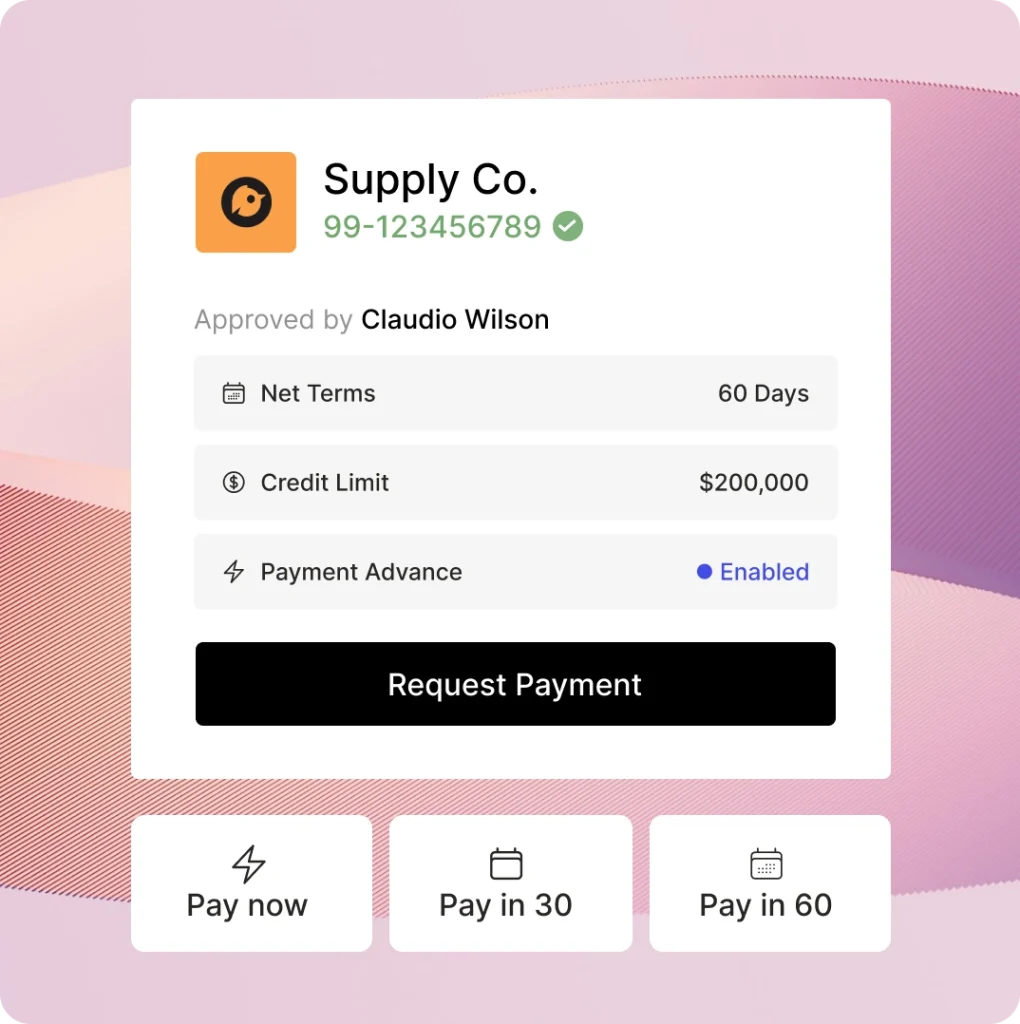
- $1M Payments With No Surprise Holds.
- Domestic And Global Transfers Across 135+ Countries.
- US-Based Support Team.
- Vendor Verification On Higher Plans.
- Dedicated Onboarding And Account Management On Higher Tiers.
Those are not as headline-friendly as free ACH or Penny, but they are the kind of features that become very important once the business is moving real money regularly.
The support angle is worth noticing, too. Finance software is not like a note-taking app. When money is stuck, support quality matters fast. Nickel’s site leans into phone-ready human support, which is a reassuring operational feature rather than a decorative one.
What Makes Nickel Unique Versus Competitors :
Nickel stands out because it combines low-friction payment economics with workflow assistance and accounting cleanup.
That combination is rare.
Some competitors are strong on invoicing but weak on payable flows. Some are strong on payables but make receivables clunky. Some automate finance work, but still leave pricing or bookkeeping messy. Nickel’s public materials suggest it is trying to solve all three:
- Lower Payment Friction.
- Better Cash Visibility.
- Less Manual Finance Admin.
The AI angle helps, but it is not the only reason the product is compelling. The real uniqueness is that the finance stack feels tied together instead of stapled together.
Which Businesses Benefit Most?
Based on the official positioning, Nickel looks strongest for:
- Contractors.
- Manufacturers.
- Distributors.
- Services Businesses.
- Core B2B Operators That Move Money Frequently.
The public site repeatedly points to practical business categories rather than abstract “everyone” messaging. I actually like that. It suggests Nickel knows its market.
If your team mostly needs easy consumer checkout widgets, this may not be the best fit. If your team lives in B2B invoicing, vendor payments, collections, and finance coordination, the feature set lines up much better.
Verdict :
Nickel’s best features in 2026 are not random checkboxes. They work together.
Free ACH lowers cost friction. Penny reduces inbox-heavy finance admin. AR and AP coverage keeps money movement inside one system. Nickel Balance adds a cash-yield story. QuickBooks syncing reduces the bookkeeping drag after the transaction happens.
That makes Nickel more than a payment button and more than a finance AI gimmick. It looks like a serious cash flow operations platform for businesses that actually need money to move cleanly.
If your business fits that profile, open Nickel here and compare one real workflow against what you do today. That is the cleanest test.
FAQ :
What Is Nickel’s Best Feature In 2026?
For most buyers, it is the combination of free ACH and the broader AR/AP workflow. That is where the practical value starts immediately.
Does Nickel Really Offer A Free Plan?
Yes. The official pricing FAQ says Core is $0 per month.
How Much Does Nickel Plus Cost?
The public pricing FAQ says Plus is $35 per month when billed annually or $45 per month when billed monthly.
What Does Nickel Pro Cost?
The official pricing FAQ says Pro is $300 per month.
Does Nickel Work With QuickBooks?
Yes. Officially, Nickel supports both QuickBooks Online and QuickBooks Desktop.
What Does Penny Actually Do?
According to the official homepage, Penny follows up on unpaid invoices, prepares bills for one-click approval, and builds reports on request.