


Quick Verdict :
Tresorit is not trying to be the cheapest cloud storage product on the market. It is trying to be the one you trust with sensitive files, external collaboration, and compliance-heavy workflows. The official site makes that clear from the first screen: end-to-end encryption, zero-knowledge control, secure data rooms, file sharing, and eSign workflows all live under the same umbrella.
That combination matters if you are tired of stitching together a storage app, a sharing tool, and a signing tool and then hoping nothing leaks through the cracks. Tresorit is built for teams that care about security first and convenience second. The good news is that it still looks practical enough to use day to day.
If you want to inspect the official product while you read, open Tresorit here and compare the official product pages against the way your team handles sensitive files now.
Product Facts And Overview :
The official homepage positions Tresorit as a secure cloud platform with end-to-end encryption and full control over where data lives and who can access it. That is the core of the product story. It is not pretending to be a generic file locker. It is a security-first collaboration layer.
The platform family matters too. Tresorit splits the experience into SecureCloud, Engage, FileSharing, and eSign. That makes the product easier to think about if your workflows are not all the same. SecureCloud is for private encrypted workspaces. Engage is for secure data rooms and client-style collaboration. FileSharing is for confidential exchange. eSign is for signatures.
The feature set is equally pointed: data residency options, audit logs, granular sharing controls, remote wipe, local wipe, and zero-knowledge design. Those are not vanity features. They are the kinds of things that make a security team sleep better.
If that sounds like the kind of platform you want to explore, start with Tresorit here and see whether the security model fits your business.
Pros And Cons :
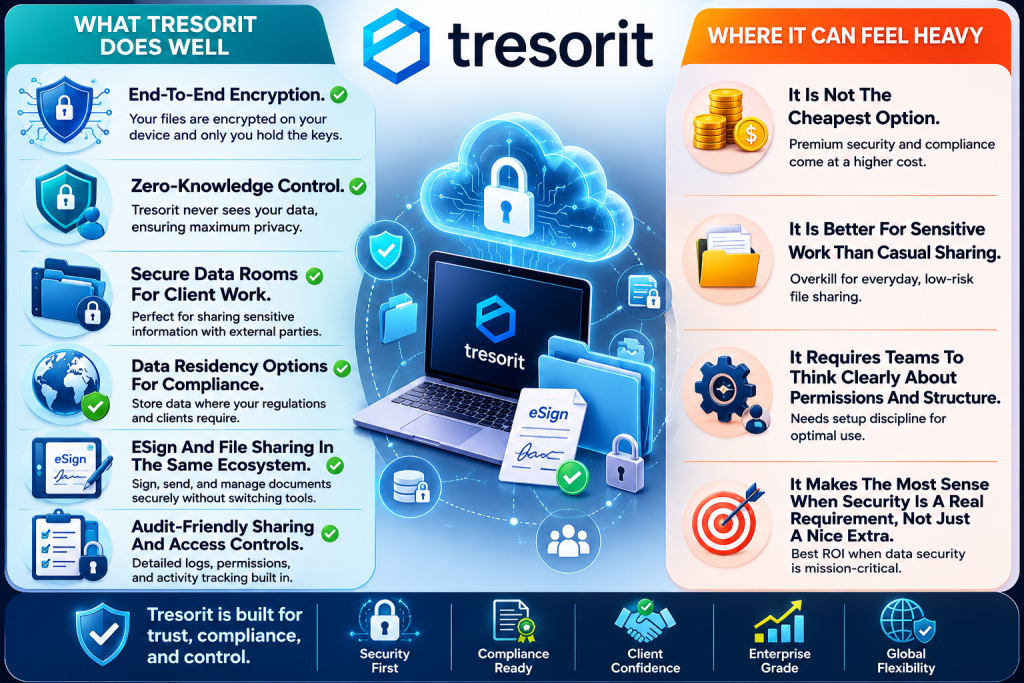
What Tresorit Does Well –
- End-To-End Encryption.
- Zero-Knowledge Control.
- Secure Data Rooms For Client Work.
- Data Residency Options For Compliance
- ESign And File Sharing In The Same Ecosystem.
- Audit-Friendly Sharing And Access Controls.
Where It Can Feel Heavy –
- It Is Not The Cheapest Option.
- It Is Better For Sensitive Work Than Casual Sharing.
- It Requires Teams To Think Clearly About Permissions And Structure.
- It Makes The Most Sense When Security Is A Real Requirement, Not Just A Nice Extra.
That balance is actually a strength. A product like this should not feel like a random consumer cloud app. If it did, I would worry. Tresorit feels intentionally built for work that matters.
Feature Deep Dive :
The most interesting thing about Tresorit is how the feature set maps to real work.
SecureCloud is the base layer. It gives you encrypted storage and collaboration that is designed around control rather than convenience theater. Engage pushes that further by giving you secure data rooms for external collaboration. That is a very real need for legal teams, finance teams, consultants, and anyone who regularly shares sensitive project files with outsiders.
FileSharing handles the “send this securely and make sure I can revoke access” part of the job. eSign closes the loop by letting you sign and manage documents without dragging the workflow into a different product.
The official site also calls out data residency options, which matters more than it sounds. If your company works across regions or has to respect local storage requirements, being able to place data in specific locations is not a side note. It is the difference between passing a compliance review and creating a headache.
The home page also mentions audit logs, remote wipe, and local wipe. Those are exactly the kinds of controls security-minded buyers want to see because they translate directly into incident response, access management, and account hygiene.
If you want to test the official workflow yourself, open Tresorit here and review the product family against the way your team shares sensitive files today.
Pricing Breakdown :
Tresorit’s pricing is clear enough to judge without guessing.
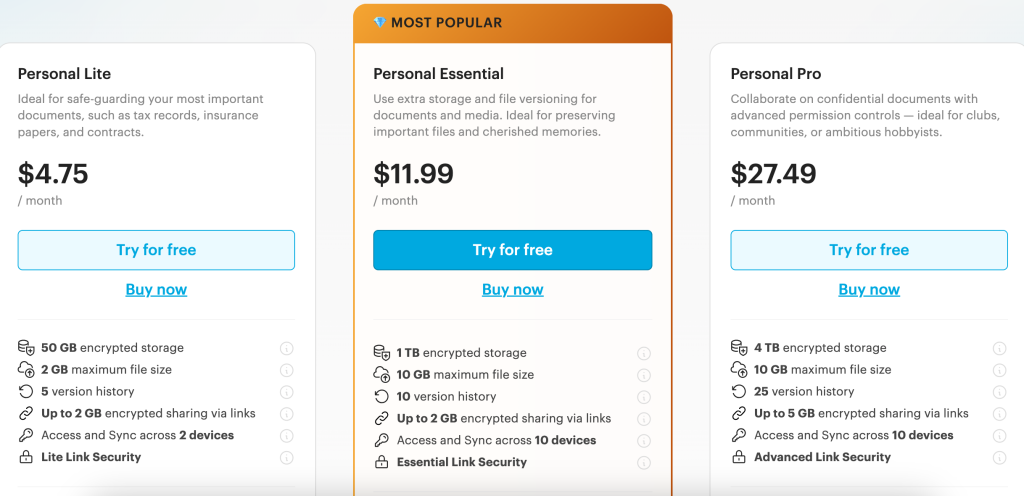
The personal side of the product starts with Tresorit Basic, which the official page says is free. It gives you a taste of encrypted storage without forcing a card onto the table. The Personal Essential plan is listed at $11.99 per month and includes 1 TB of encrypted storage, a 10 GB maximum file size, 10 version history, up to 2 GB encrypted sharing via links, and access across 10 devices.
On the business side, the pricing page shows a more layered structure. File-sharing business starts at $14.50 per user per month for companies that want a private way to send files. SecureCloud business plans include Professional for one user, Business for teams starting at 3 users, and Business Pro for larger teams starting at 5 users. The public plan cards also call out 4 TB, from 6 TB, and from 15 TB encrypted storage on different tiers, plus 10 GB, 15 GB, and 20 GB maximum file sizes depending on plan.
The business plans also include 16 eSignatures for free and unlimited free-trial data rooms. That matters because it means the product is not only about storage. It is about secure collaboration that can actually move work forward.
For a team that values secure sharing over cheap storage, open Tresorit here and compare the plan structure to the cost of doing compliance the hard way.
Who Should Use It :
Tresorit makes the most sense for teams that handle sensitive work regularly.
It is a strong fit for legal firms, finance teams, healthcare-related workflows, agencies handling confidential client material, and companies that need better control over external document exchange. It is also a good fit if your current setup feels too loose and you keep hearing the same questions over and over: who can access this, where is it stored, who shared it, and can we revoke it now?
The platform is less compelling if your files are low-risk and your main concern is simply cheap storage. In that scenario, you may end up paying for security controls you barely use. But if the work is sensitive, the extra control usually pays for itself in reduced mess, fewer incidents, and better process discipline.
What The Security Model Changes :
The most underrated thing about Tresorit is that it changes how people behave.
When a team uses a generic sharing tool, people often act like the system is casual. They send links around loosely, forget to revoke access, and assume the default settings will protect them. Tresorit pushes the team into a more deliberate mode. That is a good thing when the files are sensitive.
The secure data room model especially helps with client-facing work. Instead of dumping files into a shared folder and hoping everyone follows instructions, you can create a more controlled environment where access is clearer, and collaboration feels intentional. That usually means fewer “did you see my file?” messages and fewer awkward follow-ups about who still has access.
There is also a governance benefit. Audit logs, remote wipe, and residency controls give IT and operations teams a cleaner story when they need to explain where the data is, how it is protected, and what happens if someone leaves the company or a project ends. In other words, the software does not just store files. It helps the organization keep its own promises.
Expert Workflows :
The best Tresorit workflows are the ones where security does not become a burden.
Start by separating the use cases. Put internal team files in SecureCloud, put external client sharing into Engage or FileSharing, and keep signatures inside the eSign path when documents need sign-off. That way, people are not forcing one folder structure to do five different jobs.
The next step is permissions. Keep sharing rights narrow. Review access logs regularly. Use data residency where it matters. If your team works across departments or countries, make the location and control rules explicit instead of hoping everyone interprets “secure” the same way.
That kind of setup is where the product shines. It is calm, structured, and hard to misuse if you take the time to set it up properly.
If you want to see that in practice, start with Tresorit here and run one secure collaboration flow before you move the rest of your files.
How To Judge The Fit :
The fastest way to judge Tresorit is to ask whether the platform changes the behavior of the team in a good way.
If your current file-sharing habit is casual, Tresorit will feel stricter. That is not a weakness. It is part of the value. Sensitive work should feel deliberate. If the files matter enough to protect, the workflow should make it harder to lose track of access, easier to audit who saw what, and easier to revoke access when a project ends.
The other thing to test is external collaboration. A secure data room is only useful if clients, partners, and vendors can actually use it without confusion. That means the setup should be easy enough that people do not bypass it. If they do bypass it, the security model never gets the chance to do its job.
The right buyer, therefore, sees Tresorit as process control, not just storage. That mindset matters more than the technical spec sheet. When the team understands that the platform is supposed to make sensitive collaboration calm and repeatable, it usually becomes much easier to justify the subscription.
When The Extra Cost Is Worth It :
The extra cost is worth it when the alternative is uncertainty.
If the business handles confidential client files, regulated documents, or internal material that should never wander around the company like a loose sticky note, a security-first platform can save real time and reduce real risk. It also gives you a cleaner answer when someone asks how data is protected, where it lives, and what happens when access needs to change.
That is the value proposition in plain English. You are paying more, so the workflow can be tighter, cleaner, and easier to trust.
And once the team gets used to that structure, the platform usually fades into the background, which is exactly what good security tools should do.
That quiet reliability is part of the product’s value. When the stakes are high, a platform that simply behaves itself is often worth more than one that tries to impress you every five minutes.
Verdict :
Tresorit is a good example of a product that knows exactly what it is. It is not trying to be a generic cloud bucket with a security badge on it. It is a secure collaboration platform with encryption, data control, sharing discipline, and signed-document workflows built in.
That makes it valuable for the right teams and probably unnecessary for the wrong ones. If your files are sensitive, the product starts to make a lot of sense very quickly. If they are not, you may not need this level of control.
FAQ :
What is Tresorit?
Tresorit is a secure cloud platform for encrypted storage, secure file sharing, data rooms, and eSignature workflows.
Does Tresorit have a free plan?
Yes. The official pricing page shows Tresorit Basic as free.
How much is Tresorit Personal Essential?
The personal pricing page lists Personal Essential at $11.99 per month.
Is Tresorit good for businesses?
Yes, especially if your business cares about data control, auditability, and external collaboration with sensitive files.
Does Tresorit support eSignatures?
Yes. The official home page and pricing pages both point to eSign features and include signatures in the business plans.
Is Tresorit only for file storage?
No. It also covers secure data rooms, file sharing, collaboration, and signing workflows.