

Why Integrations Matter :
GetResponse is one of those tools that looks simple until you start connecting the pieces. The official site makes that pretty clear. It has a dedicated integrations area, a Zapier path, API docs, and a support center full of setup articles. That means the product is not just trying to send an email. It is trying to sit inside the rest of your stack.
That is the real reason integrations matter here. If you already have forms, payments, a CRM, a webinar flow, or a customer database, the value is not the email tool by itself. The value is whether GetResponse can keep those systems moving together without turning your marketing ops into a daily manual export job.
If you want to inspect the official product while you read, open GetResponse here and compare the integration story against the way your team actually works.

Top Integrations Worth Knowing :
The official help and integrations pages point to a healthy mix of native and connected workflows:
- Integrations By Zapier.
- PayPal.
- Facebook.
- Google Analytics.
- Salesforce.
- Slack.
- Teachable.
- X, Formerly Twitter.
- ClickBank.
- Amazon.
- SMS By Zapier.
That list is useful because it covers the usual growth stack. You have lead capture, analytics, CRM sync, messaging, and commerce. You also have a clean API story for teams that want to build their own integration instead of relying only on prebuilt connectors.
The advanced API angle matters more than it sounds. It means you can go beyond “send a contact to a list” and actually shape the workflow around your process. That is what power users usually want.
If you are checking whether the platform fits your stack, start with GetResponse here and map the official integration list to your current tools.
Popular Tech Stacks :
The easiest way to think about GetResponse is to imagine a few real stacks instead of a generic feature matrix.
Creator Stack –
- GetResponse For Email And Automation.
- Teachable For Courses.
- Zapier For Hand-Offs.
- PayPal For Payments.
E-commerce Stack –
- GetResponse For Nurture And Re-Engagement.
- PayPal Or Another Payment Tool For Checkout.
- Google Analytics For Tracking.
- Slack For Internal Alerts.
Sales Stack –
- GetResponse For Lead Capture.
- Salesforce For CRM.
- Zapier For Lead Routing.
- Slack For Deal Alerts.
Content Stack –
- GetResponse For Forms, Popups, And Email.
- Google Analytics For Behavior Insight.
- Amazon Or ClickBank For Affiliate Offers Where Relevant.
- API Integrations For Custom Workflows.

The best stack is the one where GetResponse is not doing everything. It is doing the part it is good at, then handing the record off cleanly to the next system.
Setup Guide :
The official help pages keep the setup logic fairly straightforward.
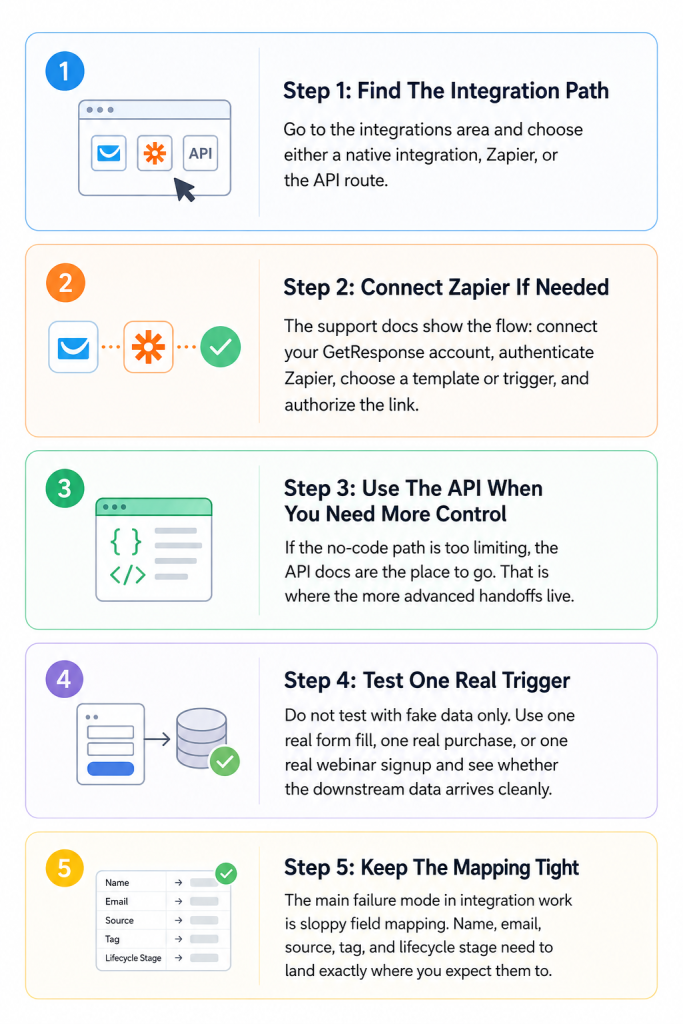
Step 1: Find The Integration Path
Go to the integrations area and choose either a native integration, Zapier, or the API route.
Step 2: Connect Zapier If Needed
The support docs show the flow: connect your GetResponse account, authenticate Zapier, choose a template or trigger, and authorize the link.
Step 3: Use The API When You Need More Control
If the no-code path is too limiting, the API docs are the place to go. That is where the more advanced handoffs live.
Step 4: Test One Real Trigger
Do not test with fake data only. Use one real form fill, one real purchase, or one real webinar signup and see whether the downstream data arrives cleanly.
Step 5: Keep The Mapping Tight
The main failure mode in integration work is sloppy field mapping. Name, email, source, tag, and lifecycle stage need to land exactly where you expect them to.
If you want to try the official workflow yourself, open GetResponse here and test one live integration before you scale the setup.
Automation Examples :
The official pages make it easy to see what the product is trying to enable.
One example is a PayPal sale, creating or updating a contact. Another is a Slack alert firing when a new lead lands. Another is a webinar signup triggering a follow-up sequence. Another is a Facebook lead routing into the right list and segment.
That is why the integration layer matters so much. You are not just connecting apps. You are deciding what happens after a real person raises their hand.
The strongest automation examples are the ones that make the next human step obvious:
- New Lead In.
- Qualification Tag Added.
- Relevant Sequence Started.
- Sales Team Notified.
- Conversion Logged.
If the workflow does not make those five steps easier to track, the integration is only half working.
For a cleaner test of the platform, try GetResponse here and trace one lead from capture to follow-up.
API Overview :
GetResponse does not hide the API story. The site literally says you can build your own integration and link GetResponse with your service. That is the language advanced users want to hear.
The API layer is what makes the product more than an email newsletter box. It turns the platform into something your own app, CRM, signup form, or event system can talk to.
That matters in three common situations:
- You Have A Custom Front-End.
- You Need A Deeper CRM Sync.
- You Want To Build A Productized Integration For Clients.
The best API projects are the ones where the marketer and the developer agree on the same data model before anyone writes code. If that happens, GetResponse can fit neatly into a larger operation instead of becoming one more tool that only one person on the team understands.
Troubleshooting Integrations :
Most integration problems are boring, which is exactly why you should pay attention to them.
- Authentication Fails.
- A Trigger Does Not Fire.
- A Field Mapping Is Missing.
- Duplicate Contacts Show Up.
- A Tag Lands In The Wrong List.
If you see one of those problems, start with the basics. Reconnect the account. Check the trigger event. Confirm that the field names match. Then test with one clean record. A lot of “integration failures” are actually setup issues or bad source data.
The official help center is useful here because it gives you a map of the common paths. That is often enough to catch the mistake before you go hunting for a more dramatic fix.
Pricing Context :
The current public pricing page shows a 14-day free trial and lists plans that begin with Starter, Marketer, Creator, and Enterprise on the broader platform. That matters because integration use cases usually live or die based on how much automation and list management you can support without paying for a bloated setup.
For many teams, the most important question is not whether GetResponse has a connector. It is whether the connector lives in a plan that still makes sense once the workflow gets real.
If that is the question you are asking, open GetResponse here and compare the trial path against the work you want the platform to own.

Buying Notes :
The easiest way to get value from GetResponse is to stop thinking about it as one monolithic marketing product. Think of it as a connection hub that handles the capture, nurture, and handoff layers of the funnel.
That matters because a lot of software buys fail when the team only evaluates the front door. A form can look great. A newsletter can look great. But if the follow-up, the CRM sync, and the handoff to the next app are weak, the funnel still leaks. GetResponse is most compelling when it helps you close those leaks without adding another six tools to the stack.
The other thing worth watching is implementation discipline. A clean integration is not just about whether Zapier works today. It is about whether the mapping remains understandable when the team revisits it six months later. If the answer is yes, the product becomes a durable part of the system instead of a one-off setup project.
Verdict :
GetResponse is strongest when you stop judging it as a newsletter tool and start judging it as a connection layer. The official pages make that pretty obvious. Native integrations, Zapier, API docs, customer stories, and partner tooling all point in the same direction.
If you already have systems that need to talk to each other, this product is worth a serious look. If you only need to blast email once in a while, you will probably use only a small part of what it offers.
FAQ :
Does GetResponse support Zapier?
Yes. The official site has dedicated Zapier integration pages and help articles.
Can I use the API?
Yes. The official integrations pages explicitly mention building your own integration with the API.
What tools does GetResponse connect with?
The official pages mention Facebook, Google Analytics, Salesforce, Slack, Teachable, X, ClickBank, Amazon, PayPal, and Zapier-related workflows.
Is there a free trial?
Yes. The current pricing page shows a 14-day free trial.
Is GetResponse only for email marketing?
No. The integrations story shows that it is meant to sit inside a broader marketing, sales, and automation stack.