


In this guide
- Quick Verdict
- Product Facts And Overview
- Pros And Cons
- Feature 1: AI Conversation Intelligence
- Feature 2: Power Dialing And Reach Acceleration
- Feature 3: Analytics Wallboards And Real-Time Reporting
- Feature 4: Live Coaching And Call Quality Management
- Feature 5: Integrations And Workflow Automation
- Pricing Breakdown
- Who Should Use It
Quick Verdict :
CloudTalk looks like a strong call-center review pick in 2026 because the official pages is focused, practical, and measurable. It combines AI conversation intelligence, outbound dialing tools, live coaching, analytics, and workflow integrations in a way that is clearly aimed at sales and support teams that care about performance.
Disclosure: Stack99 earns a commission if you buy through links on this page. It costs you nothing extra and never changes our assessment.
If your team lives on the phone and needs the calling stack to help people move faster, start with CloudTalk here.
Product Facts And Overview :
CloudTalk is not trying to be a generic phone app in 2026. The official site positions it as AI-powered call center software built to help sales and support teams handle more calls, coach agents faster, and learn from conversations without drowning managers in manual review work.
That matters because the product is built around actual operational needs:
- Better outbound throughput.
- Better coaching visibility.
- Better reporting and analytics.
- Better integration with the rest of the stack.
Pros And Cons :
What we liked
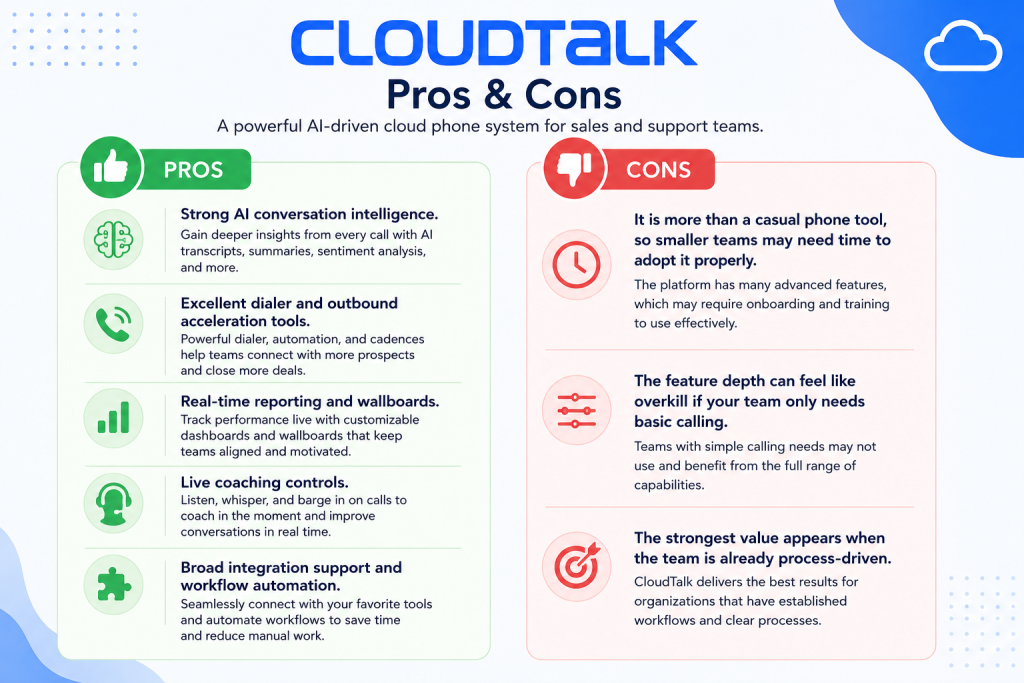
- Strong AI conversation intelligence
- Excellent dialer and outbound acceleration tools
- Real-time reporting and wallboards
- Live coaching controls
What to watch
- It is more than a casual phone tool, so smaller teams may need time to adopt it properly
- The feature depth can feel like overkill if your team only needs basic calling
- The strongest value appears when the team is already process-driven
Feature 1: AI Conversation Intelligence
This is the strongest differentiator on the current official homepage. CloudTalk now leans hard into AI summaries, transcripts, sentiment, key topics, notes, talk ratios, and broader conversation analysis that helps managers understand what happened without listening to every call from start to finish.
That is a genuinely important feature for modern sales and support teams because manual quality review does not scale well.
The official site frames the value clearly:
- Review more calls faster.
- Coach in the moment and after the fact.
- Uncover patterns automatically.
- Reduce overhead for managers.
The analytics pages also reinforce the AI story with AI Analytics, topic extraction, and deeper reporting filters. That makes CloudTalk more than a basic phone system. It is trying to become a call-performance intelligence layer.
Feature 2: Power Dialing And Reach Acceleration
CloudTalk’s features pages are packed with dialing efficiency tools, and that is where the platform starts feeling especially compelling for outbound teams.
The official feature pages highlight:
- Smart Dialer to lower call times by up to 50%.
- Power Dialer to help teams reach 3x more customers.
- Parallel Dialer to call up to 10 leads at once and connect agents only to answered calls.
- Click-to-Call for instant web-to-call behavior.
- Voicemail Drop for pre-recorded prospect messages.
That is a serious outbound toolkit.
For SDRs, recruiters, account managers, and call-heavy growth teams, these features matter because they reduce dead time between conversations. They also help standardize outreach structure instead of forcing reps to juggle browser tabs, spreadsheets, and side tools all day.
If you want to test those workflows in context, start with CloudTalk here and compare one live outbound process against your current setup.
Feature 3: Analytics Wallboards And Real-Time Reporting
CloudTalk’s analytics positioning is one of its best official selling points. The analytics page says the product helps teams save costs, cut handling time, and improve conversions with better data visibility. It specifically highlights:
- Group reporting.
- Agent reporting.
- Real-Time dashboard views.
- Wallboard for live performance visibility.
- Messages reporting.
- Call log analytics.
- AI analytics and tagged call analysis.
The homepage also backs that story with performance-oriented numbers such as 2.5X outbound success rate improvements in one case study, 80% lower wait times in another, and 2 hours per day saved on training in a separate example.
Those are meaningful signals because they show CloudTalk is trying to turn call data into operational decisions, not just archive call logs for later.
Feature 4: Live Coaching And Call Quality Management
The official homepage makes this feel very tangible. CloudTalk highlights live coaching tools that let managers listen in, whisper guidance, or barge in when needed.
That is a big feature for teams with:
- New hires.
- High-ticket sales calls.
- Complex customer support.
- Escalation-heavy workflows.
- Fast-moving training needs.
Call quality tools only matter if managers can use them without massive friction. CloudTalk’s positioning suggests the workflow is built for direct, usable intervention instead of passive monitoring. Combined with recordings, notes, customer details, and AI summaries, the coaching stack looks much stronger than a plain call-log product.
Feature 5: Integrations And Workflow Automation
This is where CloudTalk starts looking like a broader operating platform rather than just a calling layer.
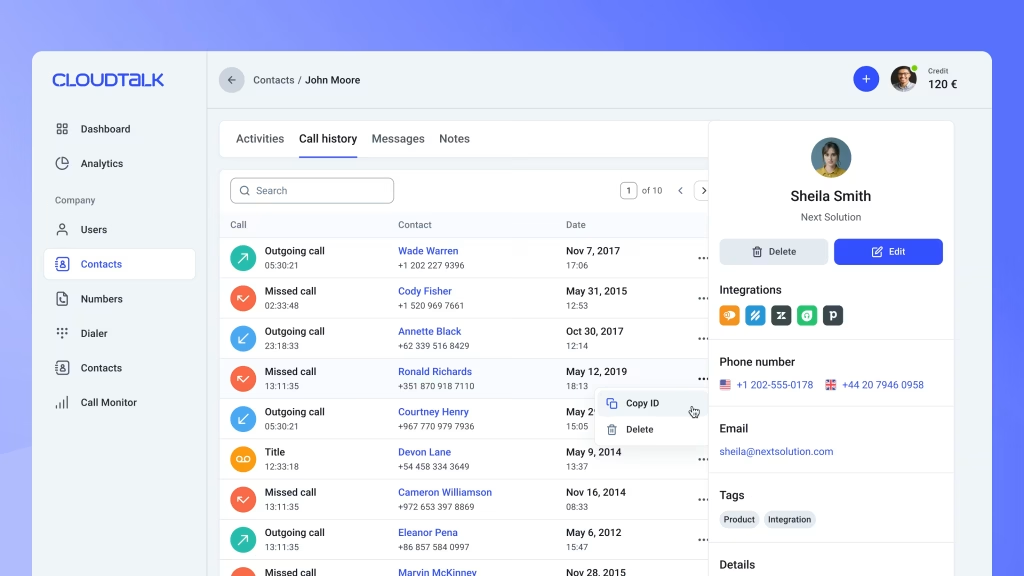
The official pricing help article says Essential and Expert plans include full integrations across 95+ tools. The analytics page also calls out built-in integrations with CRMs, helpdesks, applicant tracking systems, Zapier, Make, and CloudTalk’s own workflow automation builder.
That is a strong feature because call systems become much more valuable when they connect to the rest of the stack.
The integration story matters for:
- CRM syncing.
- Ticketing workflows.
- Recruiting pipelines.
- Sales sequence follow-up.
- Reporting consistency across tools.
The help center also makes it clear that workflow automations become available on Essential and higher plans, which is useful context for buyers evaluating feature access by tier.
If you want to see whether the integrations fit your stack, start with CloudTalk here and map one CRM or helpdesk workflow into the product.
Pricing Breakdown :
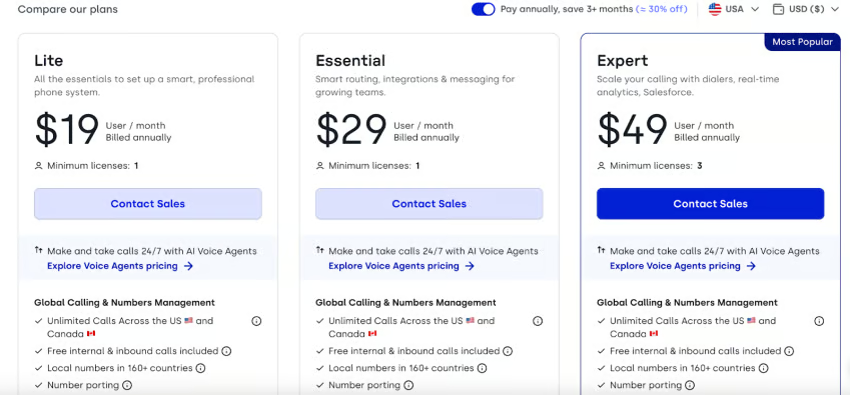
CloudTalk publishes per-seat prices in euros. The current ladder:
| Plan | Price | What you get |
|---|---|---|
| Lite | €19/user/mo annual | Entry business-phone tier, €27 billed monthly, 1 licence minimum. |
| Starter | €25/user/mo annual | €34 billed monthly; the usual starting point for small calling teams. |
| Essential | €29/user/mo annual | €39 billed monthly; the tier where workflow automations unlock. |
| Expert | €49/user/mo annual | €69 billed monthly, 3 licence minimum; the deepest analytics and coaching tier. |
That pricing ladder matters because it lets teams align spend with operational maturity. The lower tier is good for getting started, while the higher tiers make more sense when integrations, automations, analytics, and coaching become central to the daily workflow.
Who Should Use It :
CloudTalk is best for:
- Sales teams that do a lot of outbound calling.
- Support teams that need coaching and visibility.
- Recruiters and operations teams that care about call workflows.
- Companies that want calling, analytics, and integrations in one place.
Expert Verdict :
CloudTalk is strongest when you need more than just a dial tone. The combination of AI summaries, call analytics, outbound acceleration, live coaching, and workflow automation makes it feel like a revenue operations layer rather than a simple telephony product.
If that is the job you need it to do, start with CloudTalk here and test it against one live calling workflow before you decide.
Features Coming Soon :
The honest read from the current official material is that CloudTalk’s public pages focus much more on current AI and analytics depth than on a detailed public roadmap. That is fine. It means buyers can evaluate what already exists instead of guessing at promised features.
So rather than inventing a roadmap, the practical takeaway is:
- AI analysis is already a major theme.
- Analytics depth is already strong.
- Workflow automation and integrations are already significant.
- Dialing acceleration is already well-developed.
That is enough for a serious evaluation in 2026.
What Is Unique Versus Competitors :
CloudTalk’s strongest unique angle is the blend of:
- Heavy outbound dialing tools.
- AI conversation analysis.
- Real-time coaching.
- Manager-friendly reporting.
- Broad integrations and automations.
Some competitors do calling well. Some do analytics well. Some do AI summaries. CloudTalk is trying to combine all of those into one operational call platform. That is what makes it most interesting.
The published tier ladder also gives buyers clean context.
The tier ladder above — Lite through Expert, €19 to €49 per user per month on annual billing — is what makes that combination easier to reason about than a lot of vague “contact sales” alternatives.
That makes the feature ladder easier to reason about than a lot of vague “contact sales” alternatives.
Another thing CloudTalk does well is connect feature depth to team maturity. Small teams can start with Starter, while teams that need full integrations, automations, advanced analytics, and higher coaching depth can step up without moving to a totally different platform. That product continuity is useful operationally.
It also helps that the official site keeps tying features to measurable outcomes instead of feature theater. Numbers around call volume, wait time, outbound success, and training time may vary by customer, but they make the value proposition easier to understand.
What This Means In Practice :
CloudTalk is strongest when a team wants calling to be more than a transport layer for voice. It becomes more valuable when managers need to see what is happening across calls, coach reps in real time, and move data into a reporting stack that the rest of the business can actually use.
That is especially true for teams that care about:
- Faster outbound execution.
- Better support quality.
- Cleaner coaching loops.
- Less manual call review.
The product’s feature story only really makes sense when those needs exist together. That is why CloudTalk can be a strong buy for a revenue or support team, but feel like overkill for a team that just wants a basic dialer.
Practical Buyer Read :
If your team does a lot of calling, the platform has enough depth to matter. If calling is a small part of the job, the feature stack may be more than you need.
That is the main fit question.
The buyers who usually get the best value are the ones who want calling, analytics, and workflow control in one place instead of stitching together a dialer, a coach, and a reporting tool by hand.
That combination is where CloudTalk earns its keep.
It also means the product can be a very good fit for teams that are trying to standardize call handling without slowing the team down. When the stack is connected well, coaching becomes easier, reporting gets cleaner, and managers spend less time trying to reconstruct what happened after the fact.
That is especially valuable for teams that care about consistency across reps. If every agent handles calls a little differently, the reporting gets noisy fast. CloudTalk helps reduce that drift by turning the call workflow into something more visible and easier to manage.
That consistency is also what makes coaching easier. Managers can see patterns sooner, reps can improve faster, and the team can stop treating every call review like a special project.
Verdict :
CloudTalk’s top features in 2026 are genuinely strong. The standouts are AI conversation intelligence, dialer acceleration tools, analytics and wallboards, live coaching controls, and deep integrations with workflow automation.
It looks especially compelling for teams that need both call execution and call analysis in one system instead of bolting separate tools together. Sales teams, support teams, recruiters, and distributed call operations all have a clear reason to look at it.
It is also a product that seems to reward process maturity. The more a team cares about coaching, dashboard visibility, structured calling flows, and CRM-connected operations, the more the feature set starts making sense.
If that sounds close to your use case, start with CloudTalk here and compare one real calling workflow against the tools you already use.
FAQ :
What are CloudTalk’s best features in 2026?
Its strongest features are AI conversation intelligence, Smart Dialer and Power Dialer tools, real-time analytics dashboards, live coaching controls, and broad integrations with workflow automation.
Does CloudTalk include analytics?
Yes. The official analytics pages highlight group reports, agent reports, wallboards, real-time dashboards, AI analytics, messages reporting, and call-log reporting.
How much does CloudTalk cost?
CloudTalk publishes its prices in euros: Lite at €19 per user per month annually or €27 monthly, Starter at €25 annually or €34 monthly, Essential at €29 annually or €39 monthly, and Expert at €49 annually or €69 monthly.
Is CloudTalk good for outbound teams?
Yes. The official feature pages highlight Smart Dialer, Power Dialer, Parallel Dialer, voicemail drop, and click-to-call, all of which are highly relevant for outbound work.
More on CloudTalk
Hand-picked guides to help you choose the right tool — no fluff.
 Use CasesWho Is CloudTalk Best For? Use Cases & Fit (2026)Who gets the most out of it – and who should skip it.
 FeaturesCloudTalk Top Features 2026The standout features and whether they justify the price.
 FeaturesBitdefender Top Features 2026The standout features and whether they justify the price.
 ComparisonsBouncer vs Alternatives 2026The strongest competitors compared side by side.