


Why Process Street’s Features Matter In 2026 :
Process Street is not trying to win by being a prettier checklist tool. The official site positions it as a compliance operations platform built around AI-enforced workflows. That is a stronger claim than most workflow products make, and it matters because buyers in 2026 are usually not looking for one more task list. They are looking for a way to make recurring work happen consistently without relying on memory, heroics, or polite chaos.
The official pricing and product pages make that direction very clear. Process Street talks about:
- Compliance operations.
- AI-enforced workflows.
- Unlimited workflows.
- Unlimited tasks.
- Dynamic due dates.
- Role assignments.
- Approvals.
- Analytics.
That means the most important Process Street features are the ones that make recurring work safer, more visible, and easier to enforce across a team.
If you want to inspect the official product while you read, start with Process Street here.
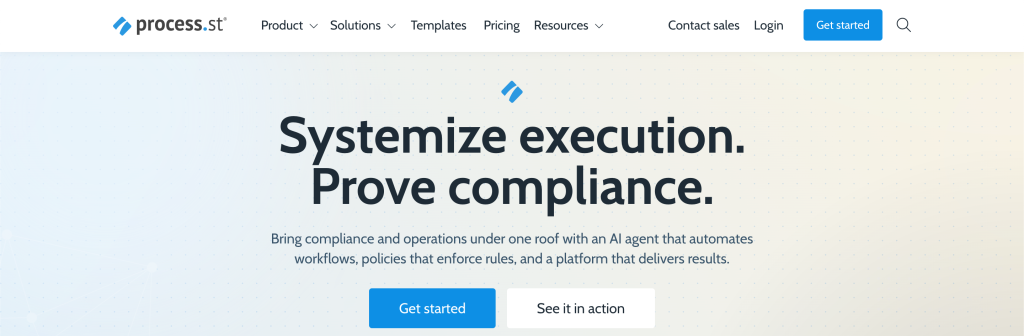
Feature #1: AI-Enforced Workflows
This is the clearest differentiator on the official homepage.
Process Street does not just talk about documenting procedures. It talks about AI-enforced workflows. That matters because documenting a process and actually getting people to follow it are very different things.
The value here is practical:
- The workflow becomes the working system.
- The team has clearer expectations.
- Skipped steps become harder to hide.
- Repeated work becomes easier to standardize.
That is the feature I would put first because it changes the product from a reference library into an operations layer.
In real life, teams do not usually fail because they never wrote the SOP. They fail because the SOP lives in one place and the actual work happens in another. Process Street’s AI-enforced workflow positioning is basically trying to close that gap.
Feature #2: Unlimited Workflows, Tasks, Forms, And Pages
The official pricing page makes this part unusually easy to understand. Even at the Startup level, Process Street publicly highlights:
- Unlimited workflows.
- Unlimited tasks.
- Unlimited forms.
- Unlimited pages.
That matters because workflow software gets annoying very fast when the pricing model punishes process volume.
For an operations-heavy team, unlimited workflow objects are a real advantage. It means the team can standardize more of its recurring work without constantly wondering whether the software cost will jump every time somebody operationalizes one more process.
This is especially useful for teams that run:
- Onboarding,
- Compliance review,
- Client intake,
- Recurring approvals,
- Documentation updates,
All inside the same system.
If that kind of process sprawl is already happening inside your business, open Process Street here and compare whether the unlimited object model would actually calm the stack down.
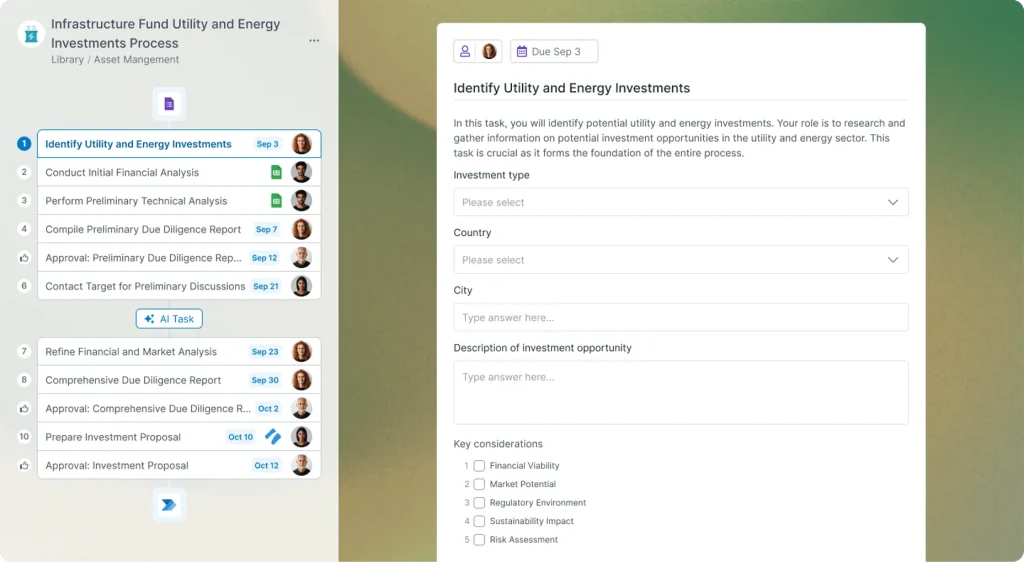
Feature #3: Role Assignments And Task Permissions
This is one of the features that sounds boring until you need it desperately.
The official pricing page highlights role assignments and task permissions because workflow quality depends on who can do what and when.
That matters for a few reasons:
- Accountability gets clearer.
- Sensitive steps can be controlled.
- Teams can scale without every person touching every step.
- Operational confusion goes down.
For compliance and regulated processes, this is not optional fluff. It is part of how the workflow stays trustworthy.
If one person can skip, edit, or complete every step without structure, then the “system” is not really enforcing much. Role assignments and task permissions are what turn a workflow from a suggestion into an operational standard.
Feature #4: Dynamic Due Dates And Approvals
The official Startup plan description publicly includes dynamic due dates and approvals, and that combination matters a lot.
Dynamic due dates are valuable because recurring work rarely happens in a vacuum. Deadlines often depend on:
- When a process starts,
- Who completed the previous step,
- Or when an external event happened.
Approvals matter because a lot of important work should not silently move forward without a check.
Together, these two features make Process Street much stronger for:
- HR workflows,
- Audit preparation,
- Client delivery,
- Finance approvals,
- And policy-based operations.
This is the kind of feature pair that saves teams from building a fake workflow that still depends on Slack reminders and memory.
Feature #5: Analytics Dashboard
The official pricing page also highlights an analytics dashboard.
That is a bigger deal than it looks because process software is not only about running work. It is about knowing whether the work is actually moving.
Analytics matter because they help answer:
- Where does work stall?
- Which workflows keep slipping?
- Which teams complete reliably?
- Which process steps create the most drag?
Without that visibility, a workflow tool becomes a filing cabinet for process ambition.
With analytics, it becomes something the operations owner can improve.
That is why I would rank this feature in the top five. The best process in the world still needs observability if you want to improve it over time.
Features Coming Soon Or Worth Watching :
The official public pages reviewed for this draft already lean heavily into AI-enforced workflows and compliance operations, so the main thing I would watch is how Process Street deepens its AI and governance story over time.
The broader signals to monitor are:
- More AI-driven enforcement or workflow intelligence.
- Deeper operational analytics.
- Stronger enterprise governance controls.
- Tighter compliance and audit support features.
The product already feels pointed in that direction. The question is how far it keeps pushing the compliance-operations identity instead of drifting back toward generic workflow language.
What Makes Process Street Different From Competitors :
The unique part of Process Street is not that it has workflows. A lot of tools have workflows.
The differentiator is the official positioning:
- Compliance operations,
- AI-enforced workflows,
- And the public plan features that support governed recurring work.
That makes it feel different from:
- A basic checklist app,
- A broad project manager,
- Or a documentation wiki pretending to be a process system.
Process Street looks strongest when the process matters enough that consistency and accountability are part of the product requirement, not just a nice bonus.
If that is your situation, start with Process Street here and test one live workflow instead of evaluating it only through marketing copy.
How I Would Evaluate These Features In A Real Team :
The fastest way to judge Process Street is not by reading every feature line. It is by choosing one recurring workflow that already causes friction and running it live for a week. Good candidates are employee onboarding, monthly compliance review, client intake, or approval-heavy finance work.
What you are really testing is whether the platform reduces ambiguity. Do people know what step comes next? Are deadlines clearer? Do approvals happen inside the workflow instead of in side channels? Can an operations owner see where things stall without chasing everyone manually?
If the answer to those questions becomes noticeably better, the feature set is doing its job. If not, then even a long feature list will not save adoption. That is why I would always evaluate Process Street through one real repeated process, not through abstract product comparison alone.
If you want to run that kind of test, try Process Street on one live workflow here.
Verdict :
The top Process Street features in 2026 are AI-enforced workflows, unlimited workflows and tasks, role assignments and task permissions, dynamic due dates with approvals, and the analytics dashboard.
That list matters because it shows what the product is really trying to do: move teams from documented processes to governed operational execution.
Process Street is not the best fit for every buyer. If you only need a lightweight checklist, it may be more system than you need. But if your team runs recurring work where consistency, visibility, and accountability matter, these features are unusually well aligned.
FAQ :
What Is Process Street’s Best Feature In 2026?
Its strongest official differentiator is the AI-enforced workflow concept, because it moves the platform beyond simple documentation into active operational execution.
Does Process Street Offer Unlimited Workflows?
Yes. The official pricing page highlights unlimited workflows, tasks, forms, and pages.
Why Do Role Assignments Matter So Much?
Because process consistency depends on who can perform, review, or complete steps. Role assignments and task permissions help make workflows more trustworthy.
Does Process Street Include Approvals And Dynamic Due Dates?
Yes. Those are publicly listed features on the pricing page and are especially useful for compliance and recurring operational work.
Who Should Use Process Street?
Teams in operations, HR, compliance, finance, and customer-facing process-heavy environments will usually get the most value.