

Why Integrations Matter :
Switcher Studio is much easier to recommend when you stop treating it as a single app and start treating it as the center of a live video stack. The official site describes it as a mobile livestreaming tool with unlimited live streaming, built-in multistreaming, and social media video integrations.
That matters because live content usually breaks down at the edges: cameras, destinations, overlays, recording, monetization, and post-production all need to cooperate. Switcher Studio is strongest when those pieces stay connected.
If you want to inspect the official product while you read, open Switcher Studio here.
The real integration story here is not just “can it stream.” It is “can it keep your production flow simple enough that your team actually uses it repeatedly.”
Top Integrations :
The official pages point to a pretty clear integration surface.
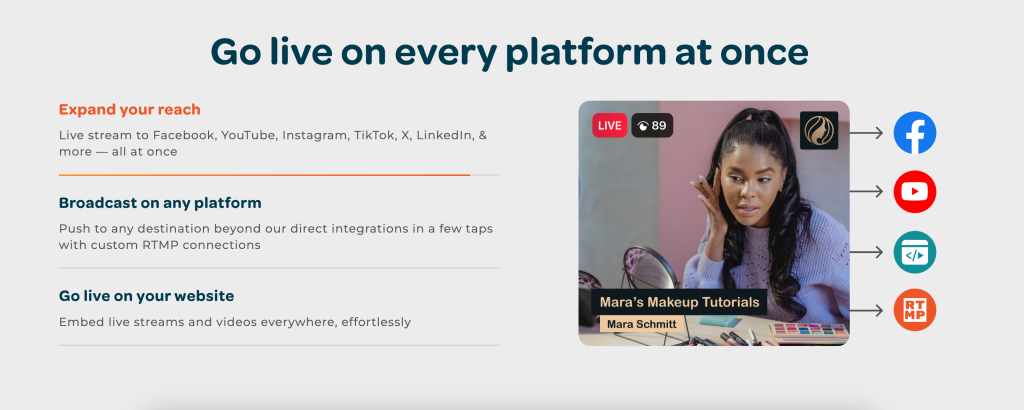
- Facebook Live.
- YouTube Live.
- LinkedIn.
- Twitch.
- Microsoft Stream.
- Accsoon SeeMo.
- Custom RTMP.
The site also shows a status page where the Switcher API and third-party integrations are operational, which is a good sign for teams that want a product with some infrastructure behind it instead of a bunch of disconnected one-off features.
For video teams, the practical value is simple: you can build a live setup that reaches the platforms your audience already uses without manually rebuilding the whole production every time.
If you want to compare that official integration story against the product pages yourself, open Switcher Studio here and read the livestreaming and support pages side by side.
Popular Tech Stacks :
Switcher’s best stacks are the ones that stay lightweight and repeatable.
Creator Stack –
- Switcher Studio For Live Production.
- YouTube Live For Reach.
- Facebook Live For Community.
- Exported Recordings For Reuse.
Mobile Field Stack –
- Switcher Studio On iPhone Or iPad.
- Accsoon SeeMo As A Camera Bridge.
- Custom RTMP For Non-Native Destinations.
Distribution Stack –
- Switcher Studio For Capture.
- LinkedIn, Twitch, Or Microsoft Stream For Distribution.
- Local Recording For Edited Clips.
Monetization Stack –
- Switcher Studio For Live Events.
- Gated Content Or Subscription Layers Where Relevant.
- Payment Or Membership Tools Downstream.
The strongest pattern is always the same: keep Switcher at the center of the production, then connect the rest of the stack around the destinations and the reuse path.
Setup Guide :
The cleanest setup is usually the least fussy one.
Step 1: Pick Your Main Destination
Decide whether you are mostly streaming to Facebook, YouTube, LinkedIn, Twitch, or something else.
Step 2: Add Your Camera Inputs
If you use a mobile setup, make sure the iPhone or iPad workflow is stable before you add extra complexity.
Step 3: Connect The Output
Use a native integration or Custom RTMP, depending on where the stream needs to land.
Step 4: Test Recording
The official help center says recorded livestream files can be exported from the video library, which makes it easy to reuse content after the live event ends.
Step 5: Check The Trial Flow
Switcher’s pricing page says there is a 14-day free trial, so the easiest test is to run one actual event and see whether the setup feels lighter than your current stack.
If you want to do that test on the live product, open Switcher Studio here and try the trial against one real stream setup.
Automation Examples :
Switcher is strongest when you build repeatable workflows around the stream itself.
Direct Social Streaming –
Use Switcher to stream directly to the social platform where the audience already is.
Camera Expansion –
Use Accsoon SeeMo to bring in a camera source through HDMI when a mobile-first setup needs a little more production quality.
Event Support –
If a direct integration does not support a specific event flow, use Custom RTMP to route the stream where it needs to go.
Content Repurposing –
Use local recordings from the video library to create clips, highlights, or edited follow-up content after the live show ends.
Monetized Content –
Use the built-in streaming setup as the production layer, then attach monetization or gated-content logic where the business model needs it.
That is the real integration win. The production tool does not stay trapped in the live moment. It becomes part of the full content workflow.
API Overview :
The official status page shows the Switcher API as operational, and the product story around third-party integrations is active enough to matter.
That means advanced teams can think about Switcher less as a sealed app and more as a live-video center with enough connectivity to fit into a broader workflow.
The most practical API questions are:
- Where Does The Stream Go?
- Where Are Recordings Stored?
- How Do We Reuse The Output?
- What Happens If A Destination Changes?
If those questions are answered cleanly, the integration story is probably good enough for the team.
If they are not answered cleanly, the issue is usually the workflow design rather than the streaming app itself.
Troubleshooting :
Most integration issues in live video are pretty predictable.
If A Destination Fails
Check whether the platform uses a native integration or Custom RTMP.
If The Camera Input Looks Off
Confirm the mobile device, the source bridge, and the input mapping before you blame the stream.
If A Recording Is Missing
Review the video library export steps and confirm that the recording was actually stored.
If A Social Platform Is Not Supported Natively
Use Custom RTMP or adjust the stack so the unsupported platform is downstream instead of central.
If The Stream Workflow Feels Clumsy
Trim the setup. Live production gets messy fast when too many tools try to do the same job.
Practical Stack Notes :
The best Switcher setups are usually the ones that stay close to the source.
That means you do not want to overcomplicate the stack just because the app can connect to a lot of platforms. The official pages are strongest when they show a clean flow: capture on mobile, send to the right live destination, record locally, and reuse the output later.
That approach keeps the setup useful for real teams. A creator can run a simpler weekly show. A brand can feed multiple social platforms without rebuilding everything. A small media team can use the recordings later for clips, highlights, or edited posts.
Accsoon SeeMo is especially useful when a better camera source needs to be bridged into a mobile production setup. Custom RTMP is useful when the destination is not one of the direct social integrations. The video library export flow is useful when the live event becomes the raw material for the next three pieces of content.
That is the real value of the integration story. The live production app does not stop at the live event. It stays useful after the stream ends.
That also makes the workflow easier to keep alive month after month. The same setup can support live production, recording, and repurposing without forcing the team to learn three separate systems.
If you are trying to simplify a messy setup, use the trial to see whether one clean live workflow can replace a few of the tools you are currently juggling.
Pricing Context :
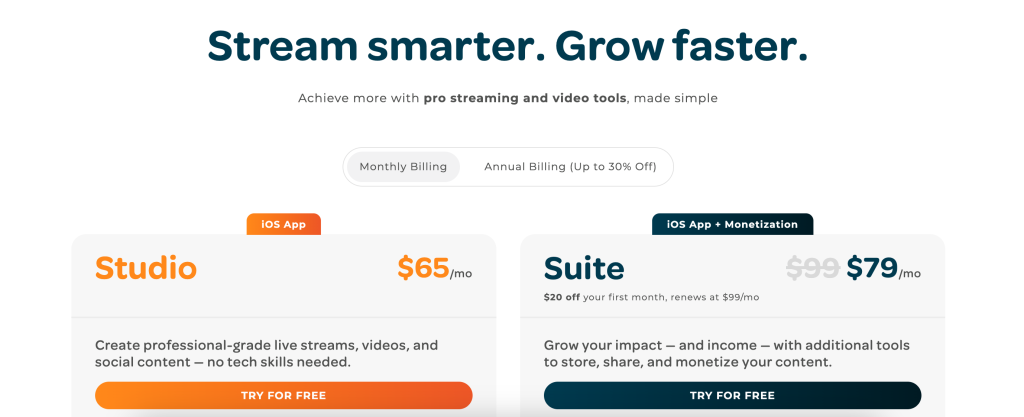
The official pricing page shows a 14-day free trial on Mac or iOS devices. The homepage also emphasizes that Switcher is available on Mac and iOS and is used by 14,000+ teams and creators.
That tells you two things.
First, the product is meant to be tested in real use, not just admired in a walkthrough. Second, the platform is clearly aimed at creators and teams that care about repeatable live production, not one-off experimentation.
If you are evaluating it seriously, open Switcher Studio here and run one live setup through the trial before you decide whether to keep it in the stack.
Verdict :
Switcher Studio is a strong integrations story for live creators because it keeps the center of gravity in one place while still connecting to the platforms and devices that matter.
The best use cases are the ones where you want one mobile production tool to feed multiple destinations, support camera expansion, and produce recordings you can reuse later.
If that sounds like your workflow, open Switcher Studio here and test the integration stack against one actual livestream before you make it part of your regular setup.
FAQ :
What does Switcher Studio integrate with?
The official site points to Facebook, YouTube, LinkedIn, Twitch, Microsoft Stream, Accsoon SeeMo, and Custom RTMP support.
Does Switcher Studio support mobile streaming?
Yes. The official pages emphasize Mac and iOS support, with a mobile livestreaming focus on iPhone and iPad.
Can Switcher Studio export recordings?
Yes. The help center says local recordings can be exported from the video library.
Does Switcher Studio have an API?
The status page shows the Switcher API as operational, which is a useful signal for connected workflows.
Is there a free trial?
Yes. The pricing page says there is a 14-day free trial.