


Pricing Overview :
Trainual’s pricing story in 2026 is much more specific than a generic “contact sales” page, but it is still clearly a serious business purchase rather than a lightweight note-taking tool.
The official pricing and solution pages show public pricing for team-size bands, plus a one-time implementation fee and optional add-ons. That makes Trainual easier to evaluate than many operations platforms, but it also means you should look at the total cost, not just the monthly sticker price.
If you want to compare the live product while you read, start with Trainual here.

The big question is simple: does the price make sense for the amount of onboarding, documentation, and training friction it removes?
For many growing teams, the answer is yes. But only if you are actually using it to centralize repeatable knowledge.
Pricing Tiers :
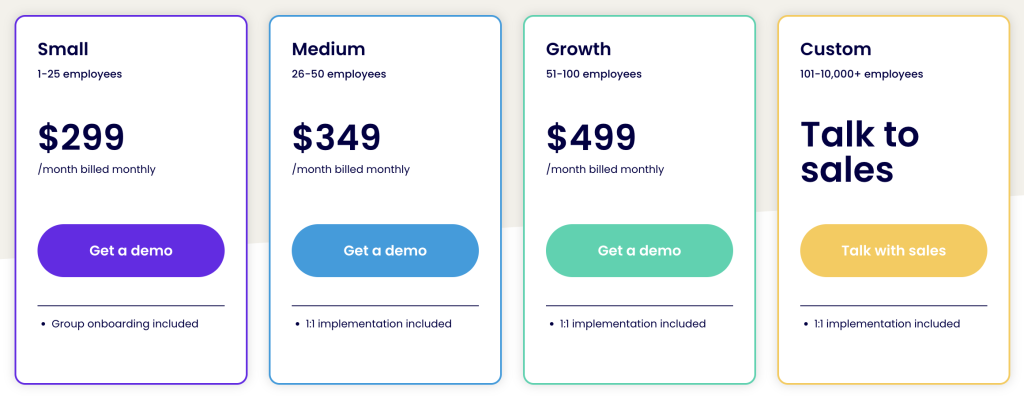
Trainual’s official solution pages currently show four core size bands:
- Small: 1 to 25 employees.
- Medium: 26 to 50 employees.
- Growth: 51 to 100 employees.
- Custom: 101 to 10,000+ employees.
The public pricing currently shown on Trainual solution pages is:
- Small: $299 per month billed monthly, or $249 per month billed yearly.
- Medium: $349 per month billed monthly, or $279 per month billed yearly.
- Growth: $499 per month billed monthly, or $419 per month billed yearly.
- Custom: Talk to sales.
That is a useful structure because it tells you the product is built for companies that have outgrown ad hoc docs and Slack explanations, but are not necessarily running a giant enterprise LMS.
The pages also show that Trainual is best suited for companies with 25 to 1000 employees, which lines up nicely with the public pricing bands.
If you are in that range, start with Trainual here and compare the monthly cost to the time your team currently wastes repeating the same training.
Hidden Costs And Gotchas :
The biggest “hidden” cost is not a surprise fee. It is the one-time implementation cost.
Trainual’s pricing page and FAQ call out a one-time implementation fee of $1,000. That is important because it changes the first-year math quite a bit.
You should also think about:
- The time needed to migrate existing content.
- The time needed to structure your first roles and paths.
- The time needed for managers to stop using old ad hoc training habits.
- Optional add-ons if you need extra capabilities.
The platform is not trying to hide these details. It is actually being fairly direct about them. But buyers still need to include them in the decision.
Another point worth noting is that Trainual is best when the team commits to using it consistently. If you only upload a few documents and never turn it into an actual onboarding system, the economics get worse very quickly.
ROI Example :
This is where Trainual starts to make more sense.
The official pricing page includes an ROI calculator and claims that a strong onboarding process can improve new hire retention by 82%, improve new hire productivity by over 70%, and improve business profit margin by 24%.
That does not mean every company gets those exact numbers. It does mean Trainual is trying to solve a real operational cost problem, not just sell software.
Here is the simple math:
- If a manager spends hours every month repeating onboarding answers, that time is expensive.
- If a new hire ramps faster, the business gets productive capacity earlier.
- If mistakes fall, the business saves correction time and frustration.
So the real question is not whether $249 or $299 is “cheap.” The real question is whether the system saves more than it costs.
If your current onboarding depends on memory and hallway explanations, start with Trainual here and test it against one role that gets hired repeatedly.
Cost Comparison :
Compared with lighter documentation tools, Trainual costs more. That is true.
But it is also doing more than a shared document stack:
- Training paths.
- Testing.
- Tracking.
- Reporting.
- Role clarity.
- Mobile access.
- AI-assisted documentation.
That means the pricing comparison should be against the cost of poor onboarding, not just against a cheaper documentation app.
If you compare it against a generic note system, Trainual will look expensive. If you compare it against manager time, onboarding mistakes, and duplicated work, it can look very reasonable.
That is the real tradeoff.
Another way to think about it is this: Trainual is often cheapest when the business is growing fast enough that process drift starts costing real money. At that point, the platform is not a document repository. It is a force-multiplier for every manager who would otherwise keep re-explaining the same work.
That is why the product usually lands best when the founder has already felt the pain of scale and wants the team to act more consistently without building a giant internal training department.
The implementation fee becomes easier to justify when you look at it as a rollout investment instead of a software surcharge. You are paying for setup help, structure, and a faster path to adoption, which can matter a lot when the alternative is a half-built system that nobody uses.
That framing is important because Trainual is not really sold as a toy. It is sold as an operational system, and operational systems usually repay their cost through saved manager time, not just through feature checklists.
If you are evaluating it for the first time, it helps to ask one practical question: how long would it take your team to create the same onboarding and accountability system manually? In many companies, that answer is enough to make the Trainual price feel a lot more sensible.
That is the real pricing lens here. Trainual is not cheap in the casual sense, but it may be inexpensive relative to the cost of inconsistency, retraining, and employee confusion.
That is especially true once the system becomes part of everyday management instead of a one-time onboarding project.
It scales with habits. Right now.
Best Value Tier :
For many small and mid-sized teams, the Small plan is the best value starting point because it gives you the core system without forcing you into a large internal rollout.
Why it usually makes sense:
- It matches the 1 to 25 employee range.
- It gives you a clean onboarding entry point.
- It is easier to justify than a larger tier if you are still proving the process.
The Medium and Growth tiers become more compelling when the training program is expanding across more roles, managers, and departments.
The Custom tier makes sense when you need more than a standard package and want Trainual to support a larger, more complex organization.
If you are still unsure, start with Trainual here and map the Small tier against the next six months of hiring.

Discounts And Annual Billing :
Trainual’s public solution pages show annual billing discounts across the size-based plans.
That matters because it rewards teams that are committed to using Trainual as a real operational system instead of a short-term experiment.
The public pages also show optional add-ons such as:
- Unlimited e-signatures at $29 per month.
- Other modular options that can be added depending on your rollout.
That is a sensible pricing model for a product like this. You pay for the base operating system, then add more only when the workflow needs it.
Alternative Tools To Compare :
Some teams will also compare Trainual against:
- Notion.
- Guru.
- Process Street.
- Other internal documentation and SOP tools.
Those tools can be cheaper or lighter. But they usually do not match Trainual’s built-in training structure, accountability, and progress tracking as directly.
That is why Trainual tends to win when the business problem is not “store docs,” but “make sure people actually learn and follow the docs.”
That distinction is huge.
Verdict :
Trainual’s pricing in 2026 is best understood as operations software pricing, not document storage pricing.
The public Small, Medium, Growth, and Custom bands make the product easier to understand, and the one-time implementation fee makes the rollout cost transparent. That is a good thing, even if it means the first-year number is higher than some teams expect.
If your company needs onboarding, SOPs, training paths, and accountability in one system, start with Trainual here and judge it against the cost of doing all of that manually.
That is the comparison that usually tells the real story.
If Trainual saves manager time, reduces onboarding mistakes, and keeps process knowledge from disappearing into Slack, the pricing can be very reasonable.
If you only want a place to dump notes, it will probably feel overpriced.
That is why the right buyer fit matters so much here.
FAQ :
How much does Trainual cost in 2026?
The public solution pages show Small at $299 monthly or $249 yearly, Medium at $349 monthly or $279 yearly, Growth at $499 monthly or $419 yearly, and Custom pricing for larger teams.
Is there an implementation fee?
Yes. Trainual’s official FAQ says a one-time implementation fee of $1,000 applies.
What is Trainual best used for?
Trainual is best for onboarding, SOPs, process documentation, role-based training, and accountability tracking.
Who should probably skip Trainual?
Very small teams that only need a lightweight notes app or a simple wiki may be better off with a cheaper documentation tool.